A clinical trial management system (CTMS) is the operational system of record for a clinical study. It holds study set-up, site activation, participant recruitment, the visit diary, delegated tasks, monitoring activity and study finance in one place, and it records who performed each action and on which date.
Systems sold under that name divide into two groups. The first records what a study team has already done. The second applies the protocol rule at the moment an action is taken, so the record and the rule agree from the start. That single difference decides whether a research team spends its week delivering the study or reconstructing it. This guide covers what a CTMS holds and where studies lose control without one. It then sets out what the April 2026 UK regulations require the system to produce, how a CTMS sits alongside EDC and the trial master file, and how to test one before you buy.
What Does a CTMS Hold in a Study?
A CTMS owns the operational record: the study’s plan, its people, its sites, its participants and its dates. Clinical data belongs to the electronic data capture system. Essential documents belong to the trial master file. Everything that describes how the study was actually run sits in the CTMS.
Eight functions make up the operational surface of clinical trial management software. The useful test for each one sits in the last column: name the question that function has to answer on demand, months after the event.
| Function | What it holds | The question it answers |
| Study set-up | Protocol version, visit schedule, visit windows, site list, study calendar | Which protocol version governed this site in March? |
| Site activation | Approval dates, contract status, capability confirmation, green light to recruit | On what date did this site become able to enrol? |
| Recruitment and participants | Screening, consent version and status, enrolment, withdrawal, follow-up | How many participants consented under version 3.0? |
| Visit diary | Every appointment measured against the protocol window that governs it | Did this visit fall inside its window? |
| Delegated tasks | Roles, qualifications and the dates each delegation started and ended | Who held authority for this task on the day it happened? |
| Monitoring | Visit reports, findings, agreed actions and their closure evidence | Which findings from the last monitoring visit remain open? |
| Study finance | Milestone triggers, invoicing status, participant reimbursement | Which completed visits are still uninvoiced? |
| Operational reporting | Recruitment against target, milestone dates, portfolio position by site | Which studies at this site are behind plan this week? |
The eight functions share one property. Each holds a fact that changes over the life of a study, and each has to remain retrievable as it stood on a given date. A system that shows only the current position satisfies the first half of that requirement and fails the second.
The same eight functions serve different organisations under different pressure. An academic institution runs studies across investigators and departments that each work slightly differently. An NHS trust reports portfolio milestones nationally while research staff hold frontline clinical duties. A CRO keeps several sponsors separated inside one platform. A sponsor maintains oversight of work delegated to sites and vendors. The record model stays constant across all four. The reporting line around it changes.
Where Does a Study Lose Control Without a CTMS?
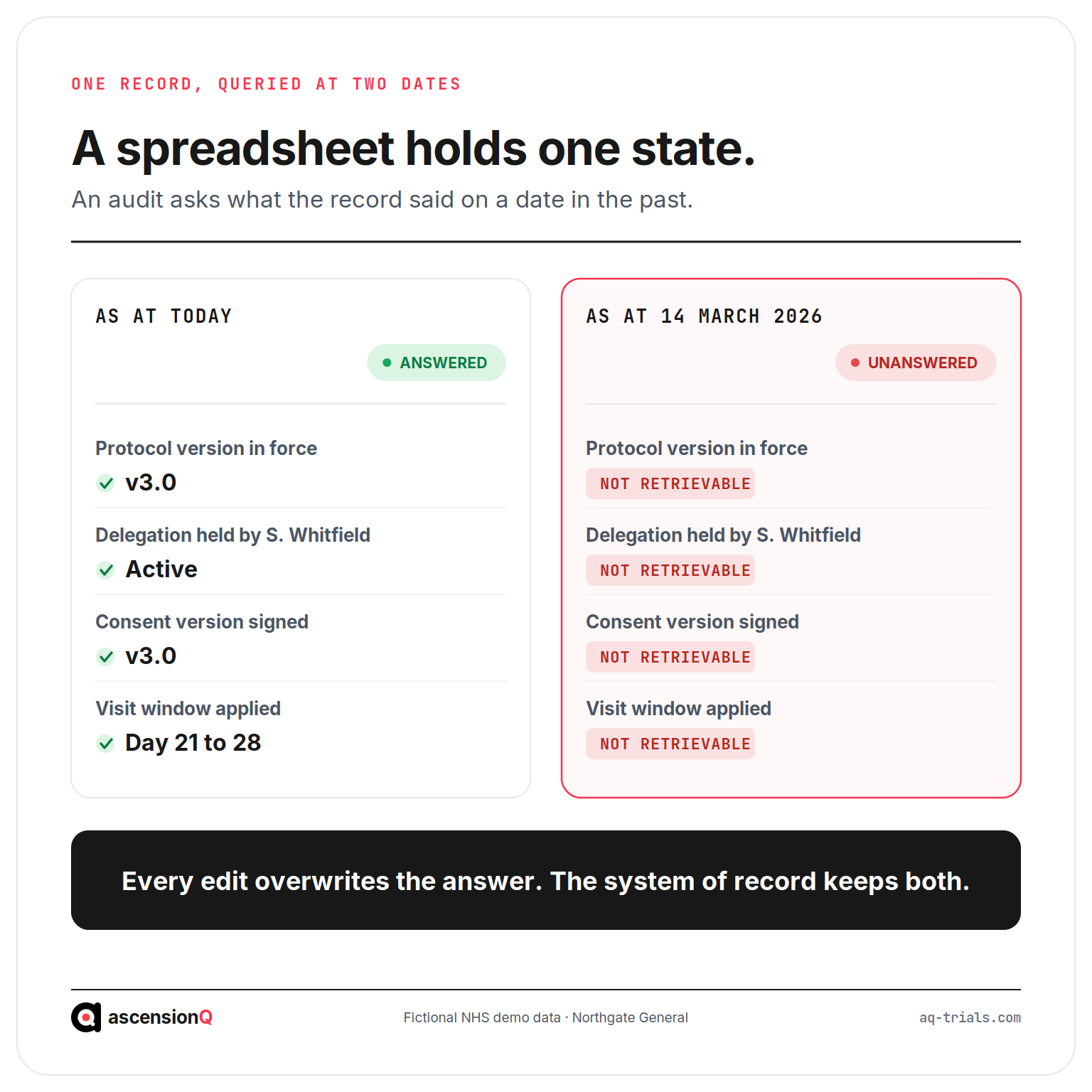
Spreadsheets, shared calendars and email hold a small study adequately for a while. The failure that follows is structural rather than a matter of diligence. A spreadsheet holds one state, the current one, and every edit quietly overwrites the answer to the question an auditor actually asks: what did this record say on 14 March?
A worked example makes the gap concrete. Northgate General NHS Foundation Trust is a fictional site running an interventional study with a protocol visit window of 21 to 28 days after randomisation. A coordinator books a participant into the shared calendar on day 29. Five weeks later a monitor asks three questions: which protocol version was live at the site that week, who held delegation to take consent on 14 March, and why the visit fell outside its window. The calendar shows today. The delegation log is a signed PDF in a folder. The answers get rebuilt from email threads and memory, and the reconstruction itself becomes the finding.
Five losses recur across sites that run studies this way.
- Historic state disappears. A shared file records the present position only, which leaves the team rebuilding past states from email whenever a monitor, auditor or inspector asks about a specific date.
- Protocol windows stay in a document. The visit schedule lives in the protocol while bookings live in a calendar, which allows an out-of-window appointment to be made in seconds and discovered in weeks.
- Delegation drifts from activity. A paper delegation of authority log sits apart from the tasks it authorises, which lets activity continue after a delegation lapses and surfaces only under review.
- Recruitment figures arrive late. Numbers get compiled for a monthly report rather than held live, which means a slow site is identified a month after the slowdown started.
- Findings lose their thread. Monitoring actions are tracked in one place and quality findings in another, which breaks the link between a problem, its cause and the evidence that the fix held.
A spreadsheet holds one state. An inspection asks about a date in the past.
Data integrity expectations put this beyond preference. The ALCOA+ principles require a record to be attributable, contemporaneous and enduring, and a file that keeps only its latest version satisfies none of the three.
What Separates a Tracking CTMS From a Controlling One?
Feature lists across vendors look similar. The distinction that matters sits in timing: the moment at which the system applies the rule. A tracking system stores an action and leaves the compliance question to a later review. A controlling system tests the action against the protocol before the record commits, so a breach becomes a decision the user makes deliberately with a reason attached.
| Aspect | Tracking system | Controlling system |
| When the rule is applied | Afterwards, during monitoring or review | At the point of entry, before the record commits |
| An out-of-window visit | Recorded silently and found weeks later | Flagged at booking, with a reason required to proceed |
| Delegation | A signed PDF filed separately from the work | Permissions tied to dated delegation that expires on schedule |
| Protocol version | Named in a document the team refers to | Attached to the visit schedule that generates every booking |
| Recruitment position | Compiled for a monthly report | Current per site with no compilation step |
| Deviations | Written up after discovery | Prevented at source, or captured with their cause attached |
| Inspection evidence | Assembled from several exports and reconciled by hand | Retrieved as the record the system already holds |
| Where the team’s time goes | Reconciliation between systems | Study delivery |
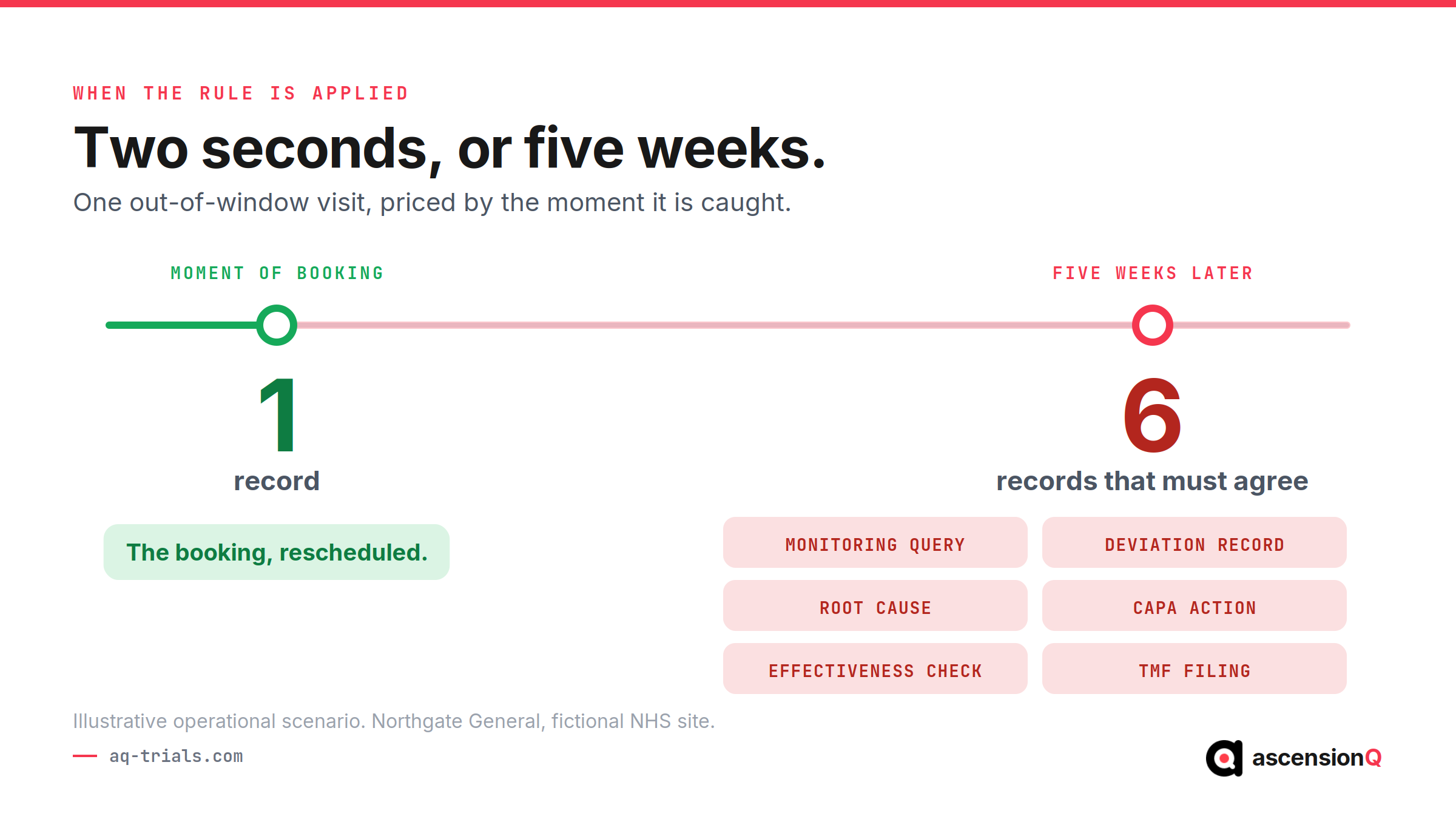
Control applied at the point of entry costs seconds. The same control applied afterwards costs a CAPA.
The cost of late control compounds across a study. One out-of-window visit caught at booking ends as a rescheduled appointment. The same visit caught five weeks later produces a monitoring query, a deviation record, a root cause investigation, a corrective action and an effectiveness check, and each of those artefacts has to agree with the others. Multiply that by a fifty-participant study across six sites and the difference stops being administrative.
Also Read: CTMS vs EDC: What Is Their Role and Difference in Clinical Research?
What Did the 2026 UK Regulations Change for a CTMS?
The Medicines for Human Use (Clinical Trials) (Amendment) Regulations 2024 came into force on 28 April 2026. The Health Research Authority confirms that most of the changes apply to every trial of an investigational medicinal product from that date, regardless of whether the trial was submitted before it. Selection criteria and system configurations written before 2026 sit behind the current requirement.
Four of the changes land directly on the operational system.
| What changed | What the CTMS now has to produce |
| Registration of a trial and publication of a summary of results became a legal requirement for the first time | A reliable trial end date and milestone history that a results submission can be assembled from |
| Compliance with the ICH Good Clinical Practice conditions and principles became a legislative requirement for trials of investigational medicinal products | Audit-trailed operational records covering the full life cycle, including activity performed by service providers |
| A notification scheme created a faster route for lower-risk trials | Risk classification held against the study record, with set-up milestones tracked to the day |
| Under Route B, eligible modifications are approved automatically unless concerns are raised within 14 calendar days | A version history showing which document version was live at each site on each date |
The published ICH E6 guideline sits on the European Medicines Agency site. Test any vendor claim about GCP alignment against that document rather than against a brochure.
National performance data shows where the remaining time goes. The HRA reports that combined review by the MHRA and the HRA now averages 41 days. Set-up time for studies going through combined review fell from 169 days to 122 days, against a government target of 150 days. Approval moves quickly. Local set-up holds the delay, which is the pattern the UK clinical research delivery KPIs track and the reason most sites still miss the 90-day set-up target. A system that holds approval dates, contract dates and first participant dates together turns those milestones into something a research office can manage weekly.
How Does a CTMS Fit With EDC, the eTMF and the Wider Stack?
A study runs on several validated systems, and each owns a distinct part of the evidence. The CTMS holds the operational thread that connects them: the participant, the visit, the site and the date. Boundary confusion between these systems creates duplicate entry, and duplicate entry creates two records that eventually disagree.
| System | What it owns | Where the boundary with the CTMS sits |
| Electronic data capture (EDC) | Participant data entered against the case report form | The CTMS says the visit happened. The EDC holds what was measured at it. |
| Electronic trial master file (eTMF) | Sponsor and CRO essential documents for the whole trial | The CTMS records the activity. The eTMF holds the document that evidences it. |
| Electronic investigator site file (eISF) | Essential documents held at each participating site | Site status in the CTMS depends on documents filed in the eISF. |
| Electronic pharmacy site file (ePSF) | Receipt, storage, dispensing, return and destruction of study drug | A dispensing event belongs to a visit the CTMS scheduled. |
| Quality management system and CAPA | SOP versions, training records, findings and effectiveness checks | A deviation detected in the CTMS becomes a finding managed in the QMS. |
| Digital delegation of authority | Roles, qualifications, signatures and delegation dates | CTMS permissions follow the delegation record rather than a local list. |
One rule keeps those boundaries stable: each record has exactly one owning system. A record owned by two systems creates a reconciliation task that repeats at every monitoring visit for the life of the study. Test that ownership during evaluation by asking a vendor to show a single event, such as one dispensed dose, moving between two modules.
Also Read: What Is the Difference Between CTMS and eTMF? and What Is Clinical Research Software and How to Choose the Right One?
How Should You Evaluate a CTMS Before You Buy?
Vendor demonstrations run on a sample study, which shows the software at its most cooperative. Send your protocol synopsis and site structure in advance, then ask for six tasks performed live. Each one tests the timing of control rather than the presence of a feature.
- Book a visit outside the protocol window. Watch what the system does at the moment of booking, which separates prevention from documentation.
- Produce the delegation position as it stood three months ago. A system that reconstructs a past state on demand removes the manual evidence pack before an audit.
- Add a coordinator and delegate two activities. Follow the audit trail entry the change creates, which shows whether authority and access move together.
- Supersede a protocol version mid-study. Check which future bookings, consent records and site statuses update, which reveals whether the version is live data or a label.
- Export the recruitment position per site for a given week. Time how long it takes, because that duration repeats every month for the life of the study.
- Request the validation package. Read the specification, test evidence and change control process, which tells you the cost of re-validation after each release.
Price the reconciliation work alongside the licence. Licence cost appears on a quotation and staff time does not, so cost every manual export the design leaves in place. The CTMS cost breakdown covers the visible half of that calculation.
Also Read: Clinical Trial Management Software for NHS Trusts: 2026 Buyer’s Guide
How Does AQ CTMS Apply Control at the Point of Action?
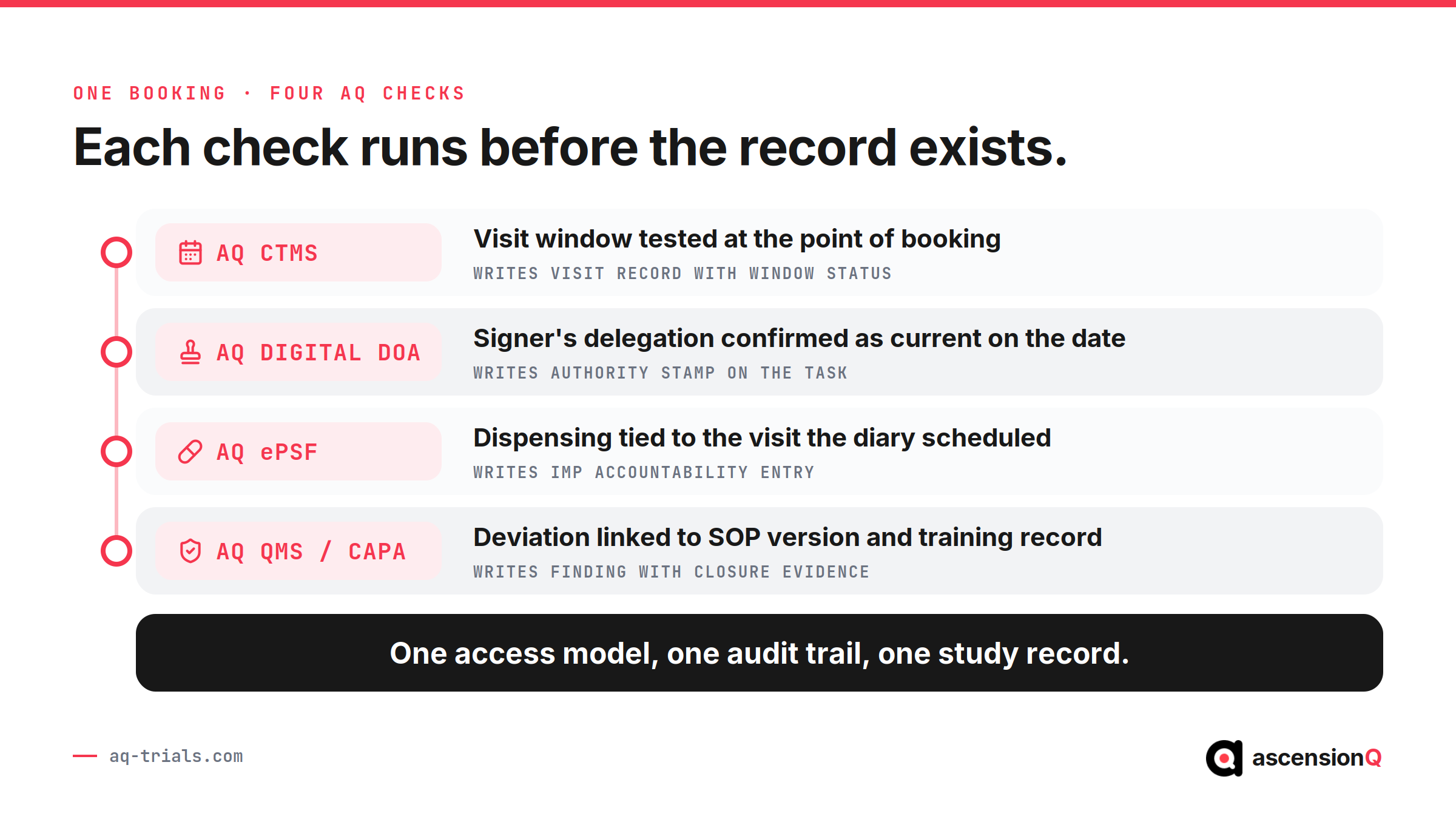
AQ CTMS runs study operations inside the same governed environment as documentation, pharmacy and quality. The modules of the AQ Platform share one access model, one audit trail and one set of study data, so an action tested at entry stays consistent everywhere it appears afterwards.
- Study set-up carries the protocol into the diary. Visit schedules and windows are configured once at set-up, which means every later booking is measured against the version in force.
- The visit diary applies the window at the point of booking. An out-of-window appointment raises its flag before it is saved, which converts a silent deviation into a recorded decision.
- Access follows delegation. AQ Digital DoA holds roles, qualifications and delegation dates, which keeps each recorded activity inside the authority that existed on the day.
- Recruitment stays current by site. Screening, consent version and enrolment update as the work happens, which gives a research office a live portfolio position with no monthly compilation.
- Findings keep their thread. A deviation raised in operations links to the SOP version, the training record and the CAPA that closes it, which shows an inspector the state of the system on the day of the event.
AQ is aligned with Good Clinical Practice, UK GDPR and 21 CFR Part 11, and supplies validation, data security and governance evidence for NHS and sponsor procurement. Assurance covers G-Cloud, DSPT and Cyber Essentials.
Book a live demo and the walkthrough runs on your protocol structure, your site set-up and your visit windows. Bring the six tasks above and use the session to test them.