Clinical research software is the set of validated systems a study team uses to plan, run, document and evidence a clinical trial. The category covers study operations, participant data, sponsor and site documentation, pharmacy accountability, quality management and delegation. Each system holds one part of the study record.
Selection normally turns into a feature comparison between vendors. A narrower test decides more. Every system leaves a record behind, and an inspector reads those records together. This guide covers the systems that make up a research software stack, the 2026 rule changes that alter what each system has to produce, and a selection method that scores systems on the evidence they leave.
What Is Clinical Research Software?
Clinical research software is purpose-built for regulated study conduct. General business tools store information and move it between people. Clinical Research Software has to prove who did what, when, under whose authority, and against which version of the protocol. That evidential duty is the whole difference, and it sets four properties every system in the stack has to hold.
- An audit trail records every creation, change and deletion with the user, the timestamp and the reason, which lets a reviewer reconstruct a record without asking the person who made it.
- Access control ties each permission to a delegated role, which keeps activity inside the authority the delegation of authority log grants on that date.
- Validation evidence shows the system does what its specification says, which is the assurance an MHRA inspector asks for. The GAMP 5 approach to computerised system validation sets out the deliverables that evidence takes.
- Retention and export control keeps records readable and exportable for the full archive period, which protects the study record beyond the length of the vendor contract.
Those four properties are the reason a shared drive fails as clinical research software. The data integrity expectations behind them run under the label ALCOA+, and they apply to the system holding a record as much as to the record itself.
Which Systems Make Up a Clinical Research Software Stack?
A study rarely runs on one system. Fifteen categories cover the stack found across UK research, from the systems every trial touches to the specialist systems larger or more complex trials add. Each one owns a distinct part of the evidence. The useful question for each row is the last column: name the record that system has to produce on request.
| System | What it holds | Who works in it | The record it must produce |
| Clinical trial management system (CTMS) | Study set-up, sites, recruitment, the visit diary, milestones | Study coordinators, research managers | Visit and recruitment history against protocol windows |
| Electronic data capture (EDC) | Participant data entered against the case report form | Data entry staff, monitors, data managers | The clinical dataset with its query and correction trail |
| Electronic trial master file (eTMF) | Sponsor and CRO essential documents for the whole trial | Sponsor, CRO document teams | Completeness against the DIA TMF Reference Model |
| Electronic investigator site file (eISF) | Essential documents held at each participating site | Site teams, monitors | Current filed evidence at the trial location |
| Electronic pharmacy site file | IMP receipt, storage, dispensing, return and destruction | Research pharmacy | Unbroken accountability for every unit of study drug |
| Quality management system (QMS) | SOPs, controlled documents, training and competency records | QA leads, research governance | The SOP version in force and who was trained on it |
| CAPA system | Findings, root cause analysis, actions, effectiveness checks | QA leads | Closure evidence showing the fix held |
| Digital delegation of authority | Roles, qualifications, signatures and delegation dates | Principal investigators, coordinators | Who held authority on the day each task was performed |
| Interactive response technology (IRT) | Randomisation, allocation concealment, supply logistics | Sponsor, pharmacy, depot | Allocation and supply chain history per participant |
| ePRO and eCOA | Participant-reported outcomes and clinical outcome assessments | Participants, site staff | The participant entry with its original timestamp |
| eConsent | Electronic informed consent capture and version control | Site staff, participants | The consent version signed, by whom, and when it was withdrawn or re-consented |
| Safety and pharmacovigilance database | Adverse event and SAE case data, coding, expedited reporting | Safety officers, medical monitors | Case narratives and reporting timelines measured against regulatory deadlines |
| Regulatory information management (RIM) | Submission tracking, licence status, regulatory correspondence | Regulatory affairs | Current approval status per country and per amendment |
| Learning management system (LMS) | Protocol and GCP training modules, competency assessments | Site staff, sponsor teams | Completion records tied to the SOP or protocol version trained on |
| Site payments and study finance | Milestone invoicing, participant reimbursement, site payment schedules | Finance, research operations | Payment history reconciled against completed visits and milestones |
Statistical analysis packages, patient registries and risk-based monitoring tools sit alongside this list. Those tools read from the study record and hold no governed part of it, which puts them outside the set of systems an inspection normally opens first.
Also Read: The Ultimate Guide to Understanding What is a CTMS
What Does Each Role Actually Need From Clinical Research Software?
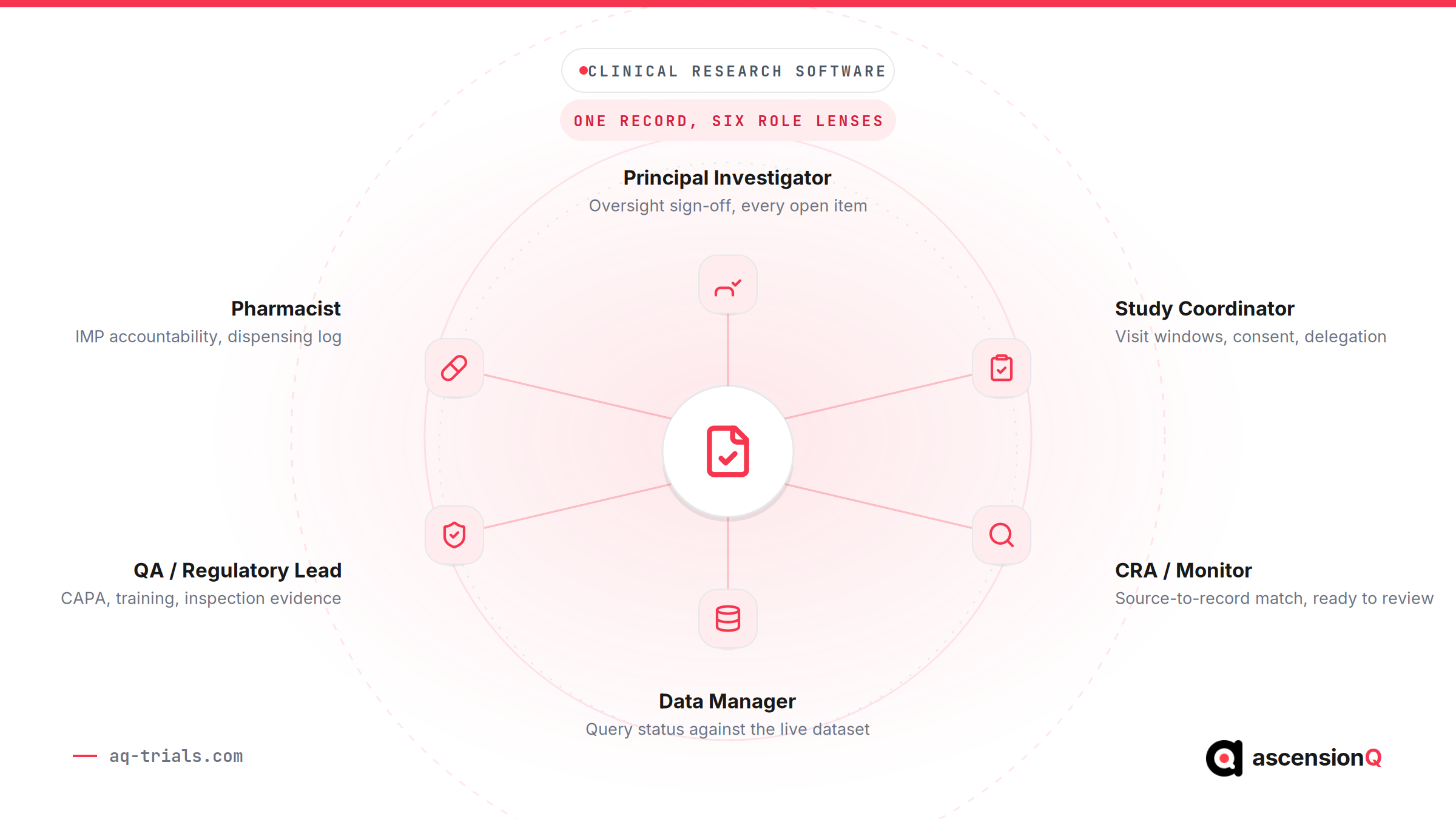
The “who works in it” column above names a role. It does not say what that role is trying to get done. A study coordinator and a QA lead can use the same CTMS for clinical trial and still need almost nothing in common from it, and a stack chosen against one role’s needs alone will under-serve the other six.
| Role | What the software has to give them | Where it usually sits |
| Principal investigator | Oversight sign-off across recruitment, delegation, deviations and CAPA, without collating separate exports first | CTMS, delegation record, CAPA |
| Study coordinator / CRC | A visit diary that applies the protocol window at the point of booking, current consent status, and their own delegated task list | CTMS, delegation record |
| CRA / monitor | Source-to-record match that is ready before a monitoring visit starts, not assembled the week before it | eISF, eTMF |
| Data manager | Query status against the live dataset and a full correction trail with the reason for each change | The study’s EDC, cross-checked against site records |
| QA / regulatory lead | SOP version history and training currency mapped to the findings raised against them, ready as inspection evidence | QMS, CAPA |
| Sponsor or CRO project manager | One oversight view across every site and system, instead of a status call per vendor per month | A connected platform spanning every module |
| Pharmacist / pharmacy technician | Unbroken IMP accountability from receipt through dispensing to destruction, traceable back to the delegation that authorised it | Pharmacy site file |
Read down the middle column and the pattern is the same for every role: each one needs a narrow, current slice of a record that other roles are also editing. Software chosen on features rarely tests that. Software chosen on records does, because the question “who owns this record, and who else touches it” forces the role-by-role need into the open before contracts are signed.
How Do Software Needs Differ By Research Institute Type?
Role explains what an individual needs from the software. Institute type explains what the organisation around them needs. A university department, an NHS trust, a CRO and a sponsor run the same categories of system under very different pressure, and a stack that fits one can be the wrong shape for another.
| Institute type | Where the pressure sits | What to prioritise in the software |
| Academic and university sites | Studies span multiple departments, investigators and study types, each running under its own funding and governance | One connected record across investigators and departments, with consistent access control rather than a separate spreadsheet per study |
| NHS trusts and hospital sites | Portfolio scale and R&D governance sign-off sit alongside frontline clinical duties, with the 90-day set-up target measured nationally | A visit diary and delegation record that remove manual chasing, plus assurance evidence such as DSPT and Cyber Essentials ready for trust governance |
| CROs | Multiple sponsors, multiple protocols and multiple site networks run in parallel, each with its own reporting line | Data segregation between sponsors inside one platform, and a single oversight view instead of a separate tool per study |
| Sponsors and pharma | Oversight of delegated execution across CROs, sites and vendors, without building enterprise-scale infrastructure on day one | Sponsor-visible status across every delegated party and one governed audit trail that spans vendors |
The differences are structural, not cosmetic. An academic site needs the same record type held consistently across investigators who each run their study slightly differently. A CRO needs the opposite: strict separation between sponsors inside one system, so oversight for one client never surfaces another client’s data. Read the institute-type column against the role table above and the software decision moves from “which vendor has the most features” to “which vendor’s record model matches how our organisation is actually structured.”
Also Read: Case studies from NHS, academic and CRO research teams
What Changed in 2026 That Affects the Software You Choose?
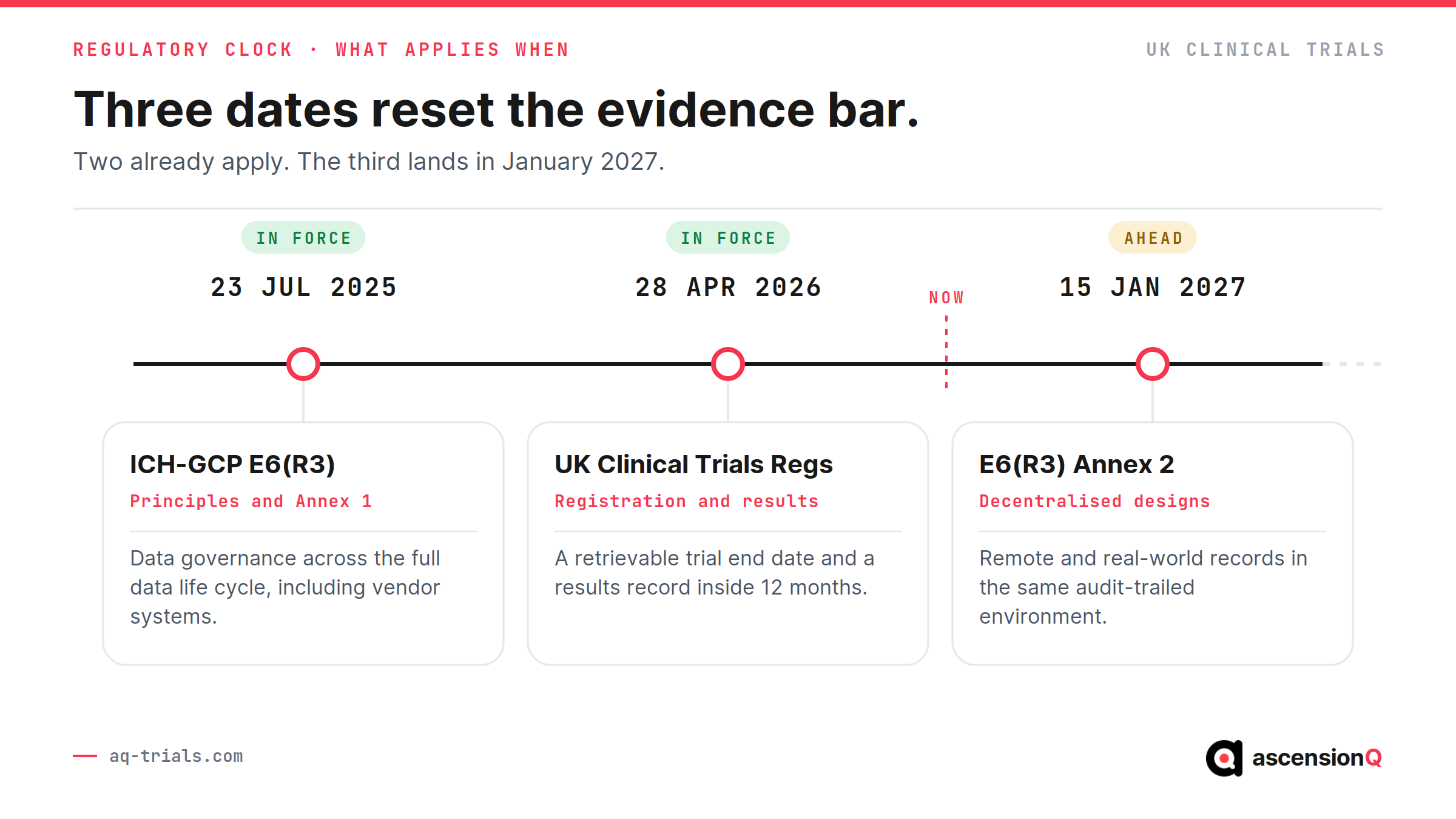
The UK regulatory position moved on 28 April 2026. The Medicines for Human Use (Clinical Trials) (Amendment) Regulations 2024 came into force on that date, and the Health Research Authority describes it as the largest change to UK clinical trials regulation in over twenty years. ICH-GCP E6(R3) came into force in the UK alongside it. Selection criteria written before 2026 miss both.
Six changes land directly on the systems a study runs on.
| What changed | What your systems now have to produce |
| Trial registration and publication of a summary of results became a legal requirement for the first time, with results due within 12 months of trial end | A reliable, retrievable trial end date and a results record that can be assembled inside the 12 month window |
| Amendments became modifications, classified as substantial, important detail, or minor | A version history showing which document version was live on which date at each trial location |
| A notification scheme created a faster route for the lowest-risk trials, and eligible modifications under Route B are approved automatically unless concerns are raised within 14 calendar days | Risk documentation held against the study record, with modification dates tracked to the day |
| ICH-GCP E6(R3) Principles and Annex 1 took effect on 23 July 2025 and now apply in the UK | Data governance across the full data life cycle, including systems operated by vendors and service providers |
| E6(R3) Annex 2 takes effect on 15 January 2027 and covers decentralised and pragmatic designs and real-world data sources | Records from decentralised activity captured in the same audit-trailed environment as site activity |
| An approved trial must recruit its first UK participant within two years or the approval lapses | Set-up milestone dates tracked from approval, per site, without a manual chase |
The published ICH E6 guideline and its annexes sit on the European Medicines Agency site, and the consolidated version was issued on 15 July 2026. Test any vendor claim about GCP alignment against that document.
The two year recruitment condition is where UK set-up performance stops being an internal metric. National reporting already tracks the same ground through the UK clinical research delivery KPIs, and most NHS sites still miss the 90-day set-up target. Systems that hold approval dates, contract dates and first participant dates in one place turn that condition into a tracked milestone.
Also Read: What is Inspection Readiness in Clinical Trials and How Does It Work Across a CRDC Network?
Where Does Disconnected Software Cost a Study?
The cost of a fragmented stack shows up at the seams. A worked example makes it concrete. Northgate General, a fictional NHS trust, runs an interventional study with a protocol visit window of 21 to 28 days after randomisation. One participant attends on day 29.
Five systems hold part of that single visit, and each holds it correctly.
- The CTMS diary shows the appointment booked for day 29, with no flag raised at the point of booking.
- The EDC record shows the visit data entered against the day 21 to 28 window, queried by a monitor five weeks later.
- The pharmacy file shows one IMP unit dispensed on day 29 against a prescription signed by a registrar.
- The delegation record shows that registrar’s delegation countersigned three days after the visit.
- The quality system holds a deviation raised for the out-of-window visit, with no link to the delegation record or the dispensing entry.
Each record is accurate. Reconstruction of the event takes a QA lead five separate exports and a spreadsheet. That reconstruction is the real cost, and it recurs at every monitoring visit, every audit and every inspection for the life of the study.
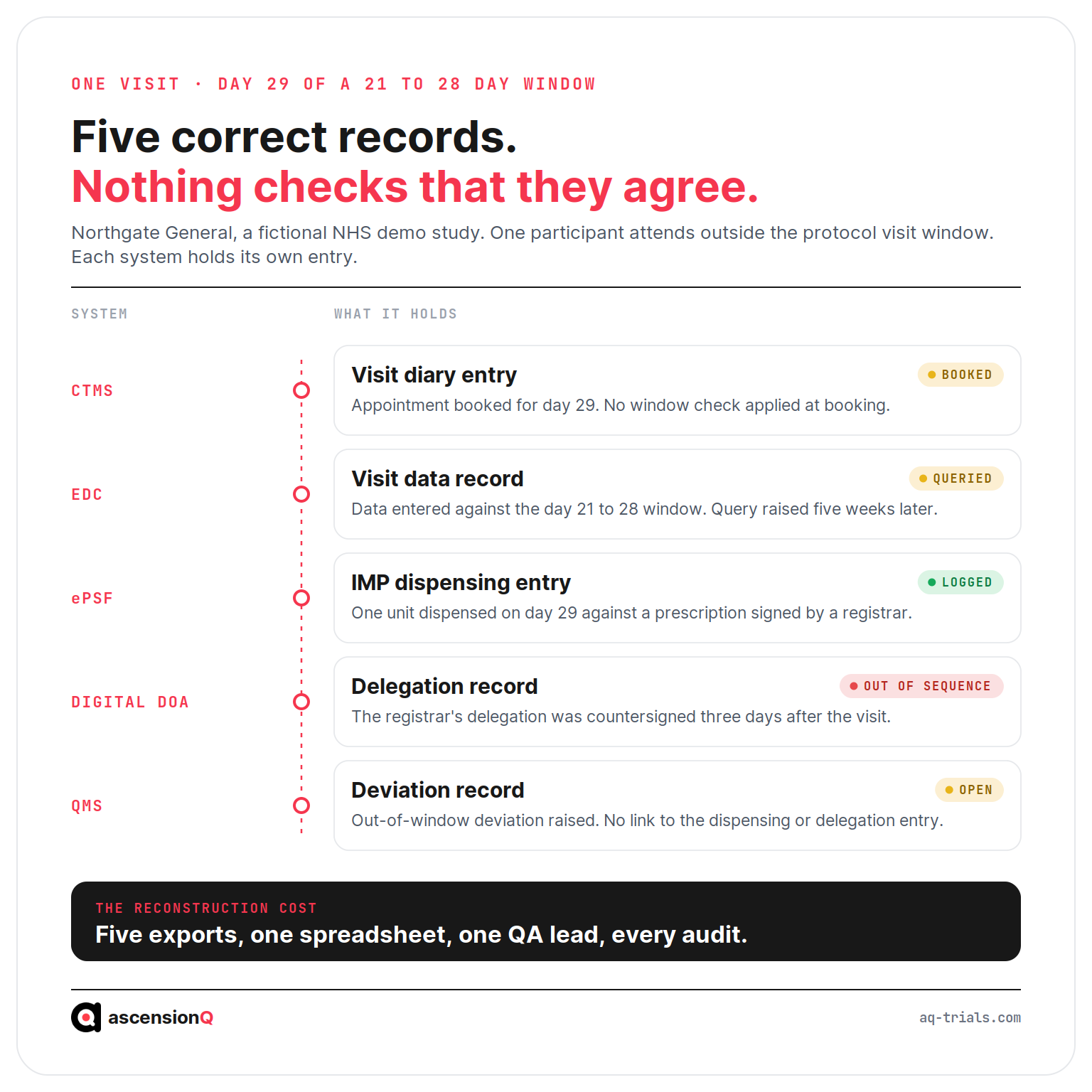
Every system leaves a record. An inspection reads them together.
Visit windows are the clearest example because the rule is numeric and the breach is provable. The same pattern runs through consent versions, training currency and IMP temperature excursions. A visit diary that applies the protocol window at the point of booking removes the deviation instead of documenting it.
Our Trial Data Is Scattered Across Five Systems, What Now?
Start by naming the system that owns each fact, then decide seam by seam whether to consolidate or integrate. Scattered data is rarely a licensing problem. It is a problem of unowned seams. Fix the two or three seams an inspection reads together, and leave the rest until they cost something.
Five systems holding five accurate records is a normal position for an NHS site, and replacing all five at once is rarely available as an option. The sequence below is what a QA lead can run in a fortnight without a procurement.
- List the facts, not the systems. Visit date, protocol window, consent version, delegation, training currency, IMP unit, deviation. Seven facts covers most studies.
- Name one owning system per fact. Write it down. Where two systems hold the same fact, one of them is a copy and has to be labelled as one.
- Mark the seams an inspection reads together. A visit date means nothing on its own. It is read against the window, the dispensing and the delegation of the person who ran the visit.
- Count the reconstruction cost at each seam. How many exports, how many hours, how often. This is the figure that justifies any change.
- Decide per seam. Consolidate, integrate, or accept the seam and control it with a scheduled reconciliation that somebody signs.
| The seam | Consolidate when | Integrate when | Accept and control when |
| Visit date against the protocol window | Out-of-window visits keep being found weeks later by a monitor | The EDC is specified by the sponsor and cannot move | Visits in the study are not window-bound |
| Delegation and training against the task | A green light routinely waits on a certificate held somewhere else | Training sits in a trust-wide learning system that will not change for one study | Two or three delegated staff and a current, signed log |
| IMP dispensing against participant and visit | Pharmacy and visit records are reconciled by hand every month | Randomisation stays in the sponsor system and the site holds the ledger | The study has no investigational medicinal product |
| Deviation against the records that caused it | Reconstructing one event needs several exports and a spreadsheet | The quality system is trust-wide and covers far more than research | Deviations are rare and each one is small enough to narrate |
| Site documents against the sponsor file | The same document is filed twice by two different people | The sponsor mandates its own trial master file | A single-site study with one file and one owner |
Most sites do not need one system. They need one owner per fact.
Why Do We Need a Unified Trial Management Platform?
You need one where the cost of reconciling records exceeds the cost of changing systems. A unified platform removes the reconciliation step rather than speeding it up, because one record carries the visit, the dispensing, the delegation and the deviation together. A federated stack reaches the same answer with owned seams and discipline.
The honest version of the case has two halves. Both are worth putting to a supplier.
- What a unified record changes. One query answers an inspector rather than five exports. A rule can be applied at the point of work, so a protocol window blocks the booking instead of generating a deviation. Access, audit trail and retention are configured once. Completeness of the file is a figure the system reports rather than an exercise someone runs.
- What it does not change. A platform does not negotiate a contract, run an ethics submission or qualify a fridge. Migration of legacy records is real work. A sponsor can still mandate its own systems for part of the study, which means the seam moves rather than disappears.
The test to apply is specific. Pick the last event that needed reconstructing, count the systems and hours it took, and ask any supplier to show that same event answered in one view. A demonstration that cannot do it on the supplier’s own demonstration data will not do it on yours.
In AQ Platform, a deviation is raised against the visit, the dispensing entry and the delegation record it concerns, so the reconstruction a QA lead would otherwise assemble is already the record.
How Should You Choose Clinical Trial Software?
Two selection methods dominate. The first compares feature lists and scores vendors on coverage. The second starts from the records the study has to produce and asks which system owns each one. The second method predicts operational cost far better, because it prices the work that sits between systems.
| Aspect | Feature-led selection | Record-led selection |
| The opening question | Which system has the most functions? | Which records must this study produce, and who owns each? |
| What the demo shows | A generic feature tour on the vendor’s sample study | Your protocol, your site set-up, your documentation requirements |
| What decides the score | Coverage against a requirements matrix | The joins between systems and the evidence they leave |
| Integration treated as | A later project with its own budget line | A selection criterion tested during evaluation |
| What happens at inspection | Separate exports reconciled by hand | One retrieval path per record, traceable to its owner |
| Where the cost lands | Licences, then unplanned reconciliation effort | Licences, with reconciliation effort designed out |
Record-led selection runs as seven steps.
- List the records the study must produce. Start from the essential documents, the delegation log, the visit history, the IMP accountability chain and the deviation register. The list is the requirement specification.
- Assign one owning system to each record. Shared ownership creates reconciliation work, so a record with two owners is a design defect.
- Test the joins. Ask each vendor to show one event moving across two modules, which exposes whether the join is a live link or a nightly file transfer.
- Request the validation package. Read the specification, the test evidence and the change control process, which tells you what re-validation costs after every release.
- Check the access model against delegation. Permissions that follow the delegation log keep authority and activity aligned, which removes a common source of inspection findings.
- Price the reconciliation work. Licence cost is visible and staff time is not, so cost every manual export the design leaves in place. Guidance on the visible half sits in the CTMS cost breakdown.
- Read the exit and archive terms. Confirm the export format, the retention period and the cost of extraction at contract end, which protects the record after the relationship changes.
The system you choose sets how much reconciliation your team performs for the next five years.
Also Read: AQ vs Veeva, Florence, RealTime and SharePoint: Choosing Connected Clinical Trial Software
What Should a Software Demonstration Prove?
A demonstration built on a vendor sample study proves very little. Send your protocol synopsis and your site structure in advance, then ask the vendor to perform seven tasks in front of you.
- Book a visit outside the protocol window and show what the system does at the moment of booking.
- Add a new coordinator, delegate two activities, and show the audit trail entry that records the change.
- Produce the delegation position as it stood on a date three months ago.
- Supersede an SOP and show which open findings now reference the previous version.
- Dispense an IMP unit and trace it back to the shipment and forward to the destruction record.
- Export the essential document index for one site in the structure a monitor expects.
- Show the full audit trail for a single participant record, including deletions.
Failure on any of the seven is informative. A vendor who needs a follow-up call to answer the delegation question is telling you the join runs through a spreadsheet.
Frequently Asked Questions
Our trial data is scattered across five systems, what now?
Name one owning system for each fact the study has to prove, then work seam by seam. List the facts, mark the seams an inspection reads together, count how many exports and hours one reconstruction takes today, and decide at each seam whether to consolidate, integrate or accept it with a signed reconciliation. Five accurate records with owned seams is a defensible position. Five accurate records with nobody holding the seams is the one that costs.
Why do we need a unified trial management platform?
Because at some point reconciling the records costs more than changing the systems. One record carrying the visit, the dispensing, the delegation and the deviation removes the reconstruction step instead of making it quicker, and it lets a rule such as a protocol window apply at the point of booking. A well-governed federated stack can reach the same answers, so the case rests on what your own reconstruction costs today.
Is one supplier for everything always better?
No. One supplier removes seams and adds concentration. The questions that decide it are whether the records can be exported with their metadata intact, what the exit position looks like, and whether each module is strong enough to stand on its own. A weak module inside a connected suite still produces weak evidence.
Where should a site start if it can only change one system this year?
Start at the seam that produces the most findings and the most rework, which for most sites is the site file and the records that evidence delegation and training. Those are the records an inspection opens first. Changing the system furthest from inspection evidence rarely shows a return in the same year.
Does consolidating systems reduce our validation burden?
It changes its shape. Fewer systems means fewer validation packs to hold, and an interface between two validated systems is itself a computerised system that needs its own evidence under ICH E6(R3) Annex 1. Ask any supplier for the validation pack covering the current release and how each future release is covered.
How do we keep the records we already hold when we move?
Treat migration as its own piece of work with its own evidence. Decide which records move, which stay readable in place, and how the audit trail travels with each one. A record that arrives in a new system without its original metadata has lost the thing that made it a record.
How Does AQ Connect Clinical Research Software Into One Record?
The AQ Platform connects seven modules in one controlled environment, so one study record covers operations, documentation, pharmacy and quality. Each module owns a defined part of the evidence, and the modules share one access model, one audit trail and one set of study data.
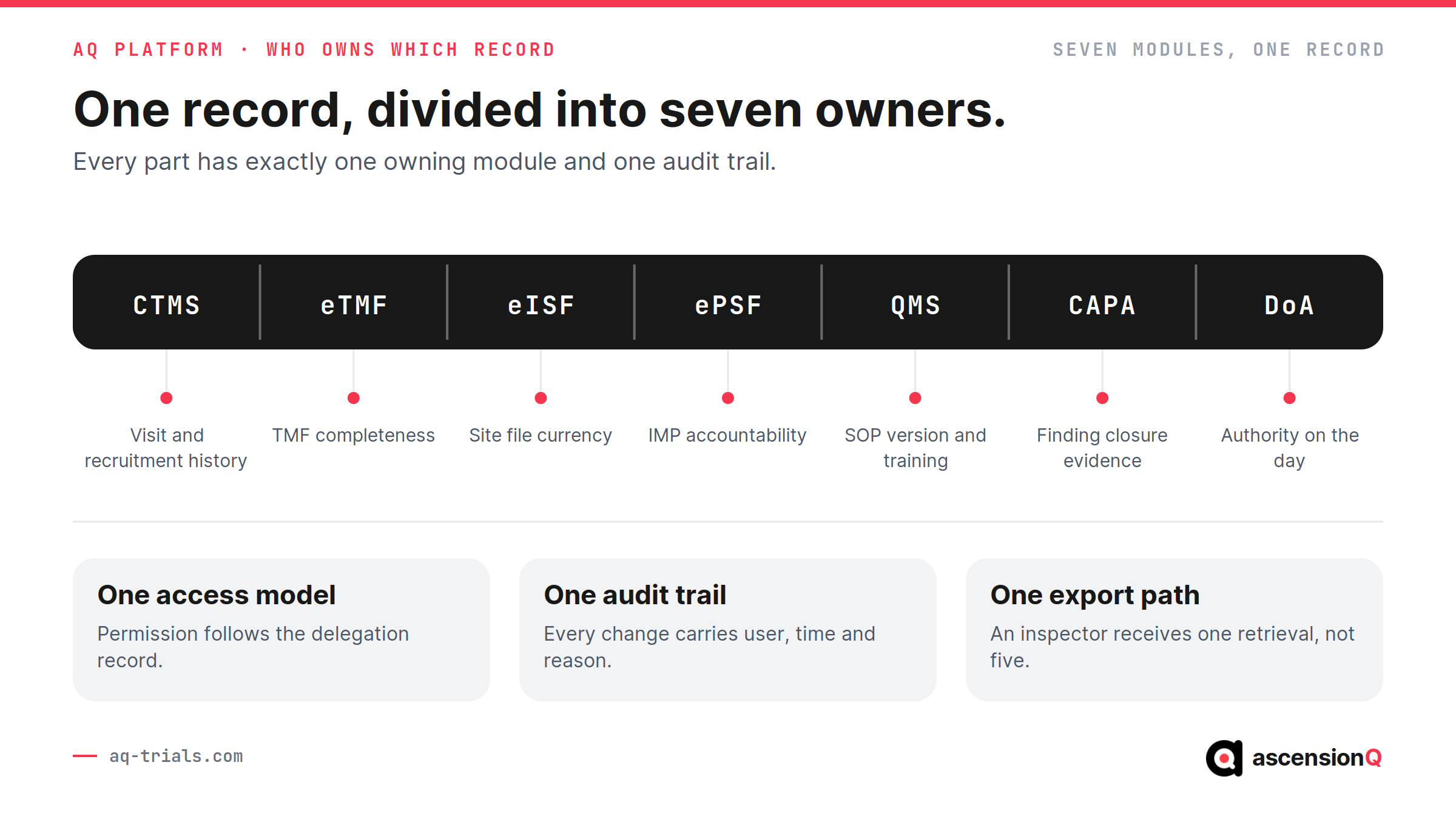
- AQ CTMS holds study set-up, site records, recruitment and the visit diary, which measures every booking against the protocol window at the point the booking is made.
- AQ eTMF is built on the DIA TMF Reference Model, which gives sponsor, CRO and site the same filing structure and one completeness figure to report against.
- AQ eISF and AQ Pharmacy hold site documentation and pharmacy accountability under that same access model, which puts the site file and the IMP chain in one place before a monitoring visit opens.
- AQ QMS and AQ CAPA link SOP versions and training records to the findings raised against them, which shows an inspector the version in force on the day of the event.
- AQ Digital DoA records delegated roles, qualifications and signatures with their dates, which ties each recorded activity to the authority that existed at the time.
AQ is aligned with Good Clinical Practice, UK GDPR and 21 CFR Part 11, and supplies validation, data security and governance evidence for NHS and sponsor procurement. Assurance covers G-Cloud, DSPT and Cyber Essentials.
Book a live demo and the walkthrough runs on your protocol structure, your site set-up and your documentation requirements. The session follows your operational priorities.