An eSource entry is corrected by saving the new value as a new version of the field, leaving the original value readable, and recording who made the change, when and why. ALCOA+ survives the correction because the system adds to the record instead of replacing it.
This guide is written for research nurses, principal investigators, data managers and QA leads at UK research sites. It covers what a governed correction changes, who may make one, the seven steps of the workflow, what makes a reason for change defensible, how late a correction can be made, and what an inspector reads in a corrected field. It sits inside our complete guide to eSource in clinical trials.
A correction adds a version. It never removes one.
What Does a Compliant eSource Correction Change?
A compliant correction changes one thing: the value the system now reports for that field. Everything already recorded stays in place, and the change itself becomes a new row in the audit trail.
The rule comes from two places. ICH E6(R3) section 2.12.2 states that changes to source records should be traceable, should not obscure the original entry and should be explained if necessary via an audit trail. The MHRA GXP data integrity guidance defines an audit trail as a secure record of creation, additions, deletions or alterations “without obscuring or overwriting the original record”. Both descriptions assume the first entry survives the correction.
| Aspect | Uncontrolled overwrite | Governed correction |
| Previous value | Replaced and gone | Retained as an earlier version of the field |
| Author of the change | Assumed from the account in use | Named in the audit trail row |
| Timing of the change | Unknown, or typed by the user | System date and time stamped on save |
| Reason for the change | Held in someone’s memory | Recorded in the system’s reason field |
| Investigator oversight | Unaffected, so a signed entry changes silently | Re-opened for review where the entry was already signed |
| What can be reconstructed later | The current value only | Every value the field has held, in order |
Consider a hypothetical haematology visit at an NHS trust. A research nurse records a haemoglobin result of 11.8 g/dL in the site eSource form during the visit. Two days later the laboratory report shows 10.8 g/dL, and a colleague opens the form and types the corrected figure over the top.
- The audit trail shows a change, and the reason field holds the single word “error”.
- The colleague is on the delegation log for visit assessments and not for laboratory data.
- The principal investigator signed the form on the day of the visit, and the signature still reads as current.
- The laboratory report that justifies the change sits in the participant’s paper file and is never referenced.
The value is now correct and the evidence around it has failed. Each failure is a system condition. The form accepted a free-text reason of any quality, the permissions ran wider than the delegation log, and the signature carried no dependency on the data beneath it.
A correction tests three ALCOA+ attributes at once. Original holds when the first entry survives the change. Attributable holds when the change carries a named user. Accurate holds when the new value matches a record the site can produce. Our guide to whether eSource meets ALCOA+ and the attributes inspectors check maps all nine attributes to the controls that evidence them.
Who May Correct an eSource Entry?
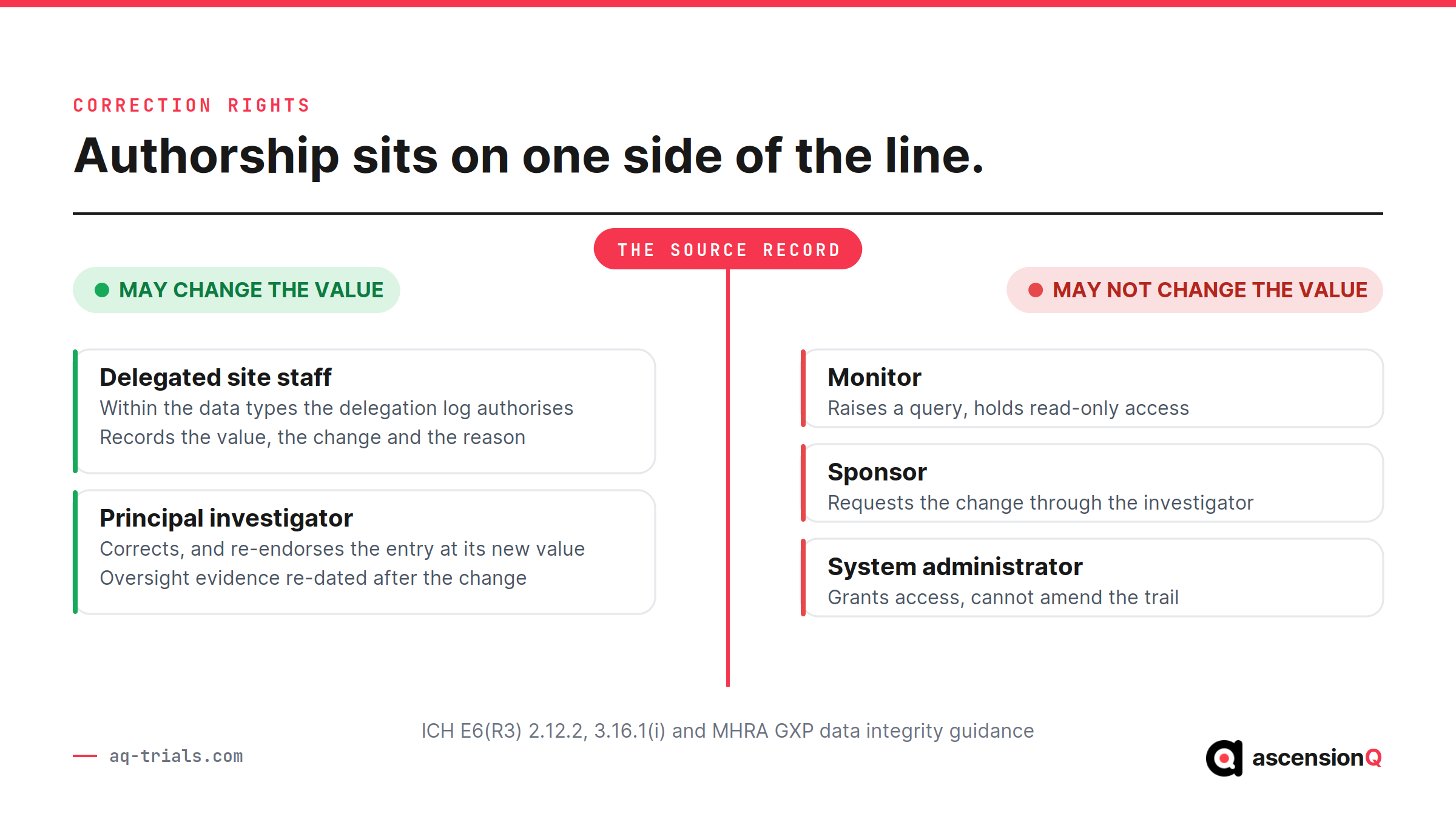
Correction rights follow delegation. A member of site staff may change a value only where the delegation log authorises them to record that data type, and system permissions should be configured to match.
- Delegated site staff correct the fields their delegated duties cover, which keeps authorship of the record inside the delegation of authority log.
- The principal investigator corrects entries and re-endorses any record already signed, which re-dates the oversight evidence against the current value.
- The monitor raises a query against the field and leaves the value alone, which keeps verification separate from authorship.
- The sponsor requests a correction through the query, because ICH E6(R3) section 3.16.1(i) states the sponsor should not change data entered by the investigator unless the change is justified, agreed in advance with the investigator and documented.
- The system administrator grants and removes access and has no route to amend the trail, because MHRA guidance states users should not be able to amend or switch off the audit trail.
The investigator’s part of this is the most visible at inspection. A signature applied before a correction, and never renewed, tells an inspector that the reviewed data and the reported data are two different things. Our guide to what PI oversight looks like in an eSource audit trail covers the review, endorsement and delegation entries that evidence the investigator’s oversight on any given date.
A monitor who can edit a site value has become an author of the source record, and the verification loses its independent standing. Our guide to how monitors do remote source data verification with eSource covers read-only access scoping and the query flow that replaces direct editing.
Also Read: Who Uses eSource in a Clinical Trial? From Research Nurse to Sponsor
How Should a Site Work Through One Correction?
A site works through a correction in seven steps, and each step produces something an inspector can later read. The sequence holds whether the error is found by the person who entered it, by the investigator at review or by the monitor.
- Identify the field and locate the record that shows the current value is wrong.
- Confirm that the person making the change holds the delegation for that data type on that date.
- Open the field inside the eSource system, rather than exporting the data or re-keying it elsewhere.
- Enter the corrected value.
- Record the reason for change in the system’s own reason field, naming the record consulted.
- Save the entry, so the system commits the change to durable storage with user, date and time.
- Route the record for investigator review where the data is clinically significant or the entry was already signed.
Two steps are commonly skipped. Step two goes when permissions run wider than the delegation log, and step seven goes when the system treats signature and data as independent objects. Both gaps are configuration decisions taken before the study opened.
The procedure that defines who may correct, within what period and with what evidence belongs in the site’s quality management system, alongside the SOPs for access review and audit trail review. An error that breaches the protocol, or that repeats across visits, moves into the deviation and corrective and preventive action records.
What Makes a Reason for Change Defensible?
A defensible reason for change names the evidence that shows the original value was wrong. ICH E6(R3) section 4.2.4 requires corrections to be attributed to the person making them, justified, supported by source records around the time of the original entry, and performed in a timely manner.
| Reason recorded | What an inspector can do with it | Standard |
| “Error” | Nothing, because the entry states that a change happened and no more | Rejected |
| “Transcription error” | Identify the category of mistake and then ask for the evidence separately | Weak |
| “Value corrected to match laboratory report dated 04 Sep 2026, sample ref X789” | Open the named record and confirm the correction independently | Defensible |
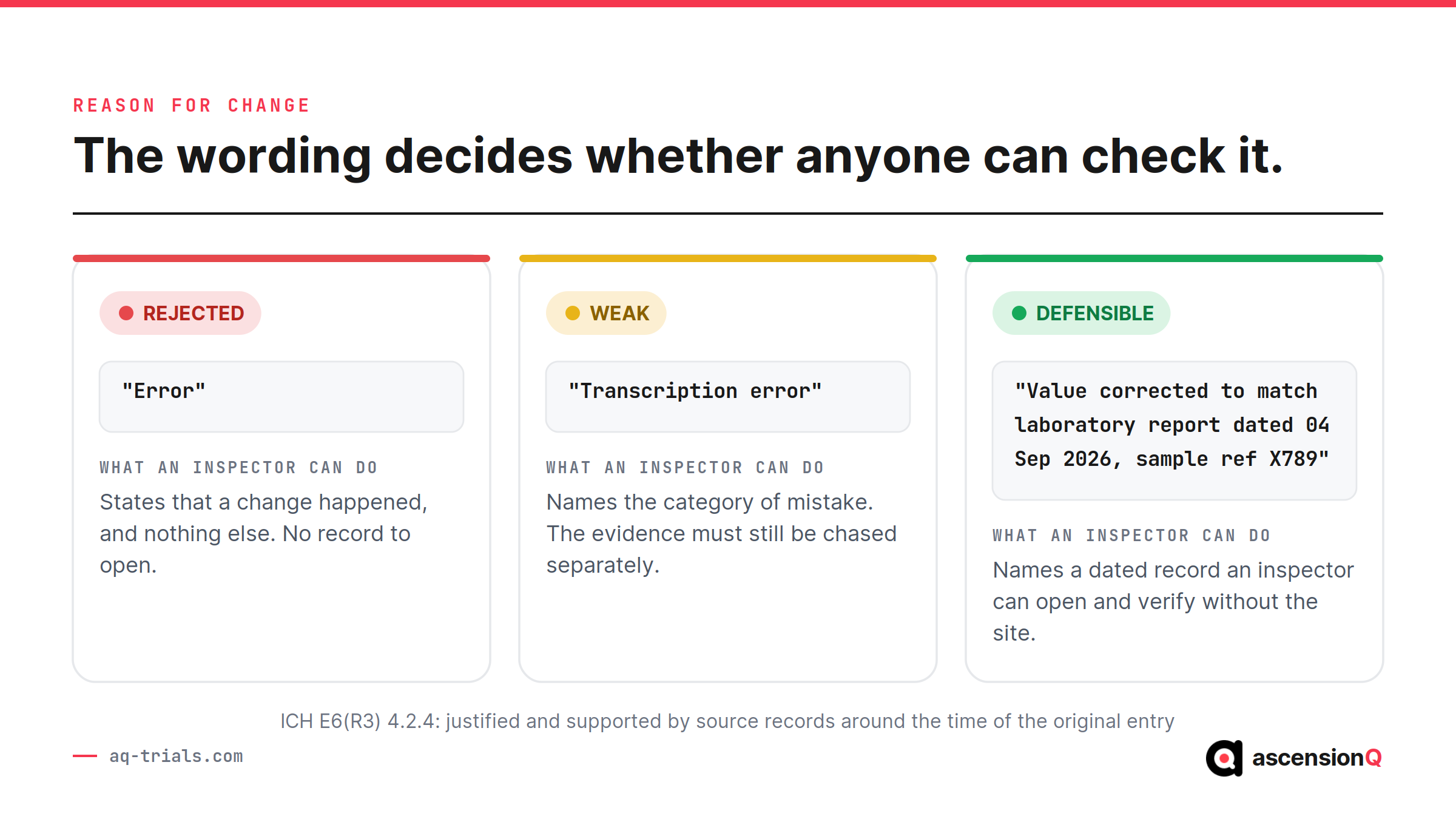
Three elements make the difference between the second row and the third:
- The record consulted, named specifically enough to be retrieved by someone else.
- The date of that record, which shows the evidence existed around the original entry.
- The direction of the change, so the reason reads correctly against both values in the trail.
A short controlled picklist paired with a mandatory free-text detail field produces the third row consistently. A picklist alone produces the second row across every study.
How Late Can an eSource Entry Be Corrected?
An entry can be corrected for as long as the record remains open, and the justification gets harder to supply as the gap widens. E6(R3) asks for the supporting source records to date from around the time of the original entry, which fixes the evidence rather than the correction to a moment in time.
| When the error is found | What the correction needs |
| During the same visit | The reason field and the record consulted |
| Before investigator review | The above, plus the entry routed for review at the current value |
| After investigator sign-off | The above, plus a fresh endorsement dated after the change |
| After monitoring or data transfer | The above, plus a query record and a reconciled value in the receiving system |
| After the study closes | A documented decision, because the archived record is fixed and any change to it is itself an event |
Removal is a separate question with a stricter test. MHRA guidance allows data to be excluded only where valid scientific justification demonstrates the data are not representative of the quantity measured, and requires excluded data to be retained with the original data set. A wrong value is corrected rather than excluded.
Also Read: What MHRA Expects from Electronic Source Systems Under the 2026 UK Regulations
What Does an Inspector Read in a Corrected Field?
An inspector reads one audit trail row and expects it to answer four questions without a supporting explanation from the site. ICH E6(R3) defines the audit trail as showing activities, the initial entry and changes to data fields, by whom, when and, where applicable, why.
- Who: the named user account, traceable to a person on the delegation log for that date.
- What: the field, the value before the change and the value after it.
- When: a system-generated date and time, unambiguous as to time zone.
- Why: the reason for change, naming the record the correction rests on.
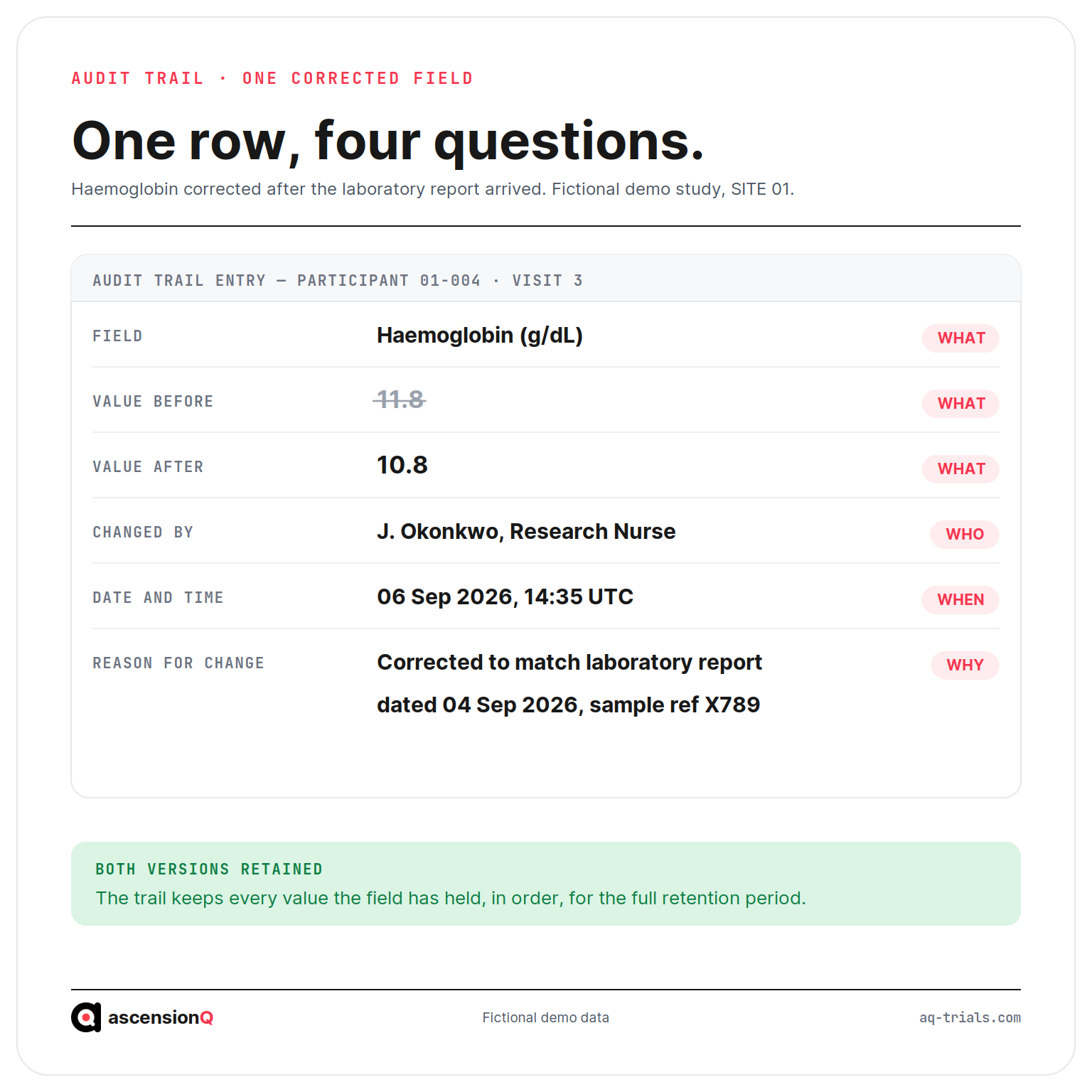
The reading extends past the single row. An inspector follows the trail forward to the investigator’s endorsement and back to the original entry, and checks the account that made the change against the delegation log in force that week. Corrections clustered on one field, one user or one date invite a wider look.
Paper source behaves differently under the same reading. A crossed-out entry with initials and a date proves that someone changed the value, and it rarely proves why. Our guide to eSource versus paper source worksheets and what changes at the site covers the anatomy of a correction in each format, and our guide to what counts as source data in a clinical trial covers which record the correction has to be made in.
The value is the smallest part of the record. The trail around it carries the proof.
Frequently Asked Questions
How is an eSource entry corrected without breaking ALCOA+?
The new value is saved as a new version of the field, the original value stays readable, and the system records who made the change, when and why. The system adds to the record instead of replacing it.
Who may correct an eSource entry?
Only staff whom the delegation log authorises to record that data type. System permissions should be configured to match the delegation log.
What makes a reason for change defensible?
It names the evidence showing the original value was wrong. ICH E6(R3) section 4.2.4 requires corrections to be attributed to the person making them, justified and supported by source records.
Book a live demo to see the AQ platform today.