eSource in clinical trials is trial data recorded electronically at the point of first capture, so the electronic entry itself is the original source record. The site enters the data once, the system keeps the audit trail, and every later copy traces back to that single original.
This guide is written for UK research sites: research nurses, principal investigators, R&D managers and QA leads. It covers what counts as eSource, the forms it takes, who uses it, how a record moves through a study, what UK law and ICH E6(R3) expect, where it helps and where it does not, and what to check before buying. Each section gives the short answer and points to the detailed guide in this series.
The source is the first place a fact is written down. Everything else is a copy.
What Is eSource in a Clinical Trial?
eSource is source data created in electronic form at the moment of observation. A blood pressure typed into a validated visit form during the visit is eSource. The same reading written on paper and typed in later is a transcription, and the paper remains the source.
The definition rests on two terms. ICH E6(R3) replaces the older phrase “source documents” with source records: the original documents or data, including their metadata, or certified copies of them, in any media format. Source data is the information in those records that is needed to reconstruct and evaluate the trial. Our guide to what counts as source data in a clinical trial sets out both definitions in full, with the usual original for each data type.
- Original record: the first capture of an observation, on paper or in a system.
- Metadata: who entered the value, when, on which device, and every later change.
- Certified copy: a copy verified as holding the same content and meaning as the original.
- Transcription: any step that retypes a value from one record into another.
Timing and originality decide whether a record is source, whatever the medium. A paper worksheet completed during the visit is source, and a spreadsheet typed from it afterwards is a copy. An electronic form completed during the visit is source, and a printout of it is a copy.
Three conditions make an electronic entry eSource in practice:
- The value is entered at or near the time of the observation, by the person who made it or a delegated colleague.
- The system records who entered it and when, without relying on the user to type a date.
- The site has declared, before the study starts, that this system holds the original for this data point.
The central search behind eSource is simple. A site wants to run a regulated study without losing the audit trail between what happened to the participant and what the sponsor analyses. Every other topic in this guide follows from that aim.
Where Does the Audit Trail Break Without eSource?
The trail breaks at each point where a person copies a value by hand. A paper source worksheet shows the value, a signature and a date. It does not show whether the worksheet was completed during the visit or reconstructed the following week.
Consider a hypothetical oncology visit at an NHS trust. The research nurse records vital signs on a paper worksheet, the pharmacist records dispensing in the pharmacy system, and the weight sits in the electronic patient record (EPR). Three days later, a data coordinator transcribes all three into the sponsor’s electronic data capture (EDC) system. The monitor then compares the EDC entries against three separate originals.
- The worksheet carries a crossed-out weight with initials and no reason for change.
- The EPR weight and the worksheet weight differ by 0.4 kg, and nobody has declared which record is the source.
- The EDC entry matches the worksheet, so the monitor raises a query against the EPR.
- The query takes a week to close because the nurse who wrote the worksheet has moved wards.
Each failure here is a system condition. The process asked a person to copy a value twice and to remember a decision that was never written down. The ALCOA+ attributes that fail are attributable, contemporaneous and original.
| Aspect | Paper source with transcription | eSource at the point of care |
| When the value is recorded | During the visit, then retyped later | Once, during the visit |
| Evidence of timing | Handwritten date | System timestamp in the audit trail |
| Corrections | Line through, initial, date; reason often missing | Old value kept, reason for change required |
| What the monitor compares | Every EDC field against a paper original | Access to the original record itself |
| Storage and retrieval | Physical files in the site file room | Controlled system with role-based access |
Each row in that table is a practical change a site feels on the ward. Our guide to eSource versus paper source worksheets and what changes at the site takes the four that matter most, covering the error types each format produces, the anatomy of a correction, storage and retrieval across the retention period, and the monitoring effort each one creates.
What Types of eSource Exist?
eSource takes four recognised forms. They differ by where the original is first recorded and who records it. FDA guidance on electronic source data and the EMA guideline on computerised systems and electronic data in clinical trials both describe these routes. Our guide to the types of eSource, from direct data capture to ePRO sets out what each form captures and who enters the data.
| Form | Where the original is recorded | Who records it |
| Direct data capture (DDC) | A site eSource form completed during the visit | Research nurse, investigator or other delegated staff |
| EHR or EPR as source | The hospital’s electronic patient record, as routine care | Clinical staff, as part of normal care |
| EHR-to-EDC transfer | The EPR, with values sent electronically to the sponsor’s EDC | Clinical staff; the transfer is automated |
| ePRO and eCOA | A participant’s device or a site tablet | The participant, or a clinician rating an outcome |
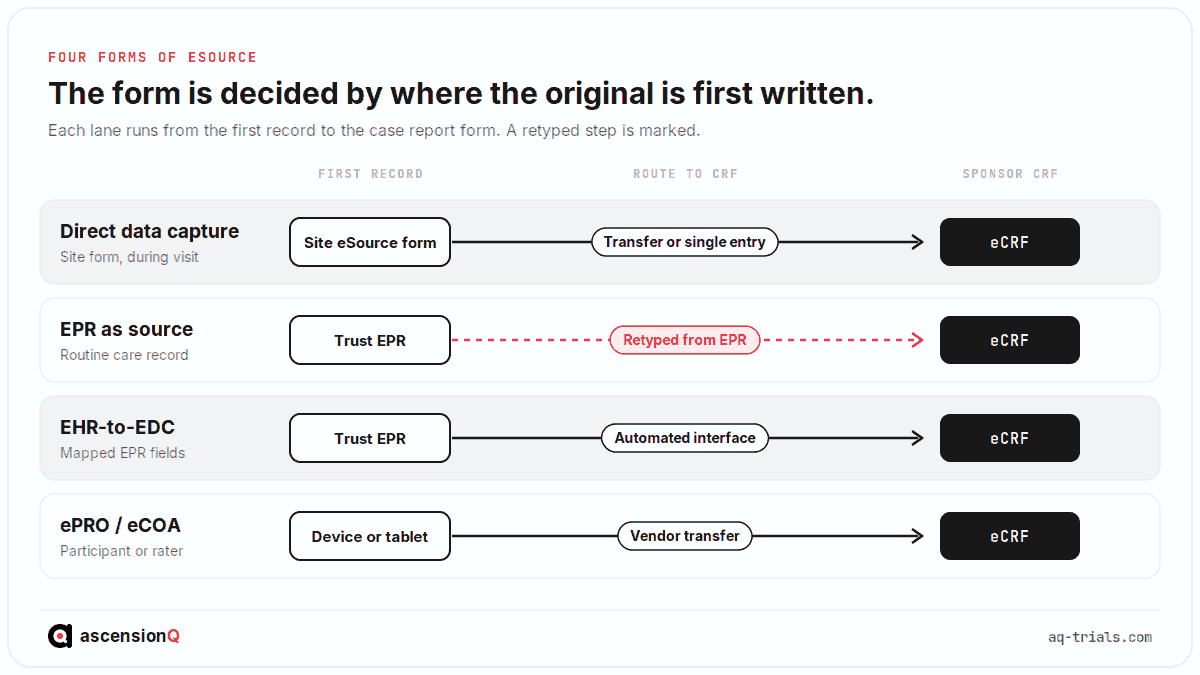
Most studies at an NHS site use more than one form at once. Laboratory results come from the EPR, visit assessments come from site forms, and symptom diaries come from ePRO. Each data point still has exactly one declared source.
Each form carries its own practical questions for a UK site:
- Direct data capture gives the site full control over form design and timing, and it requires the site to validate and maintain the forms.
- EPR as source uses data clinicians already record, and it depends on the monitor being granted governed access to the EPR.
- EHR-to-EDC transfer removes retyping for mapped fields, and it depends on the trust’s EPR vendor, interface work and information governance approval. Our guide to EHR-to-EDC integration versus site eSource at an NHS trust compares the two routes on data coverage, the trust approval chain, what the EPR supplier controls and where the cost falls.
- ePRO captures the participant’s own report directly, and it requires device provisioning, participant training and a plan for missing entries.
Who Uses eSource in a Clinical Trial?
eSource has one author for each entry and many readers. The research nurse and investigator create most of the record. Everyone else reviews, verifies, dispenses against or analyses it.
- Research nurse or practitioner: records visit assessments and observations as they happen.
- Principal investigator: reviews and signs off clinically significant data and eligibility, which evidences oversight.
- Data manager or coordinator: answers queries and confirms completeness.
- Clinical trials pharmacist: records dispensing and accountability against the prescription.
- Monitor: verifies or reviews source data, on site or remotely, within scoped access.
- QA lead: audits the trail, corrections and access logs.
- Sponsor: receives the data, directly or via EDC, and analyses it.
Access follows delegation. A user can enter or sign only the data their delegated role covers, which is why the delegation log and user permissions should match. The delegation of authority log is the record that sets those boundaries.
The same record looks different to each role. A research nurse sees the forms for today’s visits. A PI sees a queue of entries awaiting review and signature. A monitor sees the fields in scope for verification and the queries they have raised. A QA lead sees the audit trail and the access log. Access designed around these views keeps each user inside their delegated duties. Our guide to who uses eSource, from research nurse to sponsor covers what each of the seven roles does with the record, which four of them may change data, and the clauses that set each duty. The investigator’s own part of that record is read from the trail itself, and our guide to what PI oversight looks like in an eSource audit trail covers the review, endorsement and delegation entries an inspector opens.
How Does an eSource Record Move Through a Study?
An eSource record moves through six stages, and each stage leaves an entry in the audit trail. The stages start before the first participant and end with archiving decades later.
- Plan: the site and sponsor agree a source data plan and a source data location log before the site initiation visit.
- Build and validate: the visit forms are built from the protocol schedule of events and tested.
- Capture: staff record data during the visit, and the system stamps user, date and time.
- Review and sign: the investigator reviews and signs the data their oversight covers.
- Verify and query: the monitor reviews the source, raises queries and staff correct with a reason.
- Archive: the complete record, metadata and audit trail are retained in a readable format.
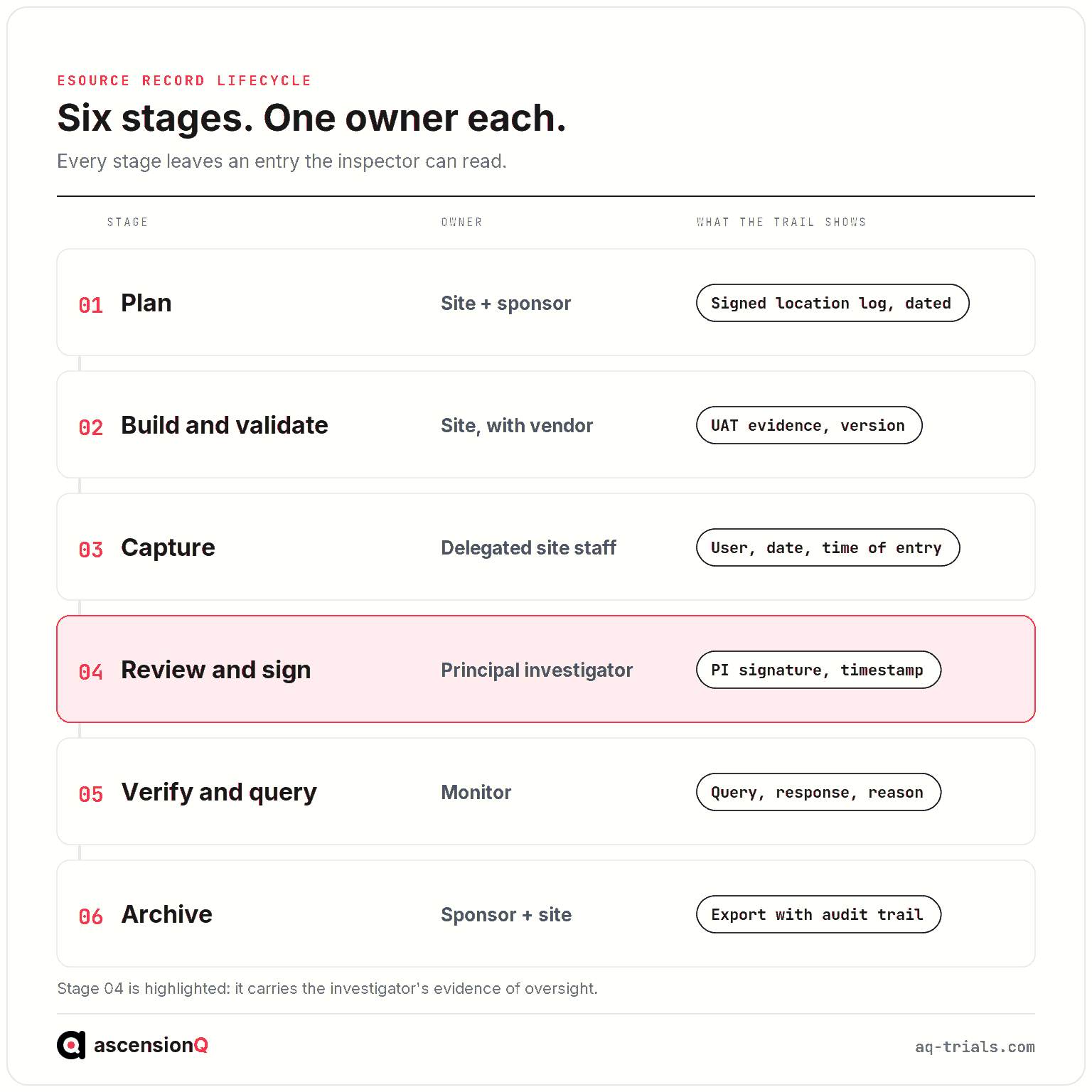
Each stage has one owner. Planning and archiving sit with the site and sponsor jointly, capture sits with delegated site staff, and verification sits with the monitor. That verification is increasingly done without a site visit, and our guide to how monitors do remote source data verification with eSource covers the boundary with source data review, how access is scoped, what the monitor sees and the seven-step query flow. A query answered at the site ends in a correction, and our guide to how to correct an eSource entry without breaking ALCOA+ covers the seven-step correction workflow, who holds the right to change a value, what makes a reason for change defensible and how late an entry can be corrected. Monitoring visit planning itself belongs to the site’s clinical trial management system. Our worked example tracing one visit from source entry to query resolution runs the whole sequence on a single hypothetical visit, from the booking that opens the form to the query the monitor closes three weeks later, with the audit trail entry each stage leaves behind.
Two stages carry most of the risk to the audit trail. Capture fails when entries are made late or by staff outside the delegation log. Review fails when investigator sign-off is absent, late or given in bulk without evidence of review. Both failures are visible in the audit trail, which is why inspectors read it.
What Do UK Regulations and ICH E6(R3) Require of eSource?
UK law and ICH E6(R3) require the same outcome for eSource and paper: records that are complete, attributable and available for inspection. The amended UK clinical trials regulations and ICH E6(R3) both took effect on 28 April 2026, as covered in our guide to what the new UK CTR requires of research software.
| Source | What it asks of an eSource system |
| ICH E6(R3), section 4.2.2 | Audit trails record the initial entry and every change or deletion, and are never disabled |
| ICH E6(R3), section 4.2.4 | Corrections are attributed, justified and supported by source records |
| ICH E6(R3), section 4.3.4 | The system is validated for completeness, accuracy and reliability |
| ICH E6(R3), section 4.3.3 | User management and security controls prevent and detect breaches |
| MHRA GXP data integrity guidance | Data meets ALCOA+ across its whole lifecycle |
| UK retention rules | Trial master file records are kept for at least 25 years after the trial ends, where the application was submitted on or after 28 April 2026 |
The MHRA sets out its data integrity expectations in its GXP data integrity guidance and definitions. Its archiving and retention guidance requires trial master file and investigator records for trials applied for from 28 April 2026 to be retained for at least 25 years. It also expects archived systems to keep audit trails and metadata readable throughout that period. Our guide to how long eSource records must be kept and how to archive them covers every UK retention clock, the difference between an archive and a backup, readable-format archiving across decades, and the vendor exit and data export terms a site agrees before go-live. Our guide to what the MHRA expects from electronic source systems under the 2026 UK regulations covers the statutory duty created by regulation 28, the data integrity definitions inspectors apply to an electronic entry, the access duty under regulation 31A, and the audit trail findings the MHRA has published.
ICH E6(R3) restructured these expectations into one data governance section. Our guide to how ICH E6(R3) changes the rules for eSource covers the source records definition, the source declaration required at section 2.12.2, the eight data life cycle clauses at section 4.2, the eight computerised system requirements at section 4.3, and which parts carry legal force in the UK.
Each of the nine ALCOA+ attributes translates into a specific control at the point of capture. Our guide to whether eSource meets ALCOA+ and the attributes inspectors check maps every attribute to the eSource control that evidences it, and to the record an inspector opens to test each one.
A site holding part of its source on paper also has to decide when a scan may stand in for the original. Our guide to certified copies and when a scanned record can replace the original source covers the ICH and MHRA definitions, the two accepted verification routes, who certifies a copy at the site, and the conditions that allow an original to be destroyed.
Inspectors read the audit trail first.
The EMA guideline on computerised systems, published in 2023, sits outside UK law, and UK sites can use it as a detailed reference. It sets out expectations for electronic source, audit trail review, user access management and certified copies that match the direction of ICH E6(R3). The FDA guidance on electronic source data, issued in 2013, applies to studies submitted to the United States and describes data originators and the identification of source for each data element.
- UK-only studies answer to the UK regulations, ICH E6(R3) and MHRA guidance.
- Studies with a US submission also answer to FDA guidance and 21 CFR Part 11.
- Studies with EU sites also answer to the EU Clinical Trials Regulation and the EMA guideline.
Which Record Is the Source When Data Exists in Two Places?
The source is whichever record the site declares, in writing, before the data is collected. A site declares it per data point in a source data location log, agreed with the sponsor and filed in the investigator site file.
- Weight recorded in the EPR during clinic, then copied to a trial form: the EPR is the source.
- Adverse event assessment entered directly into a site eSource form: the form is the source.
- Laboratory result reported by the hospital laboratory system: the laboratory report is the source.
- Symptom score entered by the participant on a device: the ePRO record is the source.
A duplicated value without a declared source is the gap the log exists to close. The log tells the monitor where to look for every field. Our guide to which record is the source when data sits in both the EPR and the trial system sets out the three levels that resolve a duplicate and what a declaration has to fix for each data point.
The log changes when the process changes. A site moving from paper to eSource mid-study, or adding a new data source, updates and re-signs the log so it describes the source in use on each date. Our guide to what a source data location log contains and who signs it off covers the document itself, its columns, its sign-off conditions, its version control and where it is filed. Our guide to how to move a site from paper source to eSource mid-study covers the sponsor approval route, the six documents that change on the cut-over date, what happens to the paper already collected and the dual running risk.
What Are the Benefits and Limits of eSource?
eSource removes the transcription step and records evidence of timing automatically. It still depends on trained staff, a validated system and a clear source declaration.
| Benefit | Limit |
| One entry per value removes transcription errors between paper and EDC | A system entry made after the visit is still late, and the timestamp shows it |
| The audit trail records every change with user, time and reason | A poorly designed form can force workarounds that sit outside the trail |
| Monitors can review source remotely within scoped access | Remote access to NHS records needs trust information governance approval |
| Edit checks can flag missing or out-of-range values at entry | Validation, user acceptance testing and training take time before first patient in |
| Records are retrievable for inspection from one controlled place | Exit planning is needed so records stay readable for 25 years |
Published evidence on time savings varies by study design and form of eSource. Our guide to how much SDV time eSource saves and what the evidence shows sets out the four published studies behind the figures in circulation, what each one actually measured, why faster capture does not by itself reduce source data verification, and which claims a business case can support. Any efficiency figure should come from peer-reviewed studies and be read against the site’s own mix of data sources.
The limits are practical and manageable. Most come down to three preparations made before the first participant:
- A signed source data plan, so every field has a declared source.
- Validation and user acceptance testing evidence filed in the site file.
- Training records for every user, matched to the delegation log.
How Does eSource Fit a Connected Site Workflow?
eSource sits in the middle of the site’s operational record. The visit schedule creates the form, the delegation log decides who can complete it, the site file holds the plan and log, and quality events flow from errors the audit trail reveals. Our guide to how a visit schedule becomes an eSource form covers that first connection in full, from the schedule of events to the fields on each form, where the visit window actually lives, what happens when a visit falls outside it, how an unscheduled visit is handled and what a protocol amendment changes.
| Upstream or downstream record | How it connects to eSource |
| Protocol schedule of events | Defines which forms open at each visit and within which window |
| Visit booking | Sets the visit date the form is completed against, as covered in visit scheduling inside a CTMS |
| Delegation log | Decides which staff can enter, sign or correct each data type |
| Investigator site file | Holds the source data plan, location log and validation evidence |
| Sponsor EDC | Receives CRF data, either transcribed or transferred; see how CTMS, eTMF, EDC and eISF differ |
| Deviation and CAPA records | Receive errors that breach the protocol or recur, through the CAPA process |
The last row of that table carries a judgement the site makes many times a year. Our guide to when an eSource error should become a protocol deviation or a CAPA sets out the boundary between a data error and a departure from the protocol, the four outcomes one error can have, the test that makes a deviation important, the point at which a systemic cause opens a CAPA, and the serious breach threshold under regulation 29A.
The boundary with EDC matters most. Source data is the site’s record of what happened to the participant. The case report form is the sponsor’s structured extract of it. Our guide to where source data ends and the CRF begins sets out that boundary in full, including when the CRF itself becomes the source record and which party controls each system. Our explainer on what EDC is in clinical trials covers the sponsor’s side of it.
Data integrity controls across these records belong to the site’s quality management system, which holds the SOPs for correction, access review and system validation.
How Should a Site Prepare for Its First eSource Study?
A site prepares by settling decisions on paper before the system goes live. The sequence below runs from protocol review to the site initiation visit, and each step produces a document for the site file.
| Step | Output filed in the site file |
| Review the protocol schedule of events against the site’s data sources | A draft list of data points and where each is recorded |
| Agree the source for each data point with the sponsor | A signed source data location log |
| Confirm the form design against the protocol | Approved form specifications |
| Complete validation and user acceptance testing | Validation summary and UAT evidence |
| Train and grant access to delegated staff only | Training records and a user access list matched to the delegation log |
| Agree monitor access with the trust information governance team | Approved access arrangement and audit arrangements |
The site initiation visit then confirms the arrangement with the sponsor. Our guide to how to build a source data plan before the site initiation visit works the whole sequence backwards from the visit date, covering the six decisions the plan settles, how the site and sponsor agree them and the four documents it produces. Changes after that point follow the site’s change control and are recorded against the date they took effect. Our guide to how to validate an eSource system before first patient in covers the split between vendor and site evidence, what user acceptance testing checks at the site, and the ten documents filed before the first participant.
Staff experience matters as much as the paperwork. Research nurses who have worked only with paper worksheets need practice entries on a test study, and investigators need to know where their review queue sits. A short dry run of one visit, from booking to sign-off, exposes most gaps before a participant is involved.
What Should a UK Research Site Check Before Buying eSource Software?
A site should check that the system can prove its own record, connect to what the site already runs and release its data at exit. The checks below apply to any vendor. Our guide to what to compare in eSource software before you buy works through each of these criteria in turn, with the evidence that settles it, the eight computerised system requirements ICH E6(R3) sets, the NHS assurance pack procurement asks for, and the supplier answers that should stop a purchase.
- Validation: the vendor supplies validation documentation, and the site can run its own user acceptance testing.
- Audit trail: every entry, change and deletion is recorded with user, time and reason, and cannot be switched off.
- Access control: roles map to the delegation log, and monitor access can be scoped to one study.
- EDC connectivity: data reaches the sponsor’s EDC by a defined, tested route.
- EPR position: the system either reads from the trust EPR or clearly records which data comes from it.
- NHS assurance: the supplier holds a current Data Security and Protection Toolkit (DSPT) submission and Cyber Essentials, as set out in our guide to NHS procurement evidence for research software.
- Exit and archiving: records, metadata and audit trails export in a readable format for the full retention period.
- Connected records: the system links to the site’s schedule, delegation log and site file.
Information governance deserves its own line in any evaluation. Monitor access to patient records must satisfy UK GDPR and the Caldicott principles, and each NHS trust approves it locally. Our guide to how NHS sites give monitors EPR access without breaching UK GDPR covers the lawful basis and consent behind that approval, the access models the MHRA recognises, the eight-step trust approval chain and the audit of the access afterwards.
A shortlist also has to account for what each supplier can supply on the day the study opens. Our guide to Veeva SiteVault eSource alternatives for NHS and academic sites covers what Veeva publishes about SiteVault eSource, where that product sits at a UK site, and the four routes to electronic source data a site can actually run now.
A site should also ask how the vendor handles change. System upgrades during a live study need impact assessment and, where they affect validated functions, regression testing. The vendor’s release notes and the site’s change records form part of the evidence an inspector may request.
Which Questions Does This eSource Guide Series Answer?
This pillar gives the short answer to each eSource question. The detailed guides in the series each own one question and go deeper, and they will be linked from the matching section above as they are published.
| Topic | Detailed guide covers |
| Definitions | What counts as source data, the four types of eSource, eSource vs EDC and vs paper worksheets |
| Source declaration | Which record is the source, and the source data location log |
| Regulation | ALCOA+ controls, ICH E6(R3), MHRA expectations, certified copies and retention |
| Roles | Who uses eSource, PI oversight and remote source data verification |
| Procedures | Source data plans, validation, corrections, mid-study transition and visit forms |
| Buying | Evaluation criteria and alternatives for NHS and academic sites |
Frequently Asked Questions
What is eSource in a clinical trial?
eSource is trial data recorded electronically at the point of first capture, so the electronic entry itself is the original source record. A value typed into a validated visit form during the visit is eSource. The same value written on paper and typed in later is a transcription.
What are the four types of eSource?
Direct data capture, the electronic health record used as source, EHR-to-EDC transfer, and electronic patient-reported outcomes. They differ by where the original is first recorded and who records it.
Which record is the source when data exists in two places?
The record the site declares in writing before the data is collected. The declaration is made per data point in a source data location log, agreed with the sponsor and filed in the investigator site file.
What do UK regulations require of eSource?
The same outcome as for paper: records that are complete, attributable and available for inspection. The amended UK clinical trials regulations and ICH E6(R3) both took effect on 28 April 2026.
Does eSource remove the need for a validated system and trained staff?
No. eSource removes the transcription step and records timing automatically. It still depends on trained staff, a validated system and a clear source declaration.
Book a live demo to see the AQ platform today.