eSource software for a UK research site is compared on six things: validation evidence, the depth of the audit trail, how access control maps to delegation, the route data takes to the sponsor’s system, the position on the hospital electronic patient record, and the exit terms. Each one is settled by evidence the supplier hands over.
This guide sets out the question to ask under each heading and the evidence that settles it. Each underlying procedure has its own guide in our complete guide to eSource in clinical trials.
Buy the evidence, not the demonstration.
Why Does the Site Carry This Evaluation?
The site carries the evaluation because the regulatory duty for a computerised system follows whoever deploys it. A sponsor deploys the electronic data capture system and answers for it. A site that buys eSource answers for that.
ICH E6(R3) states this directly. Annex 1, section 2.12.10(c) requires the investigator or institution, for systems they deploy specifically for clinical trials, to ensure the computerised system requirements in section 4 are addressed proportionate to the risks to participants and the importance of the data. That clause moves the whole of section 4 onto the site.
- Sponsor-deployed system: the sponsor holds the validation file, and the site confirms its users and access.
- Site-deployed system: the site holds the validation file, the access records and the evidence an inspector asks for.
- Either case: the investigator defines what counts as a source record before the trial starts, under section 2.12.2.
Which System Requirements Does ICH E6(R3) Set?
ICH E6(R3) sets eight requirements for a computerised system, in Annex 1, section 4.3. Each converts into a question a site can put to a supplier in writing.
| Clause | Requirement | The buying question |
| 4.3.1 | Procedures for use | Which SOPs must the site write, and are templates provided? |
| 4.3.2 | Training | What training records does the system produce per role? |
| 4.3.3 | Security | How are authentication, patching, monitoring and backup tested? |
| 4.3.4 | Validation | What documentation comes with the system, and what is left to the site? |
| 4.3.5 | System release | How is a release notified and regression tested mid-study? |
| 4.3.6 | System failure | What is the documented fallback when the system is down mid-visit? |
| 4.3.7 | Technical support | Who supports it, in which hours, and how are incidents recorded? |
| 4.3.8 | User management | Can permissions follow duties, be revoked and be reviewed? |
Section 4.3 holds no audit trail clause. That sits in section 4.2, assessed separately below.
What Validation Evidence Should a Supplier Provide?
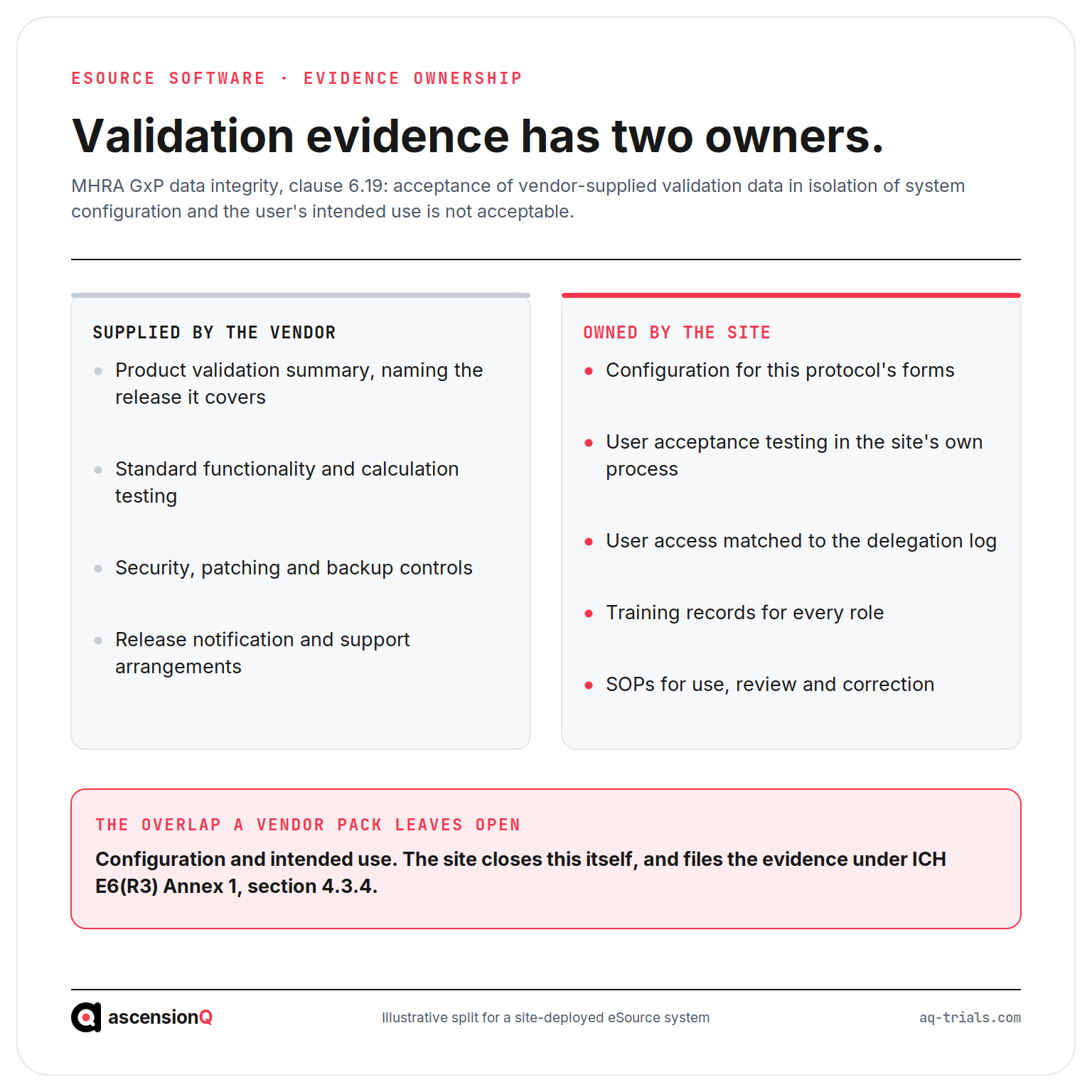
A supplier should provide validation documentation for the product, and the site should expect to add its own. Section 4.3.4(g) of Annex 1 requires the responsible party to ensure systems are validated as fit for purpose for the trial, including those developed by other parties, and to retain that documentation.
The MHRA guidance on GxP data integrity closes the gap suppliers often leave open. Clause 6.19 states that the acceptance of vendor-supplied validation data in isolation of system configuration and the user’s intended use is not acceptable. Vendor testing alone tends to prove function rather than performance in the site’s process.
- The supplier’s validation summary, with the test scope and the release it covers.
- Evidence that automated edit checks and calculations were validated, per section 4.3.4(e).
- A written split of responsibility, naming what the site must test itself.
That last line is the one to settle before signature. Our guide to how to validate an eSource system before first patient in covers the site side of that work and the documents it files.
How Deep Does the Audit Trail Need to Go?
The audit trail needs to reach beyond data values to the account and workflow events around them. Section 4.2.2 of Annex 1 expects the system to log user account creation, changes to roles and permissions, and user access, alongside the initial entry and every later change or deletion. Workflow actions belong in the trail as well as direct data entry.
Two further conditions in the same clause carry weight. Audit trails, reports and logs must not be disabled, and they must be interpretable enough to support review.
- Ask the supplier to export the full audit trail for one test participant, and read it end to end.
- Check the trail shows who, what, when and why for every change, and that an administrator cannot switch it off without leaving a record, per MHRA clause 6.13.
- Ask whether the trail can be filtered or reported by exception, so review is a practical task rather than a page-by-page read.
An unreadable export is a finding waiting to happen. The attributes the trail must evidence are set out in our guide to whether eSource meets ALCOA+ and the attributes inspectors check. The workflow behind an amended value is covered in our guide to how to correct an eSource entry without breaking ALCOA+.
How Should Access Control Map to the Delegation Log?
Access control should express the delegation log, so a user reaches only the data their delegated duties cover. Section 4.3.8 of Annex 1 requires permissions to be assigned on the basis of a user’s duties and functions, revoked once no longer needed, and reviewed periodically. Authorised users and their permissions are documented and retained, with the time each was granted.
NHS sites carry a second obligation on the same point. The fourth of the eight Caldicott Principles puts access to confidential information on a strict need-to-know basis, limited to the items a person needs to see, and names access controls as the way to achieve it.
- Ask to see a permission set built for a research nurse, and a second for a monitor.
- Test how quickly access is withdrawn when someone leaves the study.
- Ask for the standard report used for a periodic access review.
Monitor access raises its own questions. Our guide to remote source data verification with eSource covers how that access is scoped, and our guide to how NHS sites give monitors EPR access without breaching UK GDPR covers the trust approval behind it.
What Should a Site Ask About EDC Connectivity and the EPR?
A site should ask for the defined route by which data reaches the sponsor, and for evidence that it was tested. Section 4.2.5 of Annex 1 requires validated or otherwise appropriate processes to keep electronic data and its metadata intact when transferred between systems, documented so the transfer stays traceable. MHRA clause 6.8 adds that a transfer should carry its own audit trail.
- Which sponsor systems has this product exchanged data with, and by what mechanism?
- Does a transfer produce a reconciliation report a data manager can act on?
- Where a value originates in the hospital record, is that origin recorded rather than obscured?
The boundary between the source record and the case report form is set out in our guide to where source data ends and the CRF begins. The choice between an interface to the hospital record and forms completed at the site is a separate decision, covered in our guide to EHR-to-EDC integration versus site eSource at an NHS trust.
What Exit Terms Protect a Record Kept for Decades?
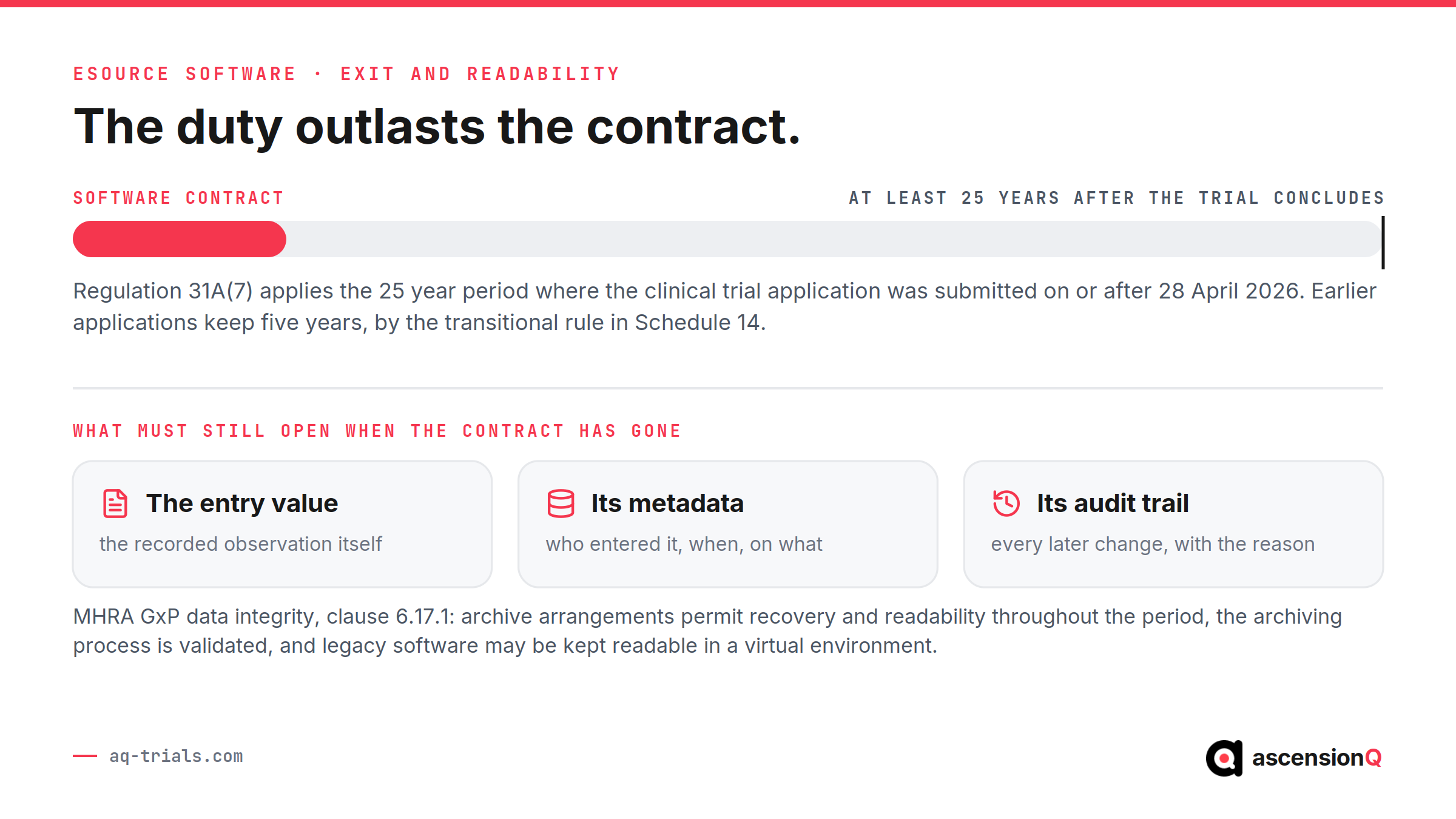
Exit terms should guarantee that the record, its metadata and its audit trail stay readable long after the contract ends. Regulation 31A(7) of the Medicines for Human Use (Clinical Trials) Regulations 2004 requires trial master file documents, expressly including those in electronic form, to be retained for at least 25 years after the trial concludes. Those documents must stay readily available, complete and legible throughout. That period applies where the clinical trial application was submitted on or after 28 April 2026. Earlier applications keep the five year period, by the transitional rule in Schedule 14.
A software contract runs for a fraction of that period. MHRA clause 6.17.1 expects archive arrangements to permit recovery and readability throughout the retention period, expects the archiving process to be validated, and contemplates maintaining legacy software in a virtual environment once a system is no longer supported. Clause 6.17.2 adds that backups do not replace long term retention in final form.
- The export format, including the audit trail and metadata rather than the values alone, and at whose cost.
- The notice period before access to archived studies may be withdrawn.
- Ownership of the data, which MHRA clause 6.20 flags for cloud services alongside retrieval and retention.
- A tested export, produced during evaluation rather than promised.
UK guidance sets no prescribed file format for an eSource export. The obligation is readability and validated migration, worked through in our guide to how long eSource records must be kept and how to archive them.
Which NHS Assurance Evidence Will Procurement Ask For?
NHS procurement asks for three pieces of supplier evidence, and their legal weight differs.
| Evidence | Published by | Status |
| Data Security and Protection Toolkit | NHS England | A formal information standard, DAPB0086, under section 250 of the Health and Social Care Act 2012. The annual cycle closes end of June. |
| Cyber Essentials | Scheme owned by the National Cyber Security Centre, delivered through IASME | Certification against five technical controls. The Plus variant adds independent testing of the same controls. |
| Digital Technology Assessment Criteria | NHS England | The minimum standard for assuring a digital health technology. Buyers are told to request the form, which sits alongside other approvals. |
The three connect. DTAC asks the supplier to confirm its annual toolkit assessment, and asks for Cyber Essentials where the product handles personal information. Our guide to what NHS procurement expects of research software covers the dates they renew on, and the good clinical practice evidence this pack was never written to ask for.
How Should a Site Score the Shortlist?
A site should weight each criterion by how hard it is to fix after signature. The audit trail, the access model and the exit terms are designed into the product. Staff training, standard operating procedures and form design stay within the site’s control.
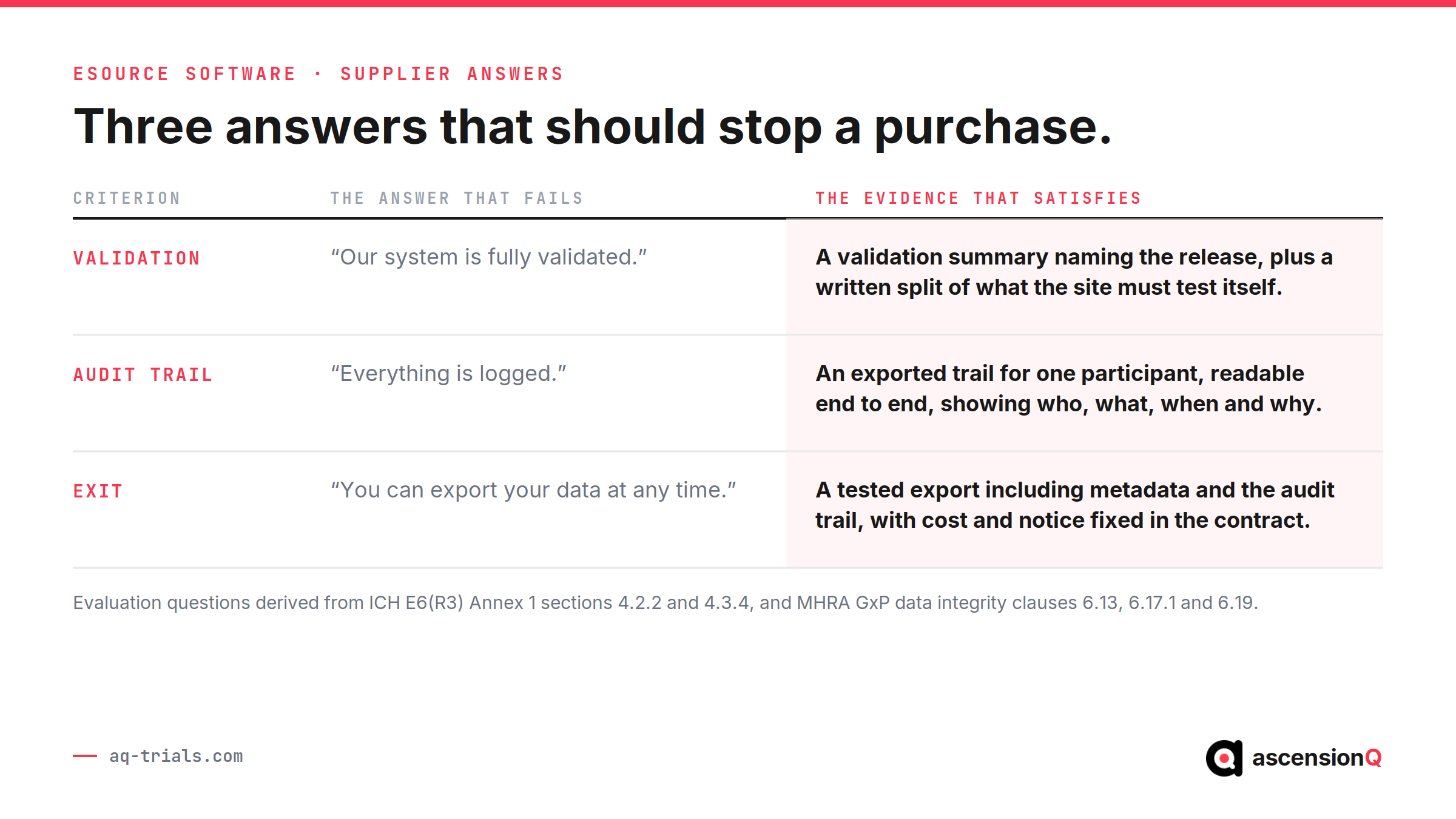
- Score the designed-in criteria first, and treat a weak answer on the audit trail or exit terms as disqualifying.
- Ask for evidence rather than assurance, and record which requests go unanswered.
- Run one visit form through the system during evaluation, from entry to endorsement to export.
- Put the validation split and exit terms in the contract rather than the proposal.
- Check the system against the source declaration the site must sign, covered in our guide to the source data location log.
The SOPs for validation, access review and correction belong to the site’s quality management system. An evaluation that produces them has done its job, whichever product wins.
Frequently Asked Questions
What should a UK site compare when buying eSource software?
Six things: validation evidence, the depth of the audit trail, how access control maps to delegation, the route data takes to the sponsor’s system, the position on the hospital electronic patient record, and the exit terms.
Why does the site carry the evaluation rather than the sponsor?
The regulatory duty for a computerised system follows whoever deploys it. The sponsor deploys the electronic data capture system and answers for it, and the site answers for the eSource system it deploys.
Which criteria matter most when scoring a shortlist?
Weight each criterion by how hard it is to fix after signature. The audit trail, the access model and the exit terms are designed into the product, so they carry the most weight.
Book a live demo to see the platform today.