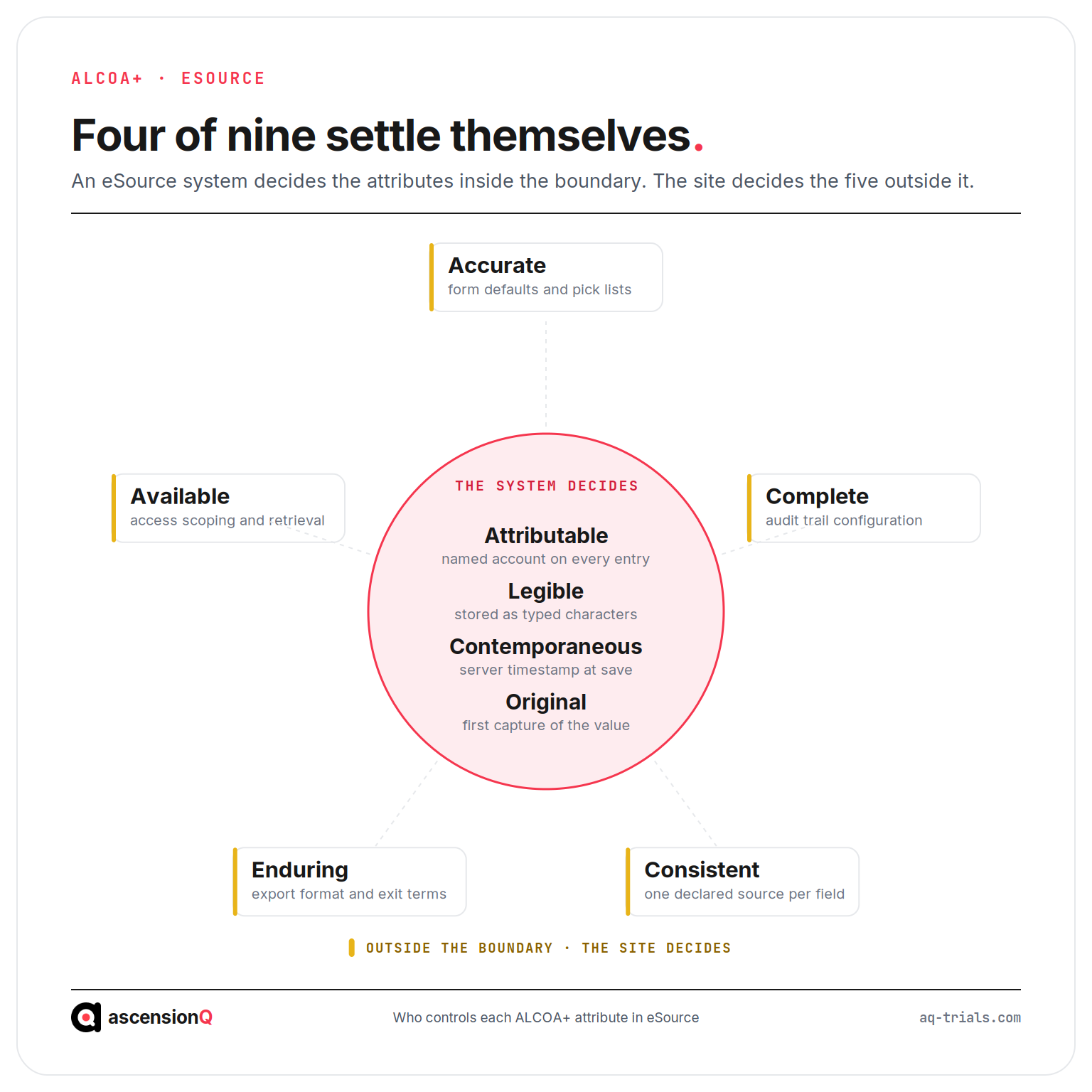
eSource meets ALCOA+ where the system is validated and configured to earn each of the nine attributes, and the electronic format on its own settles only four of them. An eSource system stamps identity, legibility, timing and originality onto every entry it accepts. Accuracy, completeness, consistency, endurance and availability stay with the site, and those five are where inspection findings collect.
This guide maps each ALCOA+ attribute to the eSource control that evidences it, and to the record an inspector opens to test it. It sits inside our wider guide to eSource in clinical trials for UK research sites. The same nine attributes applied to trial documentation rather than to captured data are covered separately in our guide to ALCOA+ and the trial master file.
A system proves when a value was entered. It cannot prove the value was true.
Which ALCOA+ Attributes Does eSource Earn by Design?
Four attributes come from the mechanics of electronic capture. The system applies each one when the entry is saved, without asking the user to supply it. Each still depends on one condition holding true.
| Attribute | What the system applies automatically | The condition that must hold |
| Attributable | Every entry and change is bound to the user account that made it | Named individual logins only, with the user list matched to the delegation log |
| Legible | Values are stored as typed characters and rendered on demand | Controlled terminology, so local abbreviations do not enter free-text fields |
| Contemporaneous | A server timestamp the user cannot type or overwrite | The entry is made during the visit rather than reconstructed afterwards |
| Original | The saved entry is the first capture of the observation | The site has declared this system as the source for that data point |
Configuration decides whether these four survive. A shared ward login removes Attributable from every entry made under it, and no later correction restores it. A timestamp remains honest evidence in both directions: it proves a contemporaneous entry, and it proves a late one just as clearly. Our comparison of eSource and paper source worksheets sets out what changes at the site across each of these points.
Original carries one extra dependency. The entry is the source only where the site said so in advance, in the source data location log agreed with the sponsor. An undeclared data point leaves the attribute unproven whatever the system recorded.
Which ALCOA+ Attributes Does eSource Put Under New Pressure?
The remaining five attributes face risks that paper never created. Each comes from a configuration decision made before the first participant.
- Accurate is exposed by form design. A field that opens with “no adverse events” pre-selected turns a skipped field into a positive assertion, and a dropdown missing the observed value pushes staff to the nearest option instead.
- Complete depends on the audit trail configuration. An audit trail that an administrator can disable or edit removes the history of the record, which leaves the current value standing alone with nothing behind it.
- Consistent is exposed by duplicated capture. The same observation held in the trust EPR and in a site form drifts apart over time, which produces two defensible answers to one question. A field definition changed mid-study has the same effect on the data collected after it.
- Enduring depends on the export format. Data, metadata and audit trail must stay readable for the full UK retention period, which makes vendor exit terms a data integrity question rather than a commercial one.
- Available depends on access scoping. Permissions set too narrowly delay production of records at inspection, and permissions set too widely create their own finding.
Duplicated capture is the most common of these at an NHS site. Our guide to which record is the source when data sits in both the EPR and the trial system sets out the order that resolves it per data point.
Also Read: What Counts as Source Data in a Clinical Trial?
How Does Each ALCOA+ Attribute Map to an eSource Control?
The MHRA defines the nine attributes in its GXP data integrity guidance, at section 6.1. Each definition translates into a specific control a site can point at during an inspection. The table gives that translation for all nine.
| Attribute | What it requires of an eSource record | The eSource control that evidences it |
| Attributable | Every entry resolves to the person who made it | Unique named accounts, no shared logins, and a user access list reconciled to the delegation log at each change |
| Legible | The record is readable by someone who was not present | Controlled terminology, units fixed at field level, and a rendered read-only view of the completed form |
| Contemporaneous | The entry is made at the time of the observation | System-applied timestamps closed to manual entry, with the visit date held separately from the entry date |
| Original | The record is the first capture, or a certified copy of it | A signed source data location log naming this system as the source for each declared data point |
| Accurate | The value reflects what was observed | Form design without pre-selected defaults, range and edit checks at entry, and investigator review of clinically significant data |
| Complete | Every value, change and deletion is retained with its metadata | An audit trail generated by the system, closed to amendment by all roles including administrators, and covered by the validation record |
| Consistent | One data point has one answer across the study record | A single declared source per data point, with the form version recorded against every entry |
| Enduring | The record survives the full retention period in readable form | An export of data, metadata and audit trail in a documented format, with exit terms agreed before go-live |
| Available | The record is produced within the time the requester allows | Role-based access covering site staff, monitor, auditor and inspector, tested by periodic retrieval rather than assumed |
ICH E6(R3) carries the same expectation into clinical research. Section 2.12.2 states that source records should be attributable, legible, contemporaneous, original, accurate and complete, and that changes should be traceable and should not obscure the original entry. It also requires the investigator to define what counts as a source record, and its location, before the trial starts. The remaining three attributes sit in the data governance expectations at section 4.2.
The SOPs behind these controls belong to the site’s quality management system, which holds the procedures for access review, correction and validation.
What Does an Inspector Open to Test Each Attribute?
An inspector tests attributes through records rather than through assurances. Each attribute has a usual first artefact and a usual first question.
| Attribute | Record opened | Question asked |
| Attributable | User access list beside the delegation log | Who held this account on the date of this entry? |
| Legible | A completed visit form in read-only view | What does this abbreviation mean, and where is it defined? |
| Contemporaneous | Audit trail entry beside the visit record | How long after the visit was this value entered? |
| Original | Source data location log | Which system holds the original for this data point? |
| Accurate | Form configuration and the investigator sign-off record | Which fields carry a default value, and who reviewed this entry? |
| Complete | Audit trail for a corrected value | What did this field say before, and why did it change? |
| Consistent | The same data point in the EPR and the trial system | These two records disagree, so which one is the source? |
| Enduring | Validation file and the vendor exit arrangement | How will this record be read in twenty-five years? |
| Available | A live retrieval of three named records | Produce these three now. |
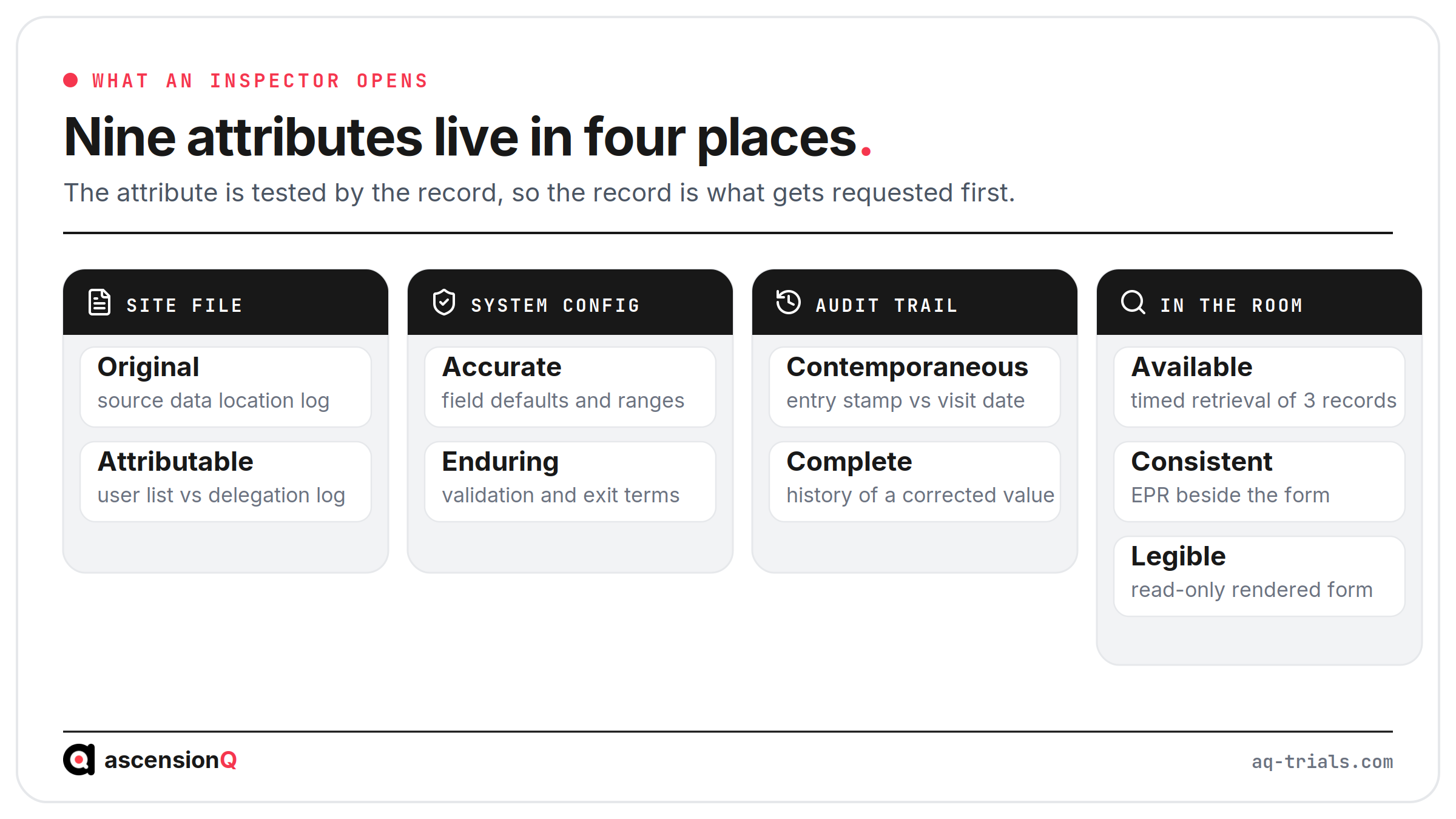
Two of these tests run in real time. Availability is measured by how long the retrieval takes in the room, and attributability by whether the delegation log covers that account on that date.
Where Does an eSource Record Fail an ALCOA+ Check in Practice?
Failures cluster around entries made under pressure and corrected later. The hypothetical example below shows the pattern.
Illustrative example. A participant attends a visit on 4 March at a hypothetical NHS trust. The clinic runs late, so the research nurse records observations on a printed worksheet and enters them into the eSource form on 9 March under a research team account shared by two nurses. The weight field defaults to kilograms, and the value was measured in stones. A correction is made on 20 March with the reason recorded as “data entry”.
Four attributes fail in that sequence, and each fails for a separate reason.
- Contemporaneous fails because the timestamp shows a five-day gap between the observation and the entry.
- Attributable fails because the shared account leaves two possible authors for one entry.
- Original fails because the printed worksheet became the first capture, and the source data location log names the system instead.
- Accurate fails because a unit default converted a measured value into a different one.
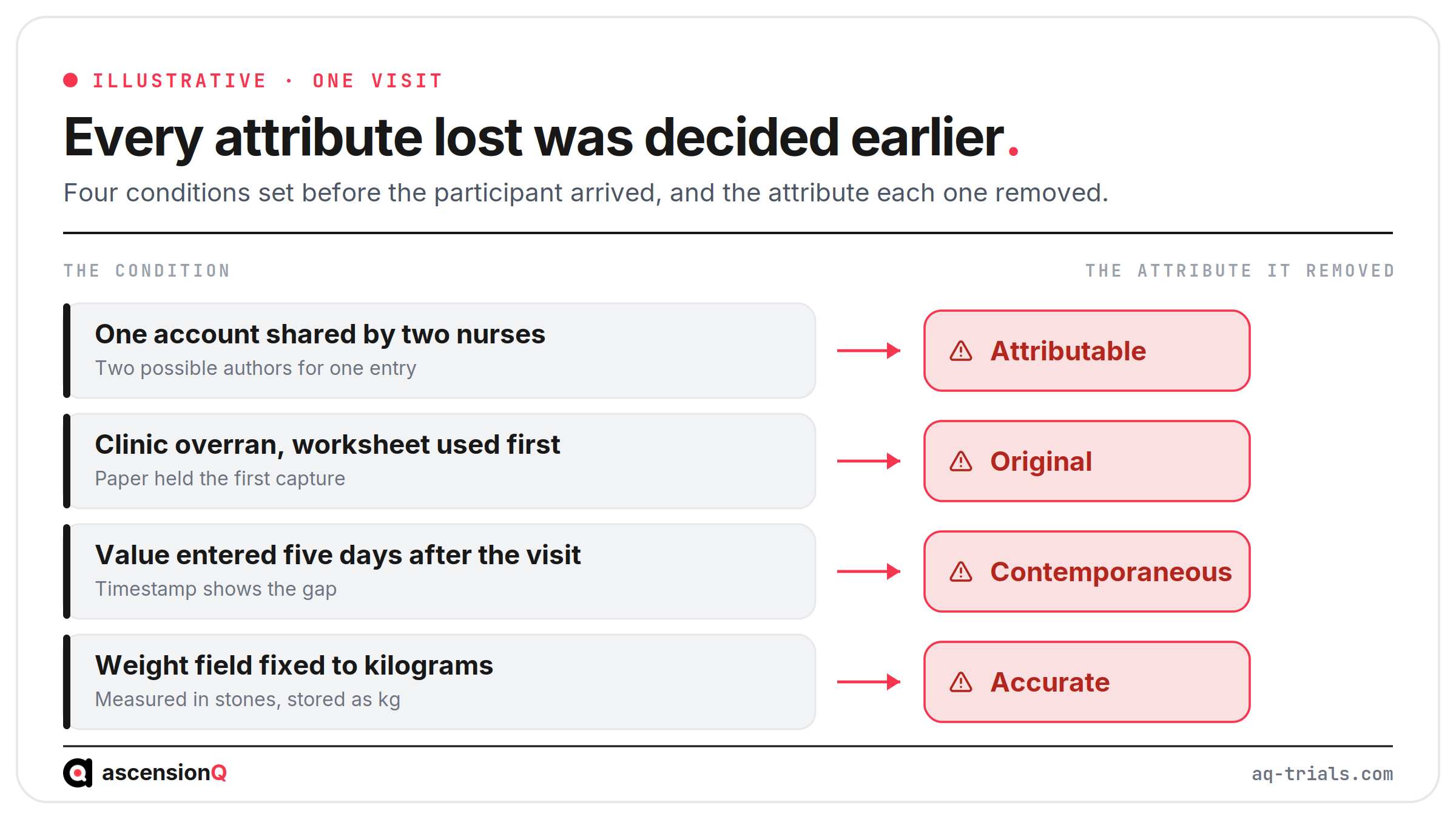
Each failure here is a system condition rather than a personal one. The account was created for convenience, the form was configured with a single unit, and the correction field accepted two words. Those decisions were all made before the visit took place.
Also Read: Types of eSource: Direct Data Capture, EHR, EHR-to-EDC and ePRO
How Does a Site Evidence ALCOA+ for eSource Before an Inspection?
A site evidences ALCOA+ through a sample rather than a statement. Each step below produces a pass, a fail, or a gap with an owner and a date.
- Reconcile the user list against the delegation log. Confirm every active account belongs to a named person delegated for the tasks that account can perform.
- Measure the entry lag on twenty entries. Record the gap between visit date and entry timestamp, and treat the outliers as the finding.
- Open the form configuration. List every field carrying a default value and confirm each default is clinically safe.
- Sample ten corrections. Confirm the previous value, the reason for change and the author are all present and meaningful.
- Test the audit trail controls. Confirm the trail cannot be switched off or edited by any role, and that the validation record covers this configuration.
- Check the source declaration is current. Confirm the source data location log matches the systems actually in use on today’s date.
- Run a timed retrieval and a test export. Produce three named records against the clock, and confirm the export carries metadata and audit trail alongside the values.
The result belongs in a record with a threshold agreed in advance. An entry lag that a site has never defined has no failure point, so every sample passes. The EMA guideline on computerised systems and electronic data in clinical trials gives a detailed reference for audit trail review and access management.
Frequently Asked Questions
Does eSource meet ALCOA+?
Only where the system is validated and configured to earn each of the nine attributes. The electronic format on its own settles four of them: identity, legibility, timing and originality.
Which ALCOA+ attributes stay with the site?
Accuracy, completeness, consistency and the remaining attributes depend on decisions the site makes before the first participant, such as form design. These need the site’s own controls rather than the system’s defaults.
How does a site evidence ALCOA+ before an inspection?
Through a sample rather than a statement. For example, reconcile the user list against the delegation log and record each check as a pass, a fail, or a gap with an owner and a date.
Book a live demo to see the AQ platform today.