ALCOA+ is the data integrity standard regulators apply to every record that supports a clinical trial, and the electronic Trial Master File is where most of those records come to rest. The nine attributes are Attributable, Legible, Contemporaneous, Original, Accurate, Complete, Consistent, Enduring and Available. A TMF document earns the first five through its own content and signature. It earns the last four only through the system that holds it.
That split is where most TMF findings sit. The document reads perfectly well on its own. The record around it fails to answer who filed it, when, from what source, and what it replaced. The same pattern runs through the areas MHRA inspectors write up most often.
Key takeaways:
- ALCOA+ governs the whole file, including the filing system. Four of the nine attributes are properties of the system, and they sit outside the document text entirely.
- Attributes are lost at the handoffs. Email, shared drives and manual renaming strip evidence long before a document reaches the TMF.
- The audit trail carries Complete and evidences the rest. Consistent, Enduring and Available live with the taxonomy, the archive format policy and indexed retrieval.
- Timing is a hard test. A record filed eighteen months after the activity fails Contemporaneous whatever its content says.
- UK retention moved to 25 years on 28 April 2026. Enduring became a media migration question for every trial applied for from that date.
- An ALCOA+ TMF check is a sampling exercise. Regular sampling against the nine attributes catches gaps while they remain fixable.
Where Does TMF Data Integrity Actually Break?
Integrity is rarely lost at the moment of filing. It drains away at the handoffs between the activity and the file, and each handoff removes a different attribute. The route below is the common one for a document created outside the TMF system.
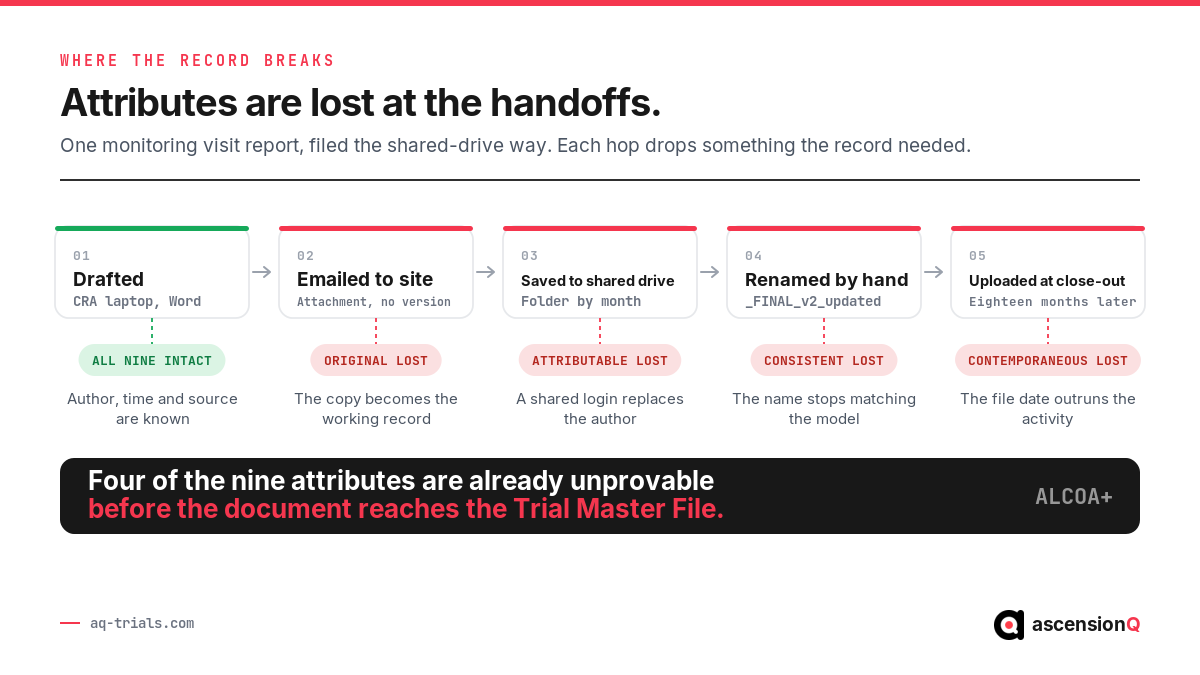
- Email transfer costs Original. The attachment becomes the working copy, and the source on the author’s machine is edited or deleted afterwards. The two are bridged only by a certified copy statement, and none was made.
- A shared login costs Attributable. The file properties record the department account that saved the document, so the audit trail names a folder in place of a person.
- A hand-typed file name costs Consistent. The name drifts from the study taxonomy, and the document stops matching the zone and section it belongs to.
- A late upload costs Contemporaneous. The system date records the day of filing, which sits far from the day of the activity, and the gap stays visible in the metadata.
- An overwrite costs Complete. The previous version disappears, so the file holds an answer stripped of the history that produced it.
Illustrative example. A monitoring visit takes place on 14 March. The CRA drafts the report that evening, emails it to the site on 16 March, and the site saves it to a shared folder under a departmental login. The document is renamed by hand in June and uploaded to the TMF at close-out in September the following year. The content is accurate throughout. Four attributes are already unprovable by the time it is filed.
The difference shows up as soon as an inspector asks a question about a specific document. A shared drive answers from file properties. A governed record answers from the record itself.
| Question at inspection | Shared-drive answer | Governed record answer |
| Who produced this document? | The account that last saved the file. | The named user who created it, holding the delegated task on that date. |
| When was it captured? | The date the file was last written to disk. | The capture timestamp, reported against the activity date as a filing lag. |
| What did this replace? | The previous file was overwritten. | Version 2.1, retained read only, with the reason for change. |
| Is this the source? | A copy of unclear provenance. | A certified copy statement naming the person who verified it. |
| Where does it belong? | A folder named by whoever filed it. | A zone and section drawn from the study taxonomy. |
The fix belongs at the point of capture. A document filed directly into the study structure keeps its author, its timestamp and its position in the taxonomy, and every later change is recorded against it. Gaps that stay open then surface through TMF completeness tracking during the study instead of at close-out.
Also Read: Placeholder Documents in a TMF: Why Gaps Need Owners, Not Just Flags
What Does ALCOA+ Mean for a Trial Master File?
ALCOA began as an FDA inspection shorthand in the early 1990s for the qualities of a reliable record: attributable, legible, contemporaneous, original and accurate. The four plus attributes, complete, consistent, enduring and available, were added later to emphasise expectations that data governance already carried. The MHRA’s GxP data integrity guidance sets out both sets and states that the expectations are the same whichever acronym a team uses. ICH-GCP E6(R3) carries the same expectation into clinical research and applies it to essential records irrespective of the media used.
The Trial Master File is the largest single population of GCP records in most studies. Each attribute translates into a specific, testable control over how a document is created, filed, changed and retrieved. The table below gives that translation for all nine.
| Attribute | What it requires of a TMF record | The control that evidences it |
| Attributable | The record shows who created it and who changed it. | Named user identity on the signature and on every audit trail entry, tied to the delegation of authority log. |
| Legible | The record stays readable for its whole life, by someone who was not there. | Rendered output, controlled file naming, expansion of local abbreviations at the point of filing. |
| Contemporaneous | The record is captured at the time of the activity it describes. | System timestamp applied at capture, held against the activity date and reported as a filing lag. |
| Original | The record is the source, or a certified copy of it. | Certified copy statement, checksum on the stored object, and retention of the source until verification. |
| Accurate | The record reflects what actually happened. | QC review recorded against the document with the reviewer name, date and outcome. |
| Complete | Every version, amendment and audit trail entry is retained. | Version history that keeps superseded copies read only, plus an expected-document list that shows what is still absent. |
| Consistent | Every document is filed the same way across the study and across sites. | One taxonomy for the study, aligned to the DIA TMF Reference Model. |
| Enduring | The record survives the retention period on readable media. | Archive format policy, planned media migration, and a retention clock that runs to the statutory end date. |
| Available | The record is produced within the time the requester allows. | Indexed retrieval with access rights defined for sponsor, CRO, monitor and site. |
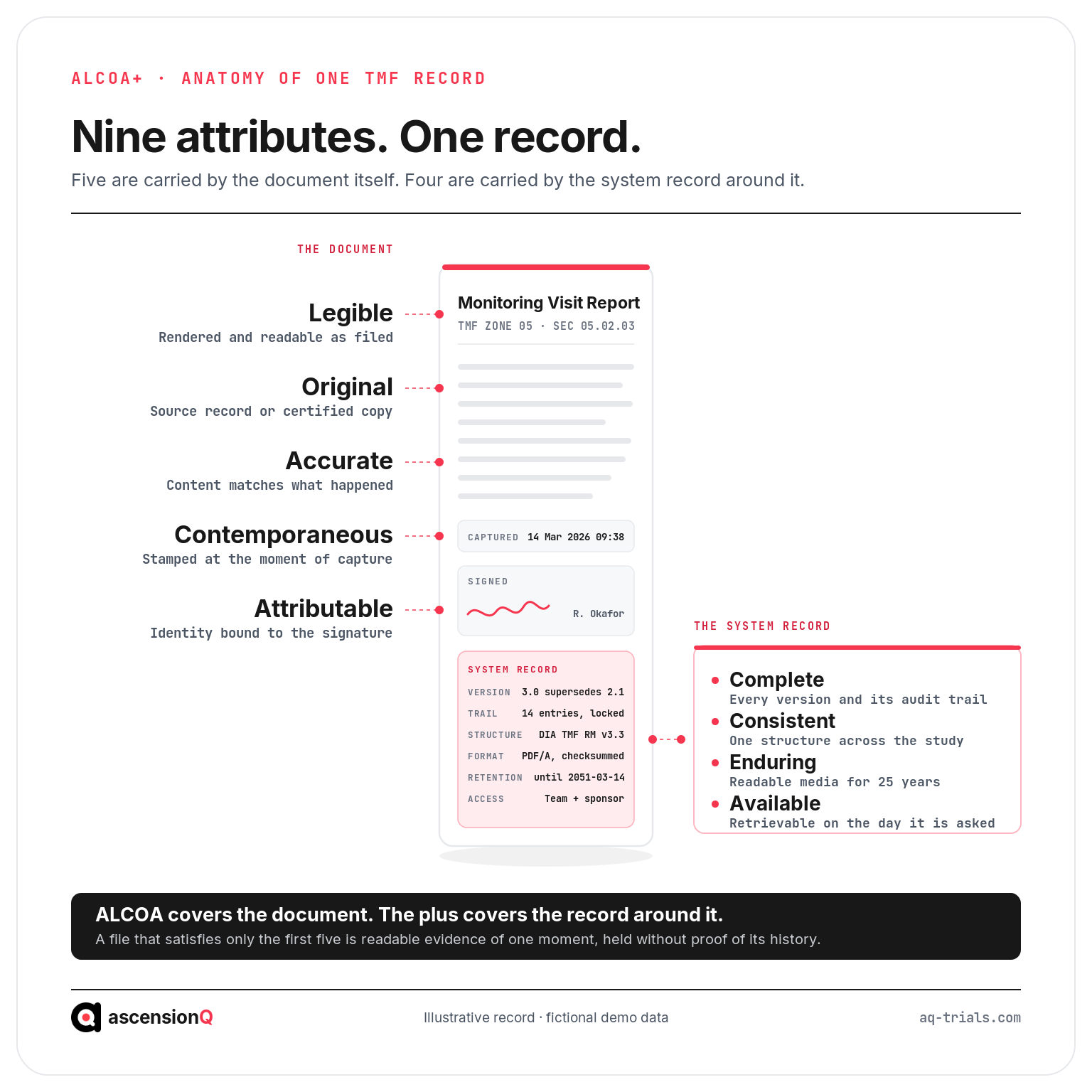
ALCOA covers the document. The plus covers the record around it.
A shared drive can satisfy the first five attributes. A monitoring visit report saved as a PDF on the day of the visit is legible, accurate, original, signed and contemporaneous. It carries the last four only where a governed system supplies them, because completeness, consistency, endurance and availability describe the filing system itself. This is the practical difference between an eTMF and a folder structure.
Why Do Four of the Nine Attributes Sit With the System?
An inspector who queries a document asks four questions in sequence: who changed it, when, what it replaced, and why. The document text answers none of them. The audit trail answers all four, which is why it carries Complete outright. Consistent, Enduring and Available sit with the taxonomy, the archive format policy and indexed retrieval, and the audit trail is what evidences each of them.
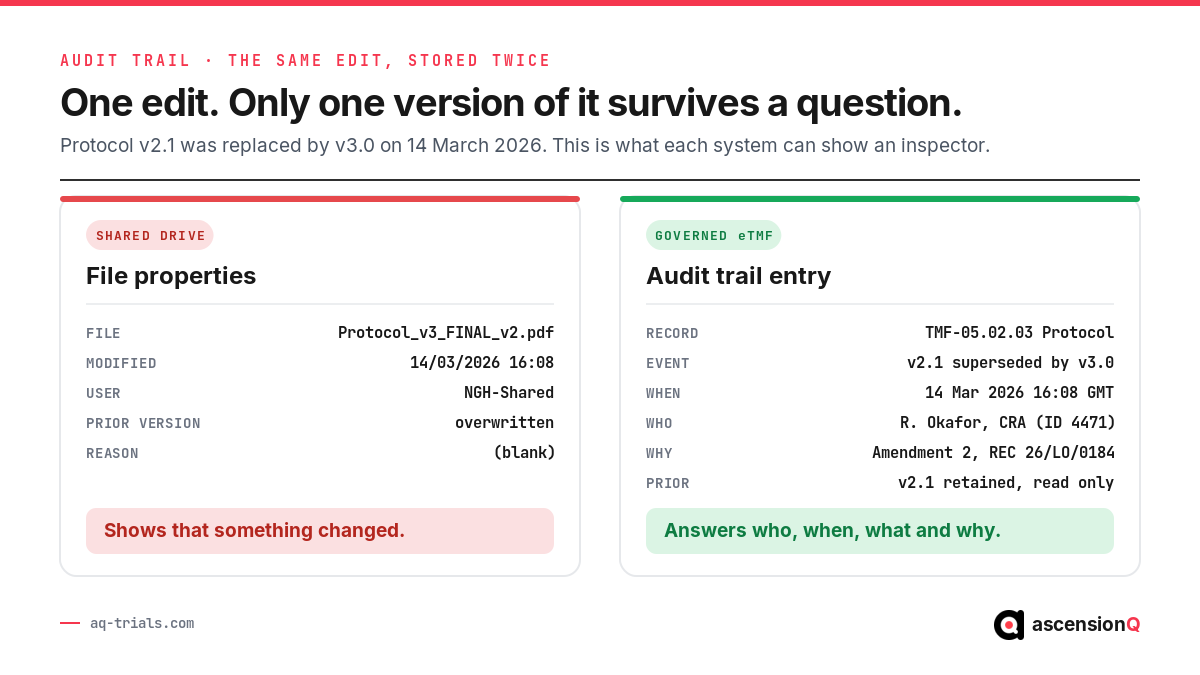
Both records above describe the same event. File properties confirm that something changed on a given date. An audit trail entry names the record, the actor, the reason and the superseded version, and it holds the earlier copy read only. A defensible entry carries these fields:
- Record identifier tied to the zone and section, so the entry survives a file rename and stays findable by its position in the model.
- Actor identity as a named user with a system ID, matched to the delegation log in force on the date of the change.
- Event type and timestamp in a stated time zone, applied by the system and closed to manual entry.
- Reason for change captured at the moment of the edit, referencing the amendment, approval or QC finding that prompted it.
- Superseded version retained read only, so a reviewer years later can reconstruct what the file said at any given date.
The audit trail itself needs protection. It should be generated by the system, closed to editing by every user including administrators, and held within the scope of computerised system validation. An audit trail that a user can amend carries the same evidential weight as the file properties beside it.
Review of the trail matters as much as its existence. E6(R3) expects sponsors to look at audit trail data as part of oversight, which means a scheduled review of edits to critical records, performed by someone independent of the person who made them.
How Does ALCOA+ Apply at Each Stage of the TMF Lifecycle?
Each stage of the lifecycle puts a different attribute under pressure. The table maps the stage to the attribute most at risk and to the control that holds it.
| Lifecycle stage | Attribute under pressure | Control that holds it |
| Creation | Attributable, Contemporaneous | Capture inside the study system, with identity and timestamp applied automatically. |
| Transfer into the TMF | Original | Certified copy process with a stated verification method, or direct filing that removes the transfer. |
| Filing and indexing | Consistent | One study taxonomy applied at upload, with the zone and section selected from a controlled list. |
| QC review | Accurate, Legible | Recorded review outcome, reviewer name and date, with rejects returned to a named owner. |
| Change and supersession | Complete | Version control that retains superseded copies and captures a reason for change. |
| Access during the study | Available | Role-based permissions across sponsor, CRO, monitor and site, with retrieval by index. |
| Archive and retention | Enduring, Available | Archive format policy, media migration plan, and a retention clock that runs to the statutory end date. |
The archive stage changed materially in 2026. UK trials with an application submitted on or after 28 April 2026 must retain the Trial Master File for 25 years after the conclusion of the trial, and trials applied for before that date stay on the previous five-year obligation. The MHRA sets both out in its archiving and retention guidance. Enduring becomes a media planning question at that horizon: a format readable today needs a documented migration path to stay readable in 2051.
The site half of the file follows the same rules. An electronic Investigator Site File holds the site-held portion of the same Reference Model, and an attribute lost at the site is lost from the study record as a whole.
Also Read: Investigational Product Storage Records: A Compliance Checklist
Which ALCOA+ Failures Do Inspectors Write Up?
TMF data integrity findings recur in a recognisable set. Each one traces back to a named attribute and to a control that would have prevented it.
- Documents filed months after the activity. Attribute: Contemporaneous. Control: a filing lag metric reviewed monthly, with a threshold that triggers escalation to the study team.
- Signatures without an identifiable signer. Attribute: Attributable. Control: signature records that resolve to a named user held on the delegation log at that date.
- Superseded versions overwritten. Attribute: Complete. Control: version history that keeps prior copies read only and records the reason for change.
- Scanned copies with no certified copy statement. Attribute: Original. Control: a documented certification process, applied by a named person against a stated verification method.
- The same document type filed in three different zones. Attribute: Consistent. Control: a single controlled taxonomy for the study, applied at the point of upload.
- Requested documents produced days later. Attribute: Available. Control: indexed retrieval tested by periodic sampling instead of assumed.
- Audit trails switched off or editable. Attribute: Complete. Control: validated configuration that keeps the trail on and closed to amendment, evidenced in the validation record.
Findings of this kind rarely arrive alone. The same attribute failing across several zones points at the filing route rather than at the documents, which makes it a process condition for CAPA management with a root cause and an effectiveness check behind it. Holding all nine attributes under routine sampling is what inspection readiness means at the level of the file.
Also Read: Drug Accountability Logs: What Auditors Actually Check
What Does an ALCOA+ TMF Check Look Like in Practice?
A data integrity check on the TMF is a sampling exercise against the nine attributes. A sample drawn across zones and sites exposes a systemic weakness that a deep review of one zone can miss. Twenty documents is a workable starting sample for most studies. Each step below produces a pass, a fail, or a gap with an owner and a date.
- Draw the sample across zones and sites. Include at least one document from each active site and one from every Reference Model zone in use.
- Compare activity date with filing date. Record the lag in days for each document and note the outliers by site and by document type.
- Resolve each signature to a person. Confirm the signer held the delegated task on the date of signature.
- Open the version history. Confirm superseded copies remain available and that each change carries a reason captured at the time.
- Test the certified copy trail. For every scanned document, find the certification statement and the person who made it.
- Check taxonomy placement. Confirm the document sits in the zone and section the model assigns to it.
- Time a retrieval. Ask a colleague to produce three named documents and record how long it takes.
- Sample the audit trail. Review the edits made to five critical records and confirm each has an actor, a timestamp and a reason.
Illustrative example. A sample of 20 documents at a hypothetical NHS trust returns a median filing lag of 4 days and two outliers at 91 and 140 days. Both outliers are monitoring visit reports from the same site. The finding is a process condition at that site, and the corrective action addresses the reporting route there.
The result belongs in a record, with a threshold agreed in advance. A filing lag that a study team has never defined has no failure point, so every result passes. A documented filing standard, evidenced through the quality management system, is what turns the check into a repeatable control.
How Does AQ eTMF Support ALCOA+ in the Trial Master File?
AQ eTMF is built around the DIA TMF Reference Model and holds documents inside a governed record instead of a folder tree. The mechanisms below map to the attributes directly.
- Capture inside the study structure applies the user identity and the system timestamp at upload, which keeps Attributable and Contemporaneous intact from the first version.
- A system-generated audit trail records every view, edit, approval and supersession with a reason, which gives Complete an evidence base an inspector can read without interpretation.
- One controlled taxonomy per study places each document in its zone and section at the point of filing, which holds Consistent across sites and across CRO partners.
- Version control with read-only supersession retains the prior copy and the change reason, so the history stays reconstructable years later.
- Expected-document lists and completeness scoring surface absences during the study, which turns a close-out reconstruction into a monthly review.
- Role-based access across sponsor, CRO, monitor and site supports Available, and connects to Digital DoA so signature authority stays current as staff change.
Accuracy stays a human judgement. AQ records that a QC review happened, who performed it and what the outcome was, and the reviewer decides whether the document reflects what actually occurred. AQ also holds no view on whether a document should exist at all: the expected-document list is configured by the study team, and an artefact left off that list stays invisible to the completeness score. Retention clocks run against the dates the team enters, and those dates remain a human responsibility.
An attribute lost in the site file or the pharmacy file is lost from the study record, which is why AQ runs the documentation modules on one connected platform with a shared identity model and a shared audit trail. The nine attributes then hold across the whole study record instead of one file at a time.
Interested in how this works on your studies? Book a live demo for a 30-minute product tour of AQ eTMF and the audit trail behind it.