A visit schedule becomes an eSource form when every row of the protocol’s schedule of events is built as a field on a validated electronic form, tested, and released before the visit it serves opens. The schedule decides which forms exist, which fields sit on each one, and the window the visit date is judged against. The form then records what actually happened, and the system stamps who entered it and when.
This guide is for UK research sites building or reviewing their own visit forms. It covers what the schedule of events specifies, how one row becomes one field, where the visit window lives, what the form does when a visit falls outside it, how an unscheduled visit is handled, and what an amendment does to a form already in use. The wider context sits in our complete guide to eSource in clinical trials for UK research sites.
The schedule of events is the specification. The form is the build.
What Does the Protocol Schedule of Events Specify?
The schedule of events is the grid in the protocol listing every visit down one axis and every assessment across the other. Sponsors also call it the schedule of activities. It fixes four things at once: which visits a participant attends, which assessments happen at each, the nominal study day of each visit, and the tolerance either side of that day.
That grid is the form builder’s only authority. The EMA guideline on computerised systems and electronic data in clinical trials sets the boundary at section 4.7: data acquisition tools should capture all information required by the protocol and not more.
| What the schedule fixes | What the form set must carry |
| The list of visits | One form for each visit, named exactly as the protocol names it |
| The assessments at each visit | The fields on that form, and no additional fields |
| The nominal study day of each visit | The target date the booking is made against |
| The tolerance around that day | The window the actual visit date is tested against |
| Activity outside the grid | A separate unscheduled visit form |
The mapping work belongs to the source data plan, and it happens first. Our guide to how to build a source data plan before the site initiation visit covers the six decisions that settle where each value originates. The form build starts once those decisions name the site’s own forms as the source.
How Does One Row of the Schedule Become One Form Field?
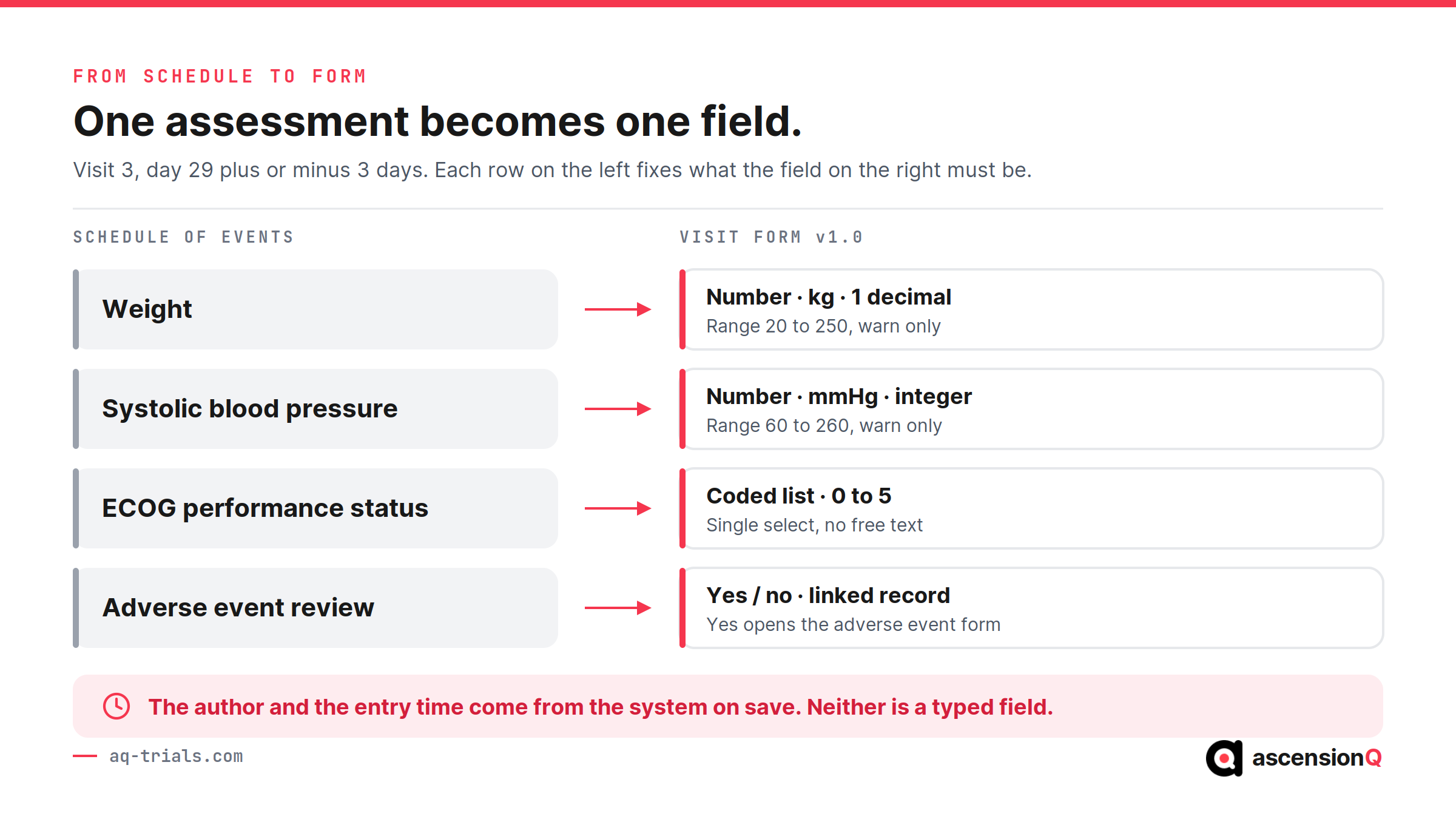
One assessment becomes one field, and six decisions turn that field into a defensible record. The sequence applies to every field on every visit form.
- Name the field as the protocol names the assessment. One term across the schedule, the form and the case report form removes a reconciliation step later.
- Fix the data type and the unit at the field. A weight stored as a number in kilograms can be range checked. Stored as free text, it cannot.
- Set the permitted range from the protocol. EMA section 6.1.4 asks that edit checks are relevant to the protocol, validated, controlled and documented.
- Warn rather than block where a real value can sit outside the range. A hard stop on a genuine extreme reading pushes it into a comments box, where no check reaches it.
- Derive what can be derived, and lock it. EMA section 4.7 allows a prepopulated field only where it is uneditable and derived from data already entered.
- Take the author and the time from the system. A typed date records what somebody believed. A system timestamp records when the entry was saved.
Every field built this way needs a line in the source data location log, so the form is declared as the original record for the values it holds.
Also Read: What Counts as Source Data in a Clinical Trial?
Where Does the Visit Window Live in an eSource Form?
The visit window lives in the booking rule, and it never becomes a field on the form. The schedule sets the window, the site’s clinical trial management system applies it when the appointment is made, and the form records the date the participant attended. Our guide to visit diaries and scheduling inside a CTMS covers the booking side of that rule.
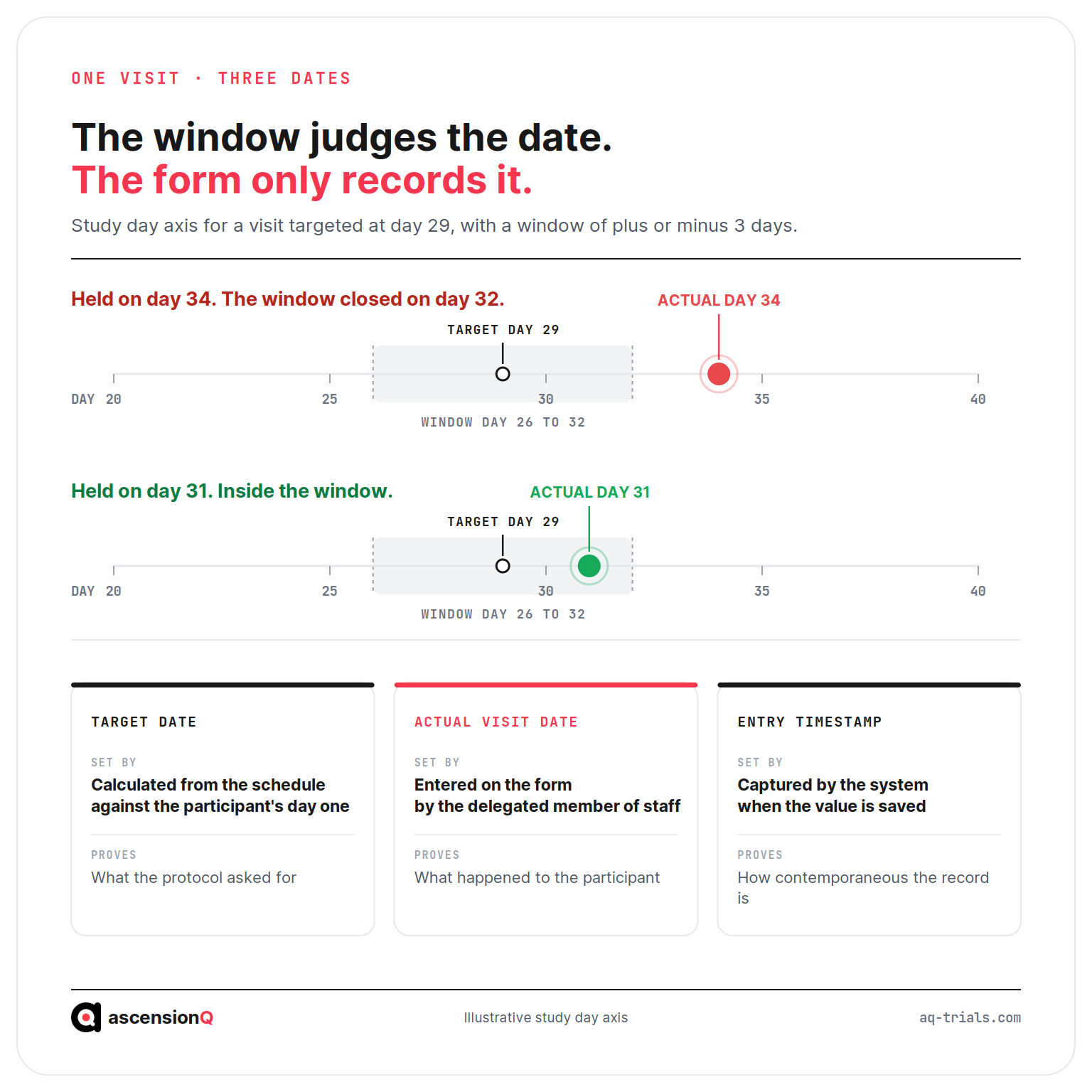
Three separate dates attach to one visit, and confusing any two of them is the most common defect in a site-built form.
| Date | Where it is set | What it proves |
| Target date | Calculated from the schedule against the participant’s day one | What the protocol asked for |
| Actual visit date | Entered on the form by the delegated member of staff | What happened to the participant |
| Entry timestamp | Captured by the system when the value is saved | How contemporaneous the record is |
The entry timestamp belongs to the system alone. EMA section 5.5 asks for accurate and unambiguous date and time information in coordinated universal time, captured automatically, with users unable to modify the date, time and time zone on the device used for entry. A form offering a typed field for the time of entry has given that proof away.
What Should the Form Do When a Visit Falls Outside Its Window?
The form should accept the true date, flag the breach at entry, and leave the record alone. A visit held on study day 34 against a window that closed on day 32 is a day 34 visit in every record the site holds.
- The date field accepts the real date, which keeps the source record accurate.
- The system raises the out-of-window flag as the date is saved, putting the finding in front of the research team that day.
- The reason attaches to the visit rather than to one field, so one explanation sits against one event.
- The investigator documents the deviation. ICH E6(R3) section 2.5.3 states that the investigator should document all protocol deviations, review them, and explain those deemed important.
- The sponsor’s own criteria decide the grade. Section 3.9.3 asks the sponsor to set trial-specific criteria for classifying a deviation as important, meaning one that may significantly affect the reliability of the data, or a participant’s rights, safety or wellbeing.
Whether a recurring breach also opens a corrective and preventive action is a separate judgement, made through the site’s CAPA process.
A form that quietly moves a date has changed what happened.
How Should an eSource Form Handle an Unscheduled Visit?
An unscheduled visit needs a form of its own, repeatable as many times as the study requires, carrying the reason it was held. Copying the nearest scheduled visit form asks staff to leave half the fields blank, and that record reads like a visit with missing data.
- One repeatable form, so four attendances outside the grid produce four complete records.
- A coded reason with a free-text line beneath it, so reasons can be counted and still read in full.
- Only the assessments the protocol permits outside the grid, plus those the reason requires.
- Its own sequence number, separate from the scheduled visit numbers, so visit 4 stays visit 4.
- A link to the adverse event record that prompted the visit, where one exists.
- A date tested against nothing, because an unscheduled visit has no window to breach.
A hypothetical example shows the separation working. A participant attends on study day 34 with a new rash. The research nurse opens the unscheduled visit form, selects “adverse event follow-up” as the reason, records vital signs and the investigator’s assessment, and links it to the adverse event record. The day 57 visit keeps its own target date and window.
What Happens to the Forms When the Protocol Is Amended?
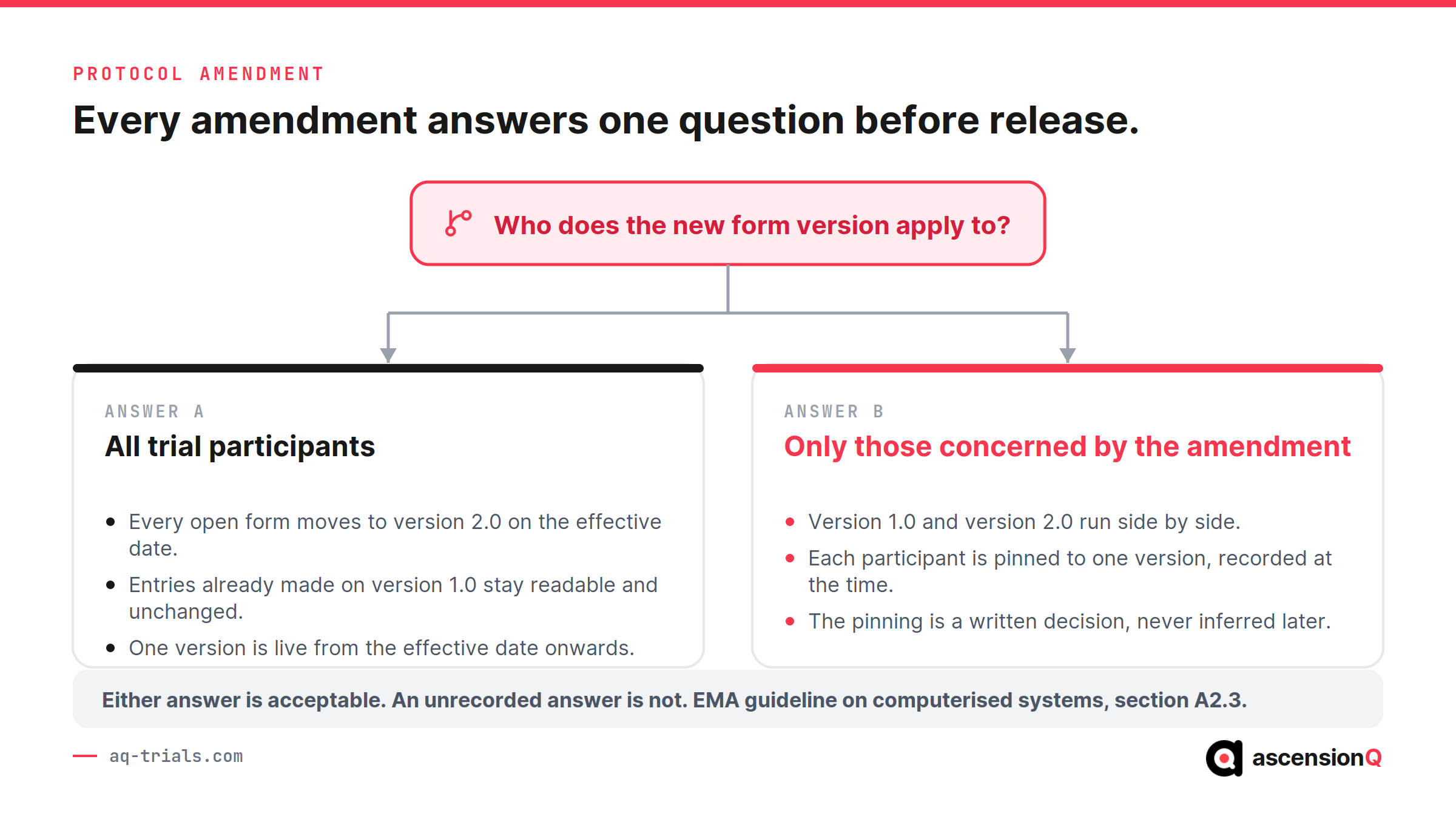
A released form changes by version, under change control, and the amendment decides who the new version applies to. EMA section A2.3 states that modifications introduced because of a protocol amendment require a determination of whether they apply to all trial participants or only to those concerned by it. It also asks that trial-specific configuration is quality controlled and tested before release for production.
| What the amendment changes | What happens to the form | What is filed |
| An assessment added at an existing visit | A new field, released as a new form version | Change record and test evidence |
| A visit added to the schedule | A new form, built and tested before the first participant reaches it | Form specification and UAT evidence |
| A window widened or narrowed | The booking rule changes and the form stays as it is | Updated schedule configuration |
| An assessment removed | The field is retired and historic entries stay readable | Retirement record and audit trail |
| A change applying to new participants only | Both versions stay live, each against its own cohort | The applicability decision, in writing |
The evidence for each version sits with the site’s validation file. Our guide to how to validate an eSource system before first patient in covers the vendor and site split.
Also Read: How to Correct an eSource Entry Without Breaking ALCOA+
What Goes Wrong Between the Schedule and the Form?
Five defects account for most of the distance between a correct schedule and a form that fails at inspection. Each stays visible in the record long after the visit it affected.
- The form carries a field the protocol never asked for, and the site collects data outside the consented scope.
- The form has no field for an assessment the protocol requires, so the value goes into a comments box and never reaches the case report form.
- The visit date defaults to today, so a form completed two days after the appointment records the wrong day of attendance.
- An unscheduled visit is recorded on a copy of the nearest scheduled form, and its blank fields read as missing data.
- A widened window is applied in the booking system and left unchanged in the schedule filed in the site file, so the two disagree at inspection.
Each of these is a build condition rather than a personal failing. A nurse writing an assessment into a comments box has found the only route the form left open. MHRA GXP data integrity guidance expects data to meet the ALCOA+ attributes across its whole lifecycle, and a form that forces a workaround puts completeness at risk on the day it goes live. Our guide to whether eSource meets ALCOA+ maps each attribute to its control.
Sites drawing protocol data from a trust electronic patient record face the same mapping question one layer up, compared in our guide to EHR-to-EDC integration versus site eSource.
Frequently Asked Questions
How does a visit schedule become an eSource form?
Every row of the protocol’s schedule of events is built as a field on a validated electronic form, tested, and released before the visit it serves opens.
Where does the visit window live in an eSource form?
In the booking rule, not on the form. The schedule sets the window, and the site’s clinical trial management system applies it when the appointment is made.
What should the form do when a visit falls outside its window?
Accept the true date, flag the breach at entry, and leave the record alone. A visit held on study day 34 against a window that closed on day 32 is a day 34 visit in every record the site holds.
A site running several studies carries a separate set of visit forms for each, and the effort concentrates in keeping every set aligned to the protocol version in force. Book a live demo to see the AQ platform today.