An electronic Investigator Site File (eISF) and a paper site file hold the same essential documents. They differ in one decisive way: a paper file can only be reviewed when a monitor is physically in the room, while an electronic Investigator Site File can be reviewed at any point in the study. That difference is the whole argument, because the state of a site file between monitoring visits is where inspection findings are made.
The monitoring visit gap is the period between one monitoring visit and the next, when a paper binder sits in a locked cabinet and nobody outside the site can see what it contains. Documents expire, versions supersede, and delegated staff change during that window. A paper file records none of this until a Clinical Research Associate (CRA) opens it weeks later. An eISF removes the gap by making the file continuously visible, version-controlled and access-logged. This guide explains how the gap forms, how the two formats compare, and what actually closes it.
Key takeaways
- The gap is a visibility problem, not a filing problem. Paper files are invisible between visits, so problems accumulate undetected until the next CRA review.
- An eISF makes the file continuously reviewable. Completeness, currency and access are visible in real time to the site, the sponsor and the monitor.
- Remote monitoring depends on the format. A paper file cannot support risk-based remote review; an eISF gives a CRA controlled, read-only access without losing the audit trail.
- Format alone changes nothing. A scanned PDF dropped into a shared drive is a paper binder with a screen. Structure, permissions and version control are what close the gap.
- Inspectors read the record, not the intent. The eISF leaves a dated trail of who did what and when, which is the evidence an MHRA inspection asks for.
What is the monitoring visit gap?
A monitor arrives at a research site for a routine visit. The Investigator Site File should hold a complete, current set of essential documents. Instead the binder has a superseded protocol still filed at the front, a delegation log with two entries added after the staff started work, and three CVs that expired four months ago. None of this was visible to the sponsor until the CRA turned the pages. The problems did not appear on the day of the visit. They accumulated quietly across the twelve weeks since the last one.
That accumulation is the monitoring visit gap. A paper file reports its own state to nobody. The site cannot see a developing problem across studies, the sponsor cannot see it at all, and the first opportunity to catch it is the next scheduled visit. For a busy NHS research site running several studies at once, that means multiple binders, each drifting out of currency on its own timeline, each invisible until someone opens it.
The gap is not caused by careless staff. It is caused by a record that cannot show its own condition.
How does a paper site file create the gap?
A paper Investigator Site File carries four structural limits. Each one turns a routine filing task into a source of latent risk that only surfaces at the next review.
- It is single-location. The file exists in one cabinet in one room. Review requires physical presence, so the sponsor sees the file only when a monitor travels to it.
- It has no version enforcement. A new protocol version can be filed on top of an old one without the old one being withdrawn. Both sit in the binder, and only a careful reader spots the duplicate.
- It records no access. There is no log of who opened the file, added a page, or removed one. The audit trail an inspector expects does not exist for a paper binder.
- It reports no completeness. A missing essential document leaves a silent gap. The file cannot flag its own absence, so a missing signature or an expired CV waits to be found by hand.
These limits compound in multi-site studies. A sponsor overseeing ten sites holds no live picture of any of them and must reconstruct the state of each file visit by visit. The essential documents themselves are well defined in ICH-GCP Chapter 8; the problem is not knowing what to file, but knowing, at any given moment, whether the file is actually complete.
Electronic Investigator Site File vs paper: how do they compare?
The two formats hold identical content and answer to the same regulations. They diverge on control. The table below sets a typical paper Investigator Site File against a controlled eISF across the dimensions a monitor and an inspector actually test.
| Aspect | Typical paper ISF | Controlled eISF |
| Review between visits | Not possible; requires physical presence | Continuous, from any authorised location |
| Version control | Manual; superseded copies can remain filed | Enforced; prior versions retained and marked superseded |
| Audit trail | None for the binder itself | Every upload, view and change time-stamped and attributed |
| Completeness visibility | Checked by hand, visit by visit | Surfaced in real time against an expected-document list |
| Remote monitoring | Not supported | Read-only, time-boxed CRA access |
| Archiving and retrieval | Physical storage; retrieval is slow | Retained and retrievable for the full retention period |
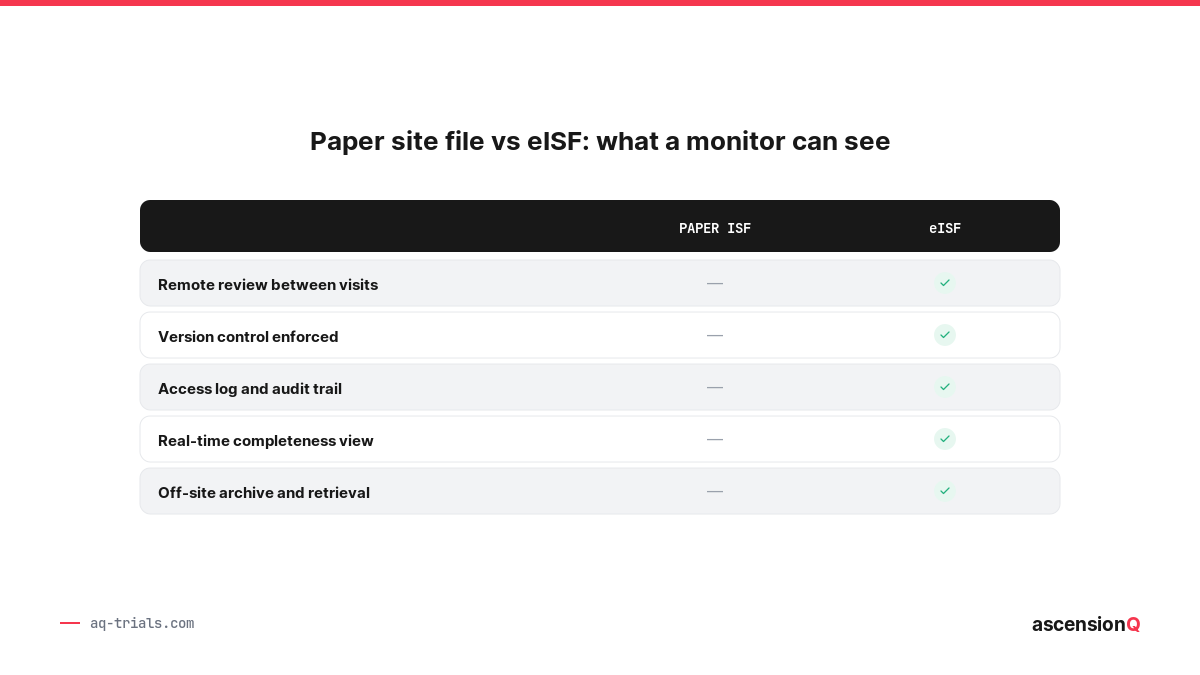
The contrast holds across every row for the same reason. A paper file is a passive container that reports nothing about itself. A controlled eISF is an active record that reports its own state on demand. That single property is what determines whether the monitoring visit gap exists.
Also Read: What is an eISF? Electronic Investigator Site File in clinical research.
How does an eISF close the monitoring visit gap?
An eISF closes the gap through four mechanisms. Each one converts a task that a paper file leaves silent into information the site and sponsor can act on before a visit, not after.
Real-time completeness
The eISF holds an expected-document list for each study and status, so a missing or expired document surfaces the moment it falls due rather than at the next visit. The site sees the gap while there is still time to fix it. This is the same completeness logic that RAG scoring applies to the Trial Master File, applied at site level.
Enforced version control
A new document version supersedes the old one automatically, and the prior version is retained and marked, not deleted. The current document is always the one on display, which removes the risk of a monitor or a staff member working from a withdrawn protocol.
A complete audit trail
Every action against the file is time-stamped and attributed to a named user. The record shows who uploaded a document, who viewed it, and when, which gives the site the attributable, contemporaneous evidence that MHRA good clinical practice guidance expects of an electronic record.
Controlled remote access
A CRA is granted a defined, read-only scope for a defined period. The monitor reviews the file remotely between on-site visits, and the eISF logs every access as part of the same audit trail. Continuous review replaces the periodic snapshot, so the gap never opens in the first place.
The site file stops being a thing a monitor visits and becomes a thing a monitor watches.
What does remote monitoring need from the site file?
ICH-GCP E6(R3) took effect in the UK on 28 April 2026. It sets a risk-based and quality-by-design expectation for trial oversight. It supports centralised and remote monitoring where the risk assessment justifies them, rather than assuming every check happens on site. A site file has to meet several conditions for a CRA to review it remotely with confidence.
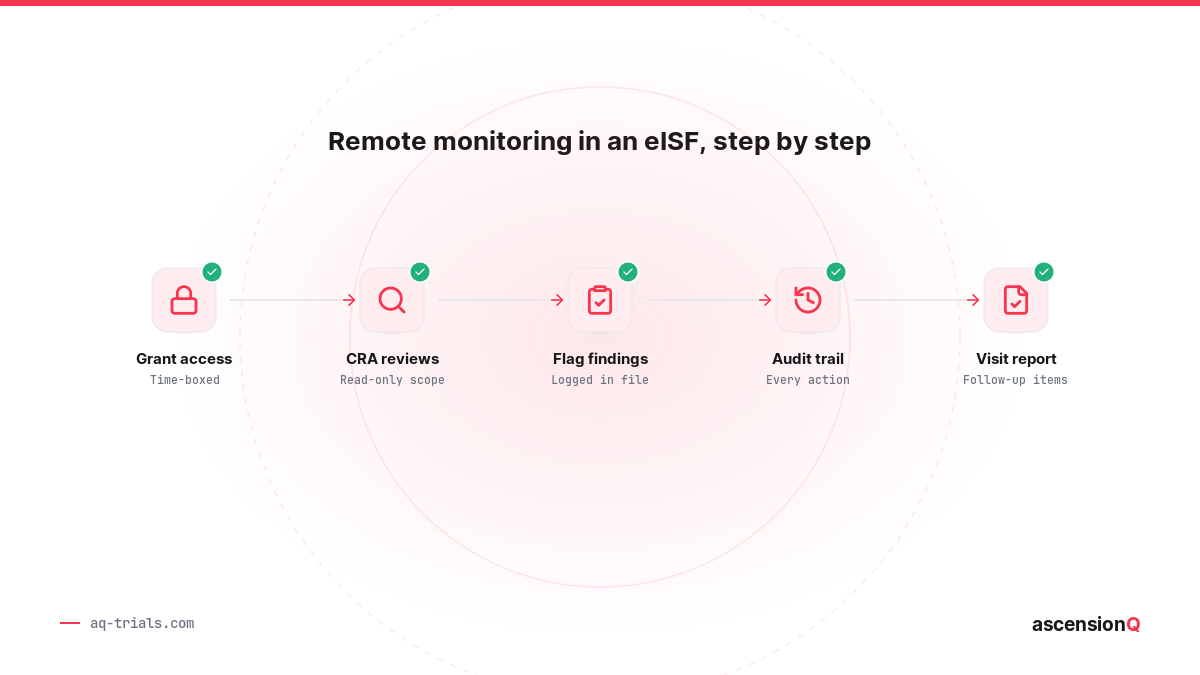
- Scoped permissions. The monitor sees the documents in scope and nothing beyond them, with access granted for a bounded period. Mechanism to outcome: a read-only scope lets the CRA review without altering the record.
- A logged access trail. Each remote view is recorded against the named monitor. Mechanism to outcome: the site can evidence exactly what was reviewed and when, which stands up at inspection.
- Current, controlled documents. The file presents the live version of every document. Mechanism to outcome: the monitor reviews the truth of the file, not a stale copy.
- Surfaced gaps. Missing or expired items are flagged before the review. Mechanism to outcome: the visit addresses real issues instead of discovering basic filing faults.
Remote access speeds review, but it also raises the standard of the record. A file reviewed continuously has nowhere to hide a lapse, which is precisely why continuous review is a stronger control than a scheduled visit. For a fuller picture of how site files sit inside a state of continuous readiness, see our guide to inspection readiness in clinical trials.
Does going digital fix bad filing on its own?
Digitising a site file changes nothing by itself. A scanned PDF dropped into a shared drive is a paper binder with a screen in front of it. It carries the same limits: no version enforcement, no completeness view, no meaningful audit trail. Format is the surface. Structure is the control.
The properties that close the monitoring visit gap come from how the system governs the file, not from the file being electronic. An eISF earns its value through four controls working together.
- An expected-document model that knows what should be present and flags what is not.
- Version control that retains history and always presents the current document.
- Permissions and an audit trail that record every action against a named user.
- Retention and retrieval that hold the record readable for its full archive period.
A site that moves to an electronic file without these controls keeps the gap and adds a screen. The same discipline applies to pharmacy records, which is why the pharmacy site file stays a separate, separately controlled record. Our guide on why pharmacy documentation needs its own file explains that boundary.
What are the risks of staying on paper?
A paper Investigator Site File carries a set of risks that grow with study count and study duration. Each maps to a recurring theme in MHRA inspection findings.
- Latent non-compliance. Expired documents and missing signatures sit undetected until a visit or an inspection surfaces them.
- Superseded documents in use. Staff work from an out-of-date protocol or consent form because the current version was filed without withdrawing the old one.
- Delegation drift. The delegation log falls out of step with who is actually performing tasks, a frequent write-up at inspection.
- No monitoring between visits. The sponsor holds no live oversight of the site, which conflicts with the risk-based oversight E6(R3) expects.
- Slow retrieval at archive. A physical file is slow to search and vulnerable to loss or damage across a long retention period.
These themes are the same ones inspectors write up most often. Our analysis of the most common MHRA GCP inspection findings shows how documentation control sits underneath the majority of them.
Also Read: The Investigator Site File essential documents checklist (ICH-GCP Chapter 8).
How do I move our investigator site file from paper to electronic for an MHRA inspection?
You move a paper investigator site file to electronic by agreeing the change with the sponsor, fixing a single cut-over date, certifying every scan that stands in for an original, and declaring in one file index which sections are paper and which are electronic. The paper originals stay until the sponsor agrees in writing that they can go.
An inspector does not ask whether the file is electronic. An inspector asks whether the record can be trusted and reconstructed. The migration itself has to leave a record that answers that. Eight steps keep it defensible.
- Agree the change with the sponsor in writing. The sponsor confirms the system is acceptable for the study, and the agreement is filed. A unilateral site decision is the first thing a finding attaches to.
- Get the validation evidence. The site holds the validation pack for the release in use, and the supplier states how each later release is covered.
- Fix one cut-over date per study. Dual running produces two versions of the truth and doubles the filing. One date, applied to the whole study file, is cleaner to explain.
- Build the structure before moving anything. Set the expected-document list, the folder structure and the roles, and map the roles to the current delegation log.
- Scan and certify. A named person verifies each scan against the original and certifies it. The certifier, the role and the date are recorded.
- Keep the paper originals. Nothing is destroyed without the sponsor agreeing in writing and a documented review of what the copies cover.
- Declare the hybrid in a file index. The index states, section by section, whether the record sits on paper, electronically, or in both places.
- Update the site documents and hand over to the monitor. Revise the SOP governing the file, the monitoring arrangements and the archiving arrangements, then grant the monitor read-only access and record the first remote review.
A migration is judged by its record, not by its software.
Certified copy checklist
A scan replaces an original only once it is a certified copy. MHRA guidance on archiving asks sites to retain original records or certified true copies, and to validate the scanning process. The table below is the check to run on each batch before the paper leaves the desk.
| Check | What good looks like | Where it is recorded |
| Completeness | Every page of the original appears in the copy, including reverse sides, annotations and attachments | Certification record for the batch |
| Legibility | Handwriting, signatures, dates and stamps are readable at the resolution used | Certification record for the batch |
| Verification | A named person has compared the copy against the original | Certifier name, role and date |
| Certification statement | The copy is declared a certified true copy of the original | On the record itself or in the file index |
| Process validation | The scanning process has been validated for authenticity and completeness | Site SOP and validation record |
| Metadata | Study, date of scanning and the process or device used are captured | eISF audit trail |
| Retention | The copy stays readable and retrievable for the full retention period | Archiving arrangement for the study |
Three migration rules for NHS organisations, covering retention under regulation 31A, what turns a scan into a certified copy, and access that follows the delegation log, are set out in our guide to eISF for NHS trusts. The test for when a scan may stand in for an original is covered in Certified Copies: When Can a Scanned Record Replace the Original Source?
In AQ eISF, the expected-document list and the audit trail start from the cut-over date, so the first inspection-facing question about a migration, what the file held and when, is answered from the system rather than from memory.
Frequently Asked Questions
How do I move our investigator site file from paper to electronic for an MHRA inspection?
Agree the change with the sponsor in writing, hold the validation evidence for the system, fix one cut-over date for the study, and build the folder structure and roles before moving any record. Certify every scan that stands in for an original, keep the paper originals, and declare in a single file index which sections are paper and which are electronic.
Can we destroy the paper file once it has been scanned?
Not on the site’s own decision. The sponsor has to agree in writing, the copies have to be certified, and the scanning process has to be validated. Some records, including wet-ink consent forms, are often kept on paper for the whole retention period by sponsor or institutional policy.
What is a certified copy?
A certified copy is a copy that has been verified as holding the same information as the original, including any handwritten annotation or signature, and certified as such by a named person. The certification is itself a record. An uncertified scan is a convenience copy, not a replacement.
Do we have to migrate the whole file at once?
No. A hybrid file is acceptable as long as it is declared. The file index has to state where each section is held, and each record needs one authoritative location. An undeclared hybrid is what attracts a finding, because nobody can say which copy is the record.
Does the MHRA approve an electronic site file before you use it?
No. The MHRA does not approve or certify individual systems. It inspects how the site uses the system, and it expects validation evidence, an audit trail, access control that matches the delegation log, and direct access to the live file at inspection.
What does an inspector ask about a migration?
Expect questions on the cut-over date, who authorised the change, how the copies were certified, where the paper originals are now, and how the file index shows which sections sit where. The answers should come from filed records rather than recollection.
Can a monitor review the file remotely during the migration?
Yes, once the structure is built and the roles are set. Grant a scoped, read-only, time-boxed view and let the access be logged. A remote review part-way through a migration is also a useful check on whether the index matches the file.
How AQ eISF supports closing the monitoring visit gap
The AQ electronic Investigator Site File gives a site the four controls the gap depends on, in one place. It holds an expected-document list per study and surfaces missing or expired items in real time, so the site sees a developing gap while there is time to close it. It enforces version control, retaining superseded documents and presenting the current one. It records every upload, view and change against a named user and a time-stamp. It grants monitors a scoped, read-only, time-boxed view for remote review, and it logs each access as part of the same trail.
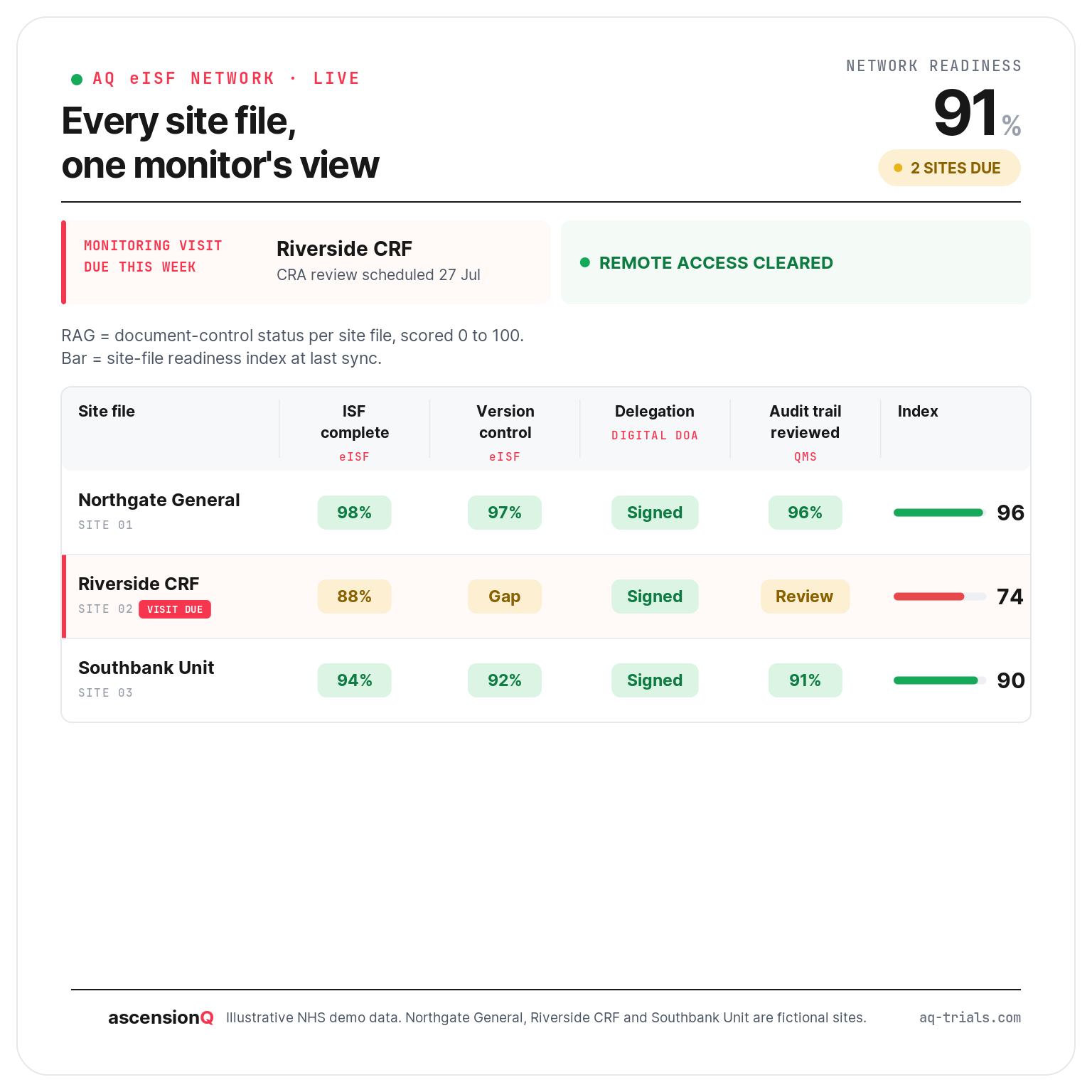
AQ structures and surfaces the record. It does not file documents for the site or make the professional judgement of what belongs in the file. Those remain with the research team. What the system removes is the blind window between visits, by making the state of the site file continuously visible to the people accountable for it. Because AQ eISF connects to the wider platform, a delegation change or a quality event links across the record rather than sitting in an isolated binder.
To see how AQ eISF closes the monitoring visit gap for your studies, book a 30-minute product tour.