The Central Portfolio Management System (CPMS) is the national system that holds every study on the NIHR Research Delivery Network (RDN) Portfolio. A Local Portfolio Management System (LPMS) is the system an NHS organisation uses to manage its own research delivery, and EDGE is the most widely used. Sites record study, site and participant data in their LPMS. That data transfers to CPMS through a digital interface, and core study details transfer back down.
The entry itself is ordinary administrative work. The consequences are considerable. CPMS data allocates network funding, triggers Excess Treatment Cost payments, sets the national performance figures a trust is published against, and feeds the feasibility intelligence sponsors read when they select sites. This guide covers the two systems and how they exchange data, the three record levels and who owns each, the site milestone fields and what makes each one due, the NIHR definition of recruitment, the timing rules, site code selection, and why confirmation queries appear.
Key Takeaways
- CPMS holds the national portfolio record. The LPMS holds the local one. Research activity flows up, and core study details flow down each night.
- Three record levels exist: project, project site and participant. A site owns the project site and participant levels.
- Ownership of the site record passes from the research management function to the delivery team once capacity and capability is confirmed.
- Recruitment means a participant who consented and is taking part, counted once, recorded against the site of consent.
- Research activity belongs in the LPMS in real time, with a weekly minimum. Studies that upload a spreadsheet complete it at the start of each calendar month.
- The CPMS study ID must be entered when a local record is created early. A missing ID makes CPMS build a duplicate, and the two records then exchange nothing.
What Are CPMS and LPMS, and How Do They Connect?
CPMS is a cloud-based system managed by the NIHR RDN Coordinating Centre on behalf of the Department of Health and Social Care as data controller. It gives network staff visibility of a study across its whole life cycle, and it supplies the Open Data Platform that sponsors, trusts and networks report from. An LPMS serves a Regional Research Delivery Network and its partner organisations. The two systems hold overlapping facts about the same study, and the interface exists to keep those facts identical.
| Aspect | CPMS (national) | LPMS (local) |
| Scope | Every study on the RDN Portfolio across the UK | The studies one organisation or region takes part in |
| Owner | NIHR RDN Coordinating Centre, for DHSC | The Regional Research Delivery Network and its partner organisations |
| Populated by | Sponsors, lead sites and RDN staff | The site research management function and the study delivery teams |
| Primary use | Performance management, funding allocation, national reporting | Day to day delivery, staffing, finance and recruitment records |
| Sends | Core study details, refreshed nightly | Research activity lines, milestone dates and site status |
Three rules govern what moves between them.
- Research activity travels up. Participant lines, site milestone dates and site status leave the LPMS for CPMS, which removes the separate spreadsheet upload and the cross-checking that went with it.
- Core study details travel down. Short and full title, status, phase, planned dates, disease area, CTIMP flag, IRAS number, REC number and funder update from CPMS overnight, so a site that edits those fields locally sees the edit overwritten.
- Documents stay where they belong. An LPMS records dates and status. Protocol versions, agreements and approvals live in the investigator site file and the trial master file under their own version control.
Example: a trust creates a local record for a study at expression of interest, before the RDN eligibility decision. The NIHR Portfolio ID field stays blank. Two months later the study is deemed eligible, CPMS creates its own record, and the trust discovers it has been recording recruitment against a record that CPMS cannot see.
Which Record Level Does a Site Own?
An LPMS separates a study into three levels, and confusion between them is the most common reason a field sits empty. The project level describes the study. The project site level describes this organisation’s delivery of it. The participant level holds the research activity. A site owns the lower two and reads the top one.
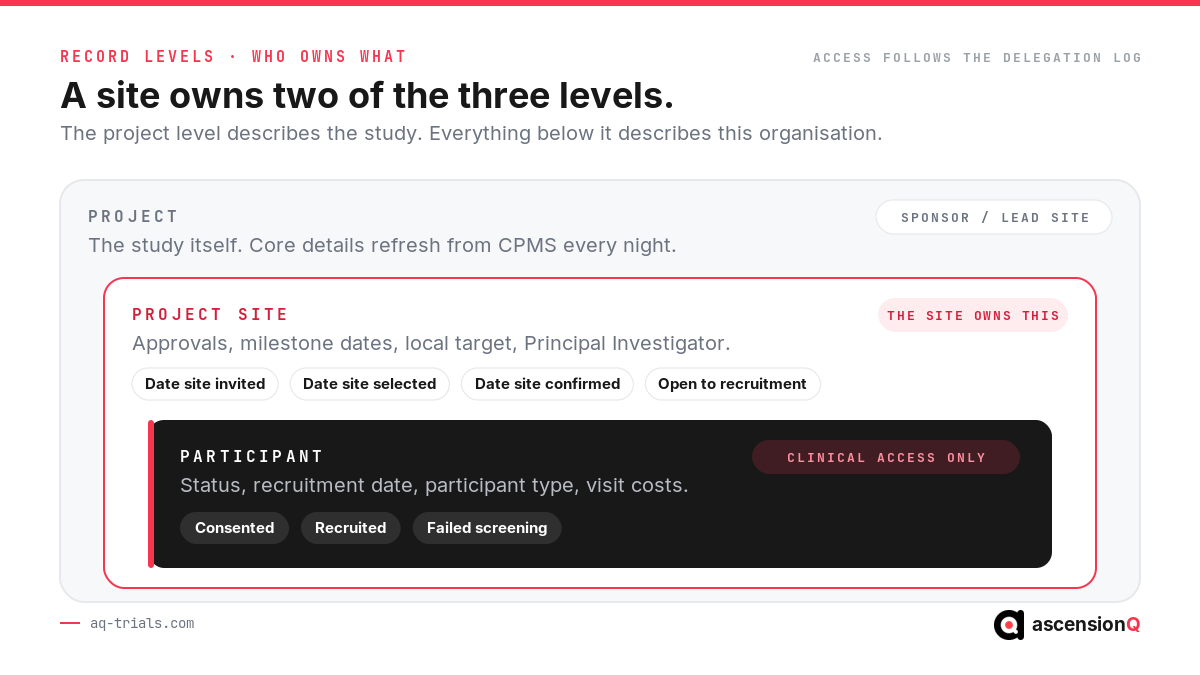
| Level | Representative fields | Who maintains it at a site |
| Project | Title, status, phase, planned start and end, disease area, CTIMP flag, sponsor, funder, IRAS and REC numbers, whole-study recruitment target | The sponsor or lead site. For portfolio studies these fields refresh from CPMS, so local edits do not hold. |
| Project site | Site status, site type, site number, Principal Investigator, local recruitment target, approval dates, milestone dates, participant identifier type | The research management function during set-up, then the study delivery team. |
| Participant | Participant status, recruitment date, participant type, visit costs | Delegated members of the delivery team holding clinical access. |
Access rights follow the same split. Basic access reads a level. Manage access edits it and assigns rights to others. Clinical access is the only right that reaches participant records, and it should map to the study delegation log rather than to a job title. A coordinator who leaves the study keeps LPMS access until someone removes it.
Also Read: Capacity and Capability Confirmation: Timelines and Delays
What Study Milestone Data Must a Site Enter?
The site record carries two groups of dates. Approval dates describe how the site came to take part. Milestone dates describe delivery. Each field has an event that makes it due, and the discipline that keeps the record accurate is entry at that event rather than at the end of the month.
| Field | What makes it due | Who enters it |
| Capacity and capability assessment required | Receipt of the local information pack | Research management |
| Date site invited | The sponsor invites the organisation to take part | Research management |
| Date site selected | The sponsor selects the organisation | Research management |
| Date site confirmed by sponsor | The sponsor notifies the organisation of its decision | Research management |
| Date site confirmed | The last contract signature across every organisation involved | Research management |
| Non-confirmation status | The organisation declines, withdraws or gives no response | Research management |
| Site initiation visit date | The visit takes place | Delivery team |
| Open to recruitment | The site is able to recruit its first participant | Delivery team, with research management |
| Recruitment end date, planned and actual | The protocol window, then the actual last recruit | Delivery team |
| Closing date, planned and actual | Scheduled closure, then actual closure at the site | Delivery team |
Two of these carry national weight beyond the local record. Date Site Confirmed ends the site set-up metric in UK clinical research delivery reporting from January 2026, and Open to Recruitment, recorded as Date Site Ready to Start, opens the delivery half. The UK clinical research delivery KPI methodology builds its published figures from these fields, which is why a date typed from memory in week six becomes a performance figure in a national release.
The site record also needs its descriptive fields complete before recruitment starts: site type, site number, Principal Investigator, local recruitment target, participant identifier type and the participant data collection plan. An empty local target makes a site invisible in delivery-to-time-and-target reporting even while it recruits well. The approval dates align with the stages the HRA guidance on NHS site set-up in England describes, so a site recording them accurately is describing work it already did.
What Counts as Recruitment in CPMS?
The NIHR definition is narrow and precise. Recruitment is the enrolment of an individual meeting the inclusion criteria into a research study. A participant counts once they have both provided informed consent and are taking part, meaning they count towards the sample size set out in the protocol. CPMS receives three statuses: Consented, Recruited and Failed Screening.
| Scenario | Treatment in CPMS |
| A participant consents twice in the same study | Counted once. A repeated recruitment event within one study adds no further line. |
| A participant withdraws after consent | The line remains, provided they met eligibility, passed screening and the investigator genuinely intended to include them. |
| A completed questionnaire is returned | Counted as implied consent. Returned questionnaires count, not the number sent out. |
| Consent given by a legal representative or consultee | A line is uploaded. The participant type describes the person taking part, not the person consenting. |
| Ethically approved consent waiver | A line may be uploaded, with an alternative activity date such as first presentation to the study team. |
| A participant consented outside the UK | No line of data. The number belongs in the non-UK recruitment field on the study record. |
| A sub-study under the same ethics approval | No separate reporting. Recruitment is already captured under the main study. |
Participant data leaving the LPMS carries no identifiers. The unique participant ID must avoid NHS numbers, hospital numbers and any other value that could identify a person, and only total participant numbers reach publication. A site that uses a hospital number as its LPMS participant identifier has created an information governance problem in a system designed to prevent one.
When Must Each Entry Be Made?
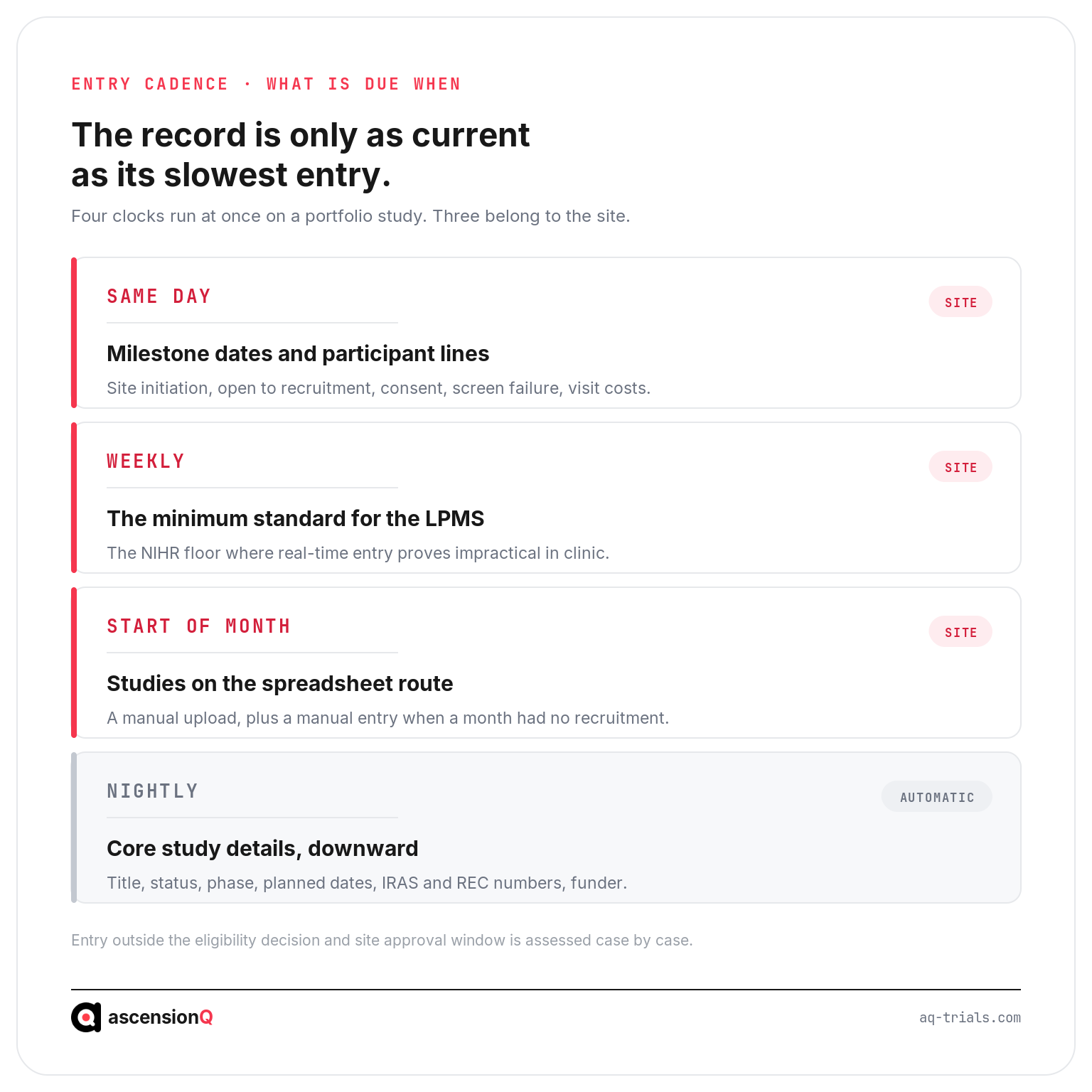
Timeliness has an explicit standard. The NIHR recruitment policy asks local teams to record research activity in the LPMS as soon as possible after the event, and it sets a weekly floor where real-time entry proves impractical. Studies outside the LPMS route upload a spreadsheet at the start of each calendar month.
Two conditions open the window for recruitment data. The study must have reached its eligibility decision in CPMS, and capacity and capability approval must be in place for the site. Retrospective uploads outside that window go to the RDN research delivery team for case by case assessment.
- Milestone dates belong in the record on the day the event happens, because the person who knows the date is the person who was there.
- Participant lines follow the visit, which keeps recruitment figures usable for weekly delivery conversations rather than monthly reconstruction.
- Visit costs follow the participant line, since invoicing runs to the timeframe in the site agreement and reconstructed costs slip past it.
- A month with no recruitment still reports. Studies fed from an LPMS report the absence automatically. Studies on the spreadsheet route log it manually through the CPMS process.
Data entered on the day is a record. Data entered at month end is a recollection.
Also Read: Recruitment Visibility: How a CTMS Tracks Enrolment in Real Time
Which Site Code Should Recruitment Be Recorded Against?
The rule is short. The site where the participant gave consent is the recruitment site, and it is recorded using the site-specific Organisation Data Service (ODS) code rather than the parent organisation code. Everything else follows from that rule.
- Use the main hospital or organisation code, since ward-level and department-level codes complicate recruitment reports without adding anything CPMS needs.
- Record site activity type accurately. CPMS distinguishes Participant Identification Site, Recruitment Site, Shared Care Site and Follow Up Site, and each describes a different contribution.
- Never record recruitment against a Patient Identification Centre. CPMS data has triggered Excess Treatment Cost payments since October 2018, so a misplaced line sends money to the wrong organisation.
- Check codes after a trust merger. Site codes close when their parent organisation closes, uploads validate against site start and end dates, and activity recorded against a closed code fails to load.
- Map online consent geographically. Studies consenting participants online allocate activity to the region rather than to the lead organisation, which keeps the recorded reach of the study honest.
Sites of consent that resist coding have their own conventions. Home visits, ambulances and confidential settings map to the code for the organisation whose staff took consent. A site with genuine doubt should ask its lead network rather than guess, because a wrong code is harder to unpick after a funding allocation has run on it.
Why Do CPMS Confirmation Queries Appear?
A confirmation query is a disagreement between two records of the same fact. CPMS compares the recruitment a site has entered in its LPMS against the recruitment the sponsor expects at that site. Matching figures confirm the accrual. Different figures raise a query that someone has to resolve.
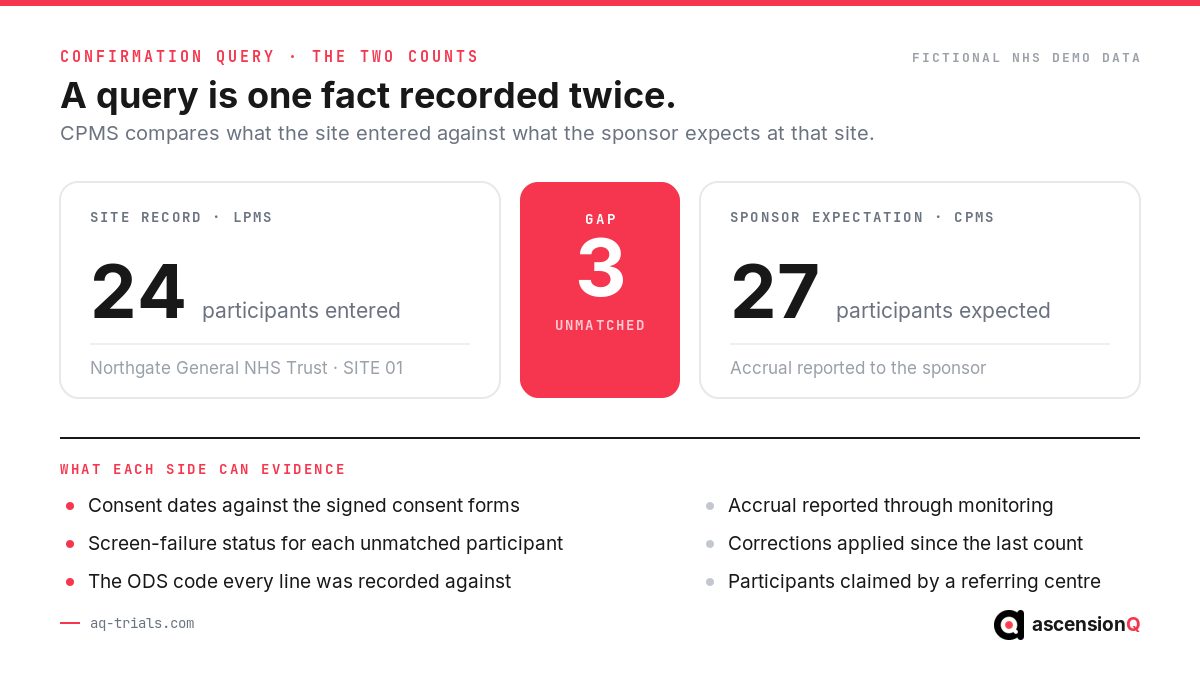
| Cause | What it looks like | Where the fix sits |
| Entry lag at the site | The site is behind the sponsor because visits happened and lines did not | Delivery team, by entering the outstanding participants |
| Screen failures counted as recruits | The site is ahead of the sponsor | Delivery team, by correcting participant status |
| Wrong site code | Recruitment appears at a sister site or a parent organisation | Research management, with the lead network |
| Consent taken elsewhere | A referring centre claims a participant consented at the treating site | Both sites, by applying the site-of-consent rule |
| Sponsor expectation out of date | The sponsor figure predates a withdrawal or a correction | Sponsor, once the site evidences its own count |
Queries have a natural owner at a site. The research management function monitors and triages them. The delivery team investigates and acts, because only the delivery team knows what happened in clinic. Sites that leave queries open accumulate a backlog that eventually demands a reconciliation exercise, and reconciliation exercises consume the delivery time the query was reporting on.
What Does Late or Wrong Entry Cost a Site?
Portfolio data entry looks like administration and behaves like finance. Five consequences follow directly from the record.
- Network funding follows recorded activity, so activity recorded at the wrong site moves infrastructure support to the wrong place.
- Excess Treatment Cost payments follow the recruitment record, which turns a coding error into a payment to another organisation.
- Published performance uses the milestone dates a site entered, and the UK delivery KPIs report those dates without adjusting for how carefully they were captured.
- Sponsors read the same data at feasibility, so a trust with thin recruitment history competes for the next study against trusts whose figures are complete.
- Local management loses its own picture, because a research office working from a month-old record cannot tell which of its studies are behind while there is still time to act.
The pattern behind all five is the same one that produces late set-up. Sites that reconstruct records at reporting time report accurately about a period they can no longer influence, a failure described in why NHS sites miss the 90-day set-up target and in site capacity planning without a CTMS.
Also Read: NHS R&D: Governing Site Files Across a Trust’s Studies
How Does AQ Support Portfolio Data Currency?
The obstacle to timely portfolio entry is rarely willingness. A research nurse finishes a visit in clinic, and the LPMS sits on a different screen in a different office. The AQ platform holds the operational record where the work happens, so the facts a site owes CPMS exist before anyone opens the LPMS.
- The CTMS records each set-up milestone with its date and owner, which makes Date Site Confirmed and Open to Recruitment a captured fact rather than a recalled one.
- Recruitment tracking holds consent, enrolment and screen-failure status against the participant as the visit happens, which is the same distinction CPMS asks for.
- Visit scheduling links each participant to the protocol window, so a completed visit prompts its own record.
- Portfolio views show every study a trust is running at once, which gives an NHS R&D office the mid-month picture that monthly reporting cannot.
- The essential documents behind each milestone stay in the site file, so the date and its evidence agree when a monitor or an inspector asks.
The limits matter as much as the capability.
- AQ is not an LPMS and does not replace EDGE or any other regional system.
- AQ does not submit data to CPMS. Sites enter research activity through their own LPMS or through the CPMS upload route.
- AQ does not resolve confirmation queries. It supplies the site-side evidence a team needs to answer one.
The value sits in the gap between the event and the entry. A team whose operational record is already current spends minutes on portfolio data instead of days, and answers a query from evidence rather than memory. Book a live demo to see how AQ keeps milestone and recruitment data current from the day it happens.
Frequently Asked Questions
What is the difference between CPMS and LPMS?
CPMS is the single national system holding the NIHR RDN Portfolio, managed by the RDN Coordinating Centre for the Department of Health and Social Care. An LPMS is a regional system used by a Research Delivery Network and its partner organisations to manage local delivery. Sites work in the LPMS, and the interface carries their data to CPMS.
How often should recruitment data be uploaded to CPMS?
Research activity should reach the LPMS as soon as possible after the event, with a minimum expectation of weekly updates. Studies that upload a spreadsheet directly to CPMS complete it at the start of each calendar month. Sites fed by an LPMS also report months with no recruitment automatically.
Which site should recruitment be recorded against?
The site where the participant gave consent, recorded with that site’s own ODS code. Parent organisation codes apply only where the site of consent is unknown, confidential or impossible to code. Recruitment recorded against a Patient Identification Centre misdirects Excess Treatment Cost payments.
What is a CPMS confirmation query?
A confirmation query is raised where the recruitment a site recorded in its LPMS differs from the recruitment the sponsor expects at that site. Matching figures confirm the accrual. The site research management function triages the query and the delivery team investigates the underlying records.
Does a withdrawn participant still count as a recruit?
Yes, provided the participant met the eligibility criteria, passed any screening tests and gave informed consent, and the investigator genuinely intended to include them at the point of consent. The existing line of recruitment data stays in the system.