Remote source data verification is done with eSource through a named, read-only account scoped to one study’s participants at one site, worked from the source data location log rather than from the case report form. The verification itself is identical to the verification a monitor performs on site. The access route, the confidentiality controls and the audit of what the monitor read are the parts that change.
This guide sits in our series on eSource in clinical trials. It covers the boundary between source data verification and source data review, how a monitor’s access is scoped, what the monitor sees in the record and what stays hidden, how a query travels from the monitor to the site and back, and where the arrangement breaks down in practice. The duties behind it come from ICH E6(R3) and from MHRA guidance on monitoring.
Remote access is a scope, not a door.
What Is the Difference Between Source Data Verification and Source Data Review?
Source data verification compares a reported value against the source record that holds the original. Source data review reads the source record on its own terms, for completeness, consistency and protocol compliance, with no reported value in the comparison. A monitor working remotely performs both, and the two produce different findings.
| Aspect | Source data verification | Source data review |
| The question asked | Does the reported value match the original? | Does the source record hold what the protocol required? |
| Records compared | Two: the source record and the reported data | One: the source record itself |
| Typical finding | A transcription difference between source and CRF | A missing assessment, a late entry or an unexplained correction |
| Extent | Risk based, concentrated on critical data | Applied across the record, sampled by risk |
| What remote access needs | Sight of the declared source for that data point | Sight of the record, its metadata and its audit trail |
The extent of verification follows the trial’s risk category rather than a fixed percentage. The MHRA guidance on oversight and monitoring activities states that UK legislation does not require regular on-site visits, and that centralised or remote monitoring techniques may cover many of the tasks a monitor would undertake at site provided the appropriate and genuine documentation has been provided by the investigator. It also expects source data verification to focus on the data that matters to the reliability of the trial results, and a higher level on a Type C trial than on a Type A trial.
Central monitoring is the third method. The EMA reflection paper on risk based quality management defines it as document review, data review and analysis performed remotely from the investigator site by the sponsor to check compliance. The reported data a monitor verifies against belongs to the sponsor’s system, and our guide to where source data ends and the CRF begins sets out that boundary.
How Is a Monitor’s Access to an eSource System Scoped?
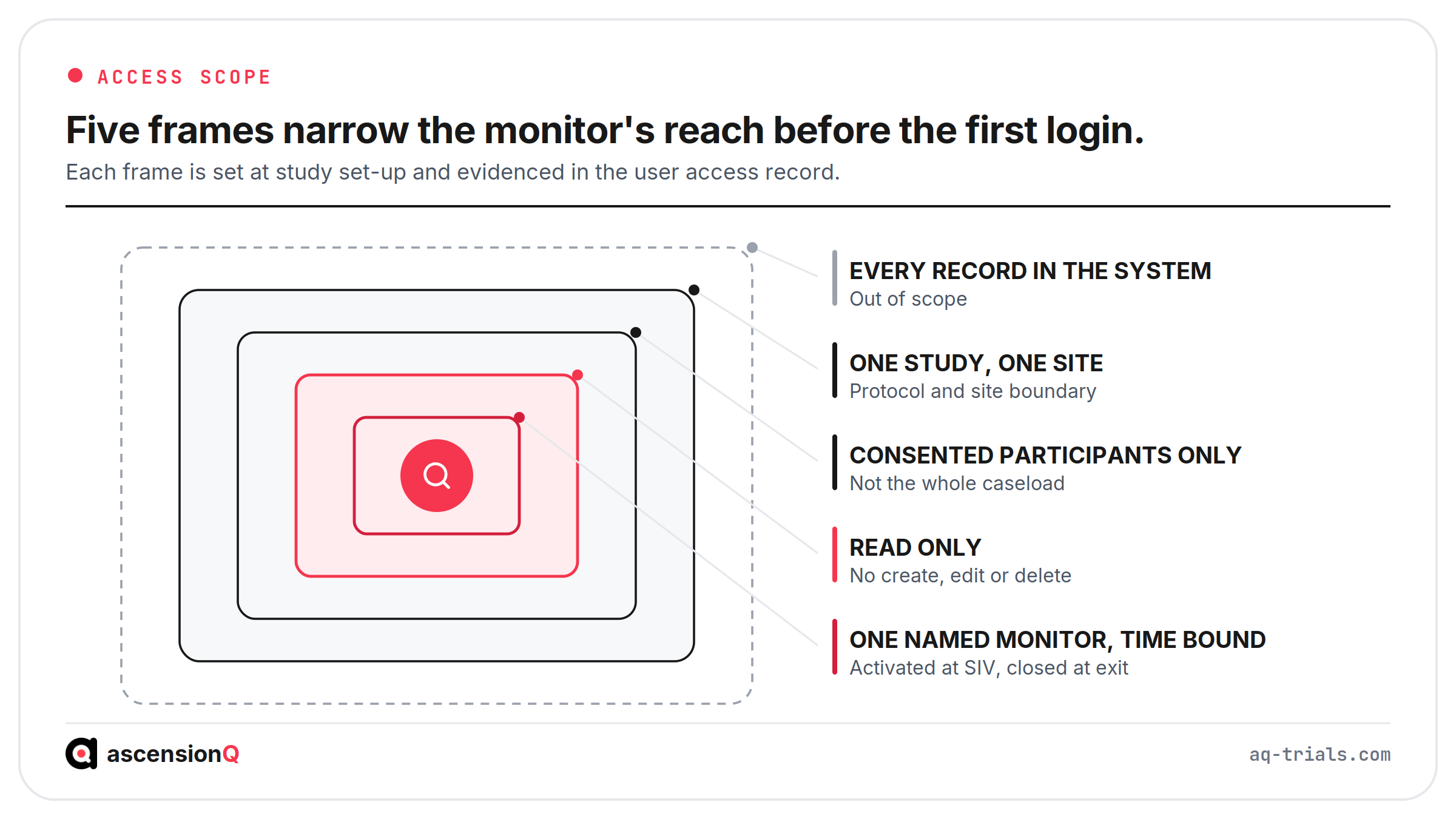
Access is scoped along five dimensions, and each one is set before the monitor logs in for the first time. The MHRA guidance on access to electronic health records by sponsor representatives states that a user role with read-only permission should be available and assigned on an individual basis to each monitor or auditor, and that system design should ensure research monitor access is limited to only the records of clinical trial participants and that this access is auditable.
- Identity: the account belongs to one named monitor, so every read event attributes to a person rather than to a role.
- Participants: the account reaches the records of consented trial participants only, which keeps routine patients outside the monitor’s view.
- Study and site: the account covers one protocol at one site, so a monitor covering three studies holds three scopes rather than one broad permission.
- Permission level: the role reads and raises queries, and it creates, edits and deletes nothing, which keeps the site as the sole author of its own source.
- Time: the account activates at the site initiation visit and deactivates at close-out or on the day the monitor leaves the study, which stops dormant access accumulating.
The physical setting carries its own control. The MHRA account of regulators’ experience of clinical trials during the pandemic asks where the access takes place, and whether clinical research associates will be reading records in an open plan office, a public space or another location where unauthorised people could view sensitive information. A site agreeing remote access sets that condition in writing alongside the technical scope.
Provisioning and withdrawal are evidence in their own right. The same MHRA guidance expects the system to log additions and deactivations of users and any changes to permissions, and to support a risk-based review of that activity. Those procedures belong to the site’s quality management system.
Also Read: Who Uses eSource in a Clinical Trial? From Research Nurse to Sponsor
What Does the Monitor See in an eSource Record?
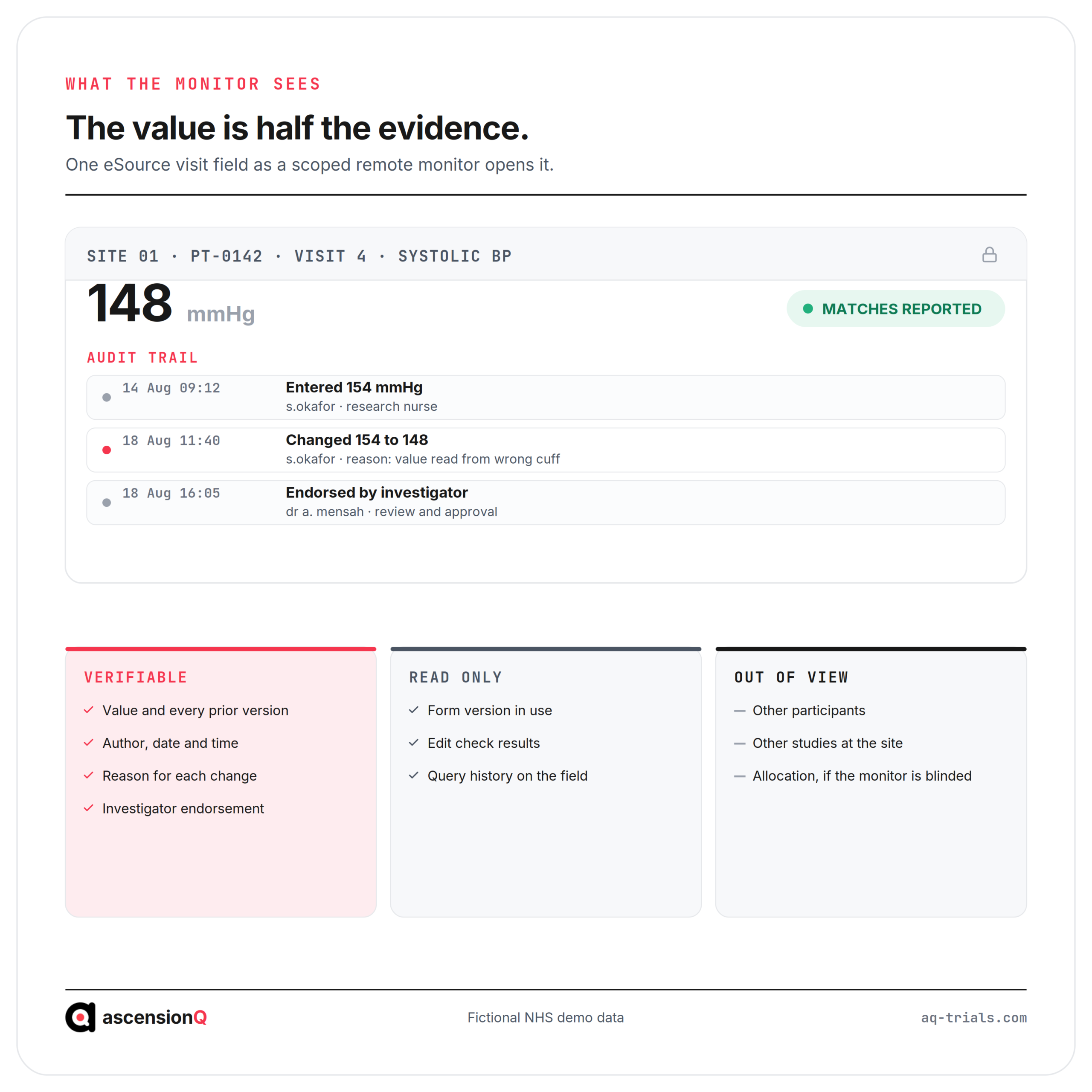
The monitor sees the current value, every prior value, the person behind each entry, the time of each entry and the reason recorded for each change. The EMA guideline on computerised systems and electronic data in clinical trials states at section 6.6 that electronic source data, including the audit trail, should be directly accessible by investigators, monitors, auditors and inspectors without compromising the confidentiality of participants’ identities.
Three categories divide the record from the monitor’s seat.
| Category | What it contains | Why the scope sets it this way |
| In view and verifiable | Visit values, prior versions, author, timestamp, reason for change, investigator endorsement and the meaning of each signature | These carry the evidence that the reported value is the original |
| In view and read only | Form version, edit check results, query history and the participant identifiers the protocol permits | The monitor needs context to judge a value, and the site stays the author |
| Out of view | Other participants, other studies, treatment allocation for a blinded monitor and records the location log places elsewhere | Scope, blinding and the source declaration each remove a category |
Blinding sets a hard limit on what the trail may display. The EMA guideline warns that care should be taken to ensure information jeopardising the blinding does not appear in the audit trail accessible to blinded users. A system that shows a dispensing correction to a blinded monitor breaks the blind through metadata rather than through data.
The monitor reaches the right record through the site’s own index. The source data location log names the system that holds the original for each data point, and a monitor verifying against a record the log does not name is verifying against a copy. Our guide to which record is the source when data sits in both the EPR and the trial system covers the order that settles a duplicate.
How Does a Query Move from the Monitor to the Site and Back?
A query runs through seven steps, and each step has one owner. The route matters because the correction has to land in the source record with a reason, rather than only in the sponsor’s reported data.
- The monitor compares the declared source against the reported value and records a discrepancy against the specific field.
- The query reaches the site with the participant code, the visit, the field and the reason it was flagged.
- Delegated site staff open the source record and establish what the original entry actually says.
- The site corrects the source where the source is wrong, and the system keeps the prior value, the author, the time and a stated reason for change.
- The investigator re-endorses the data where the correction falls inside the scope of an existing signature.
- The reported data is updated so the sponsor’s record and the source agree.
- The monitor re-reads the field and the trail, then closes the query with a dated entry.
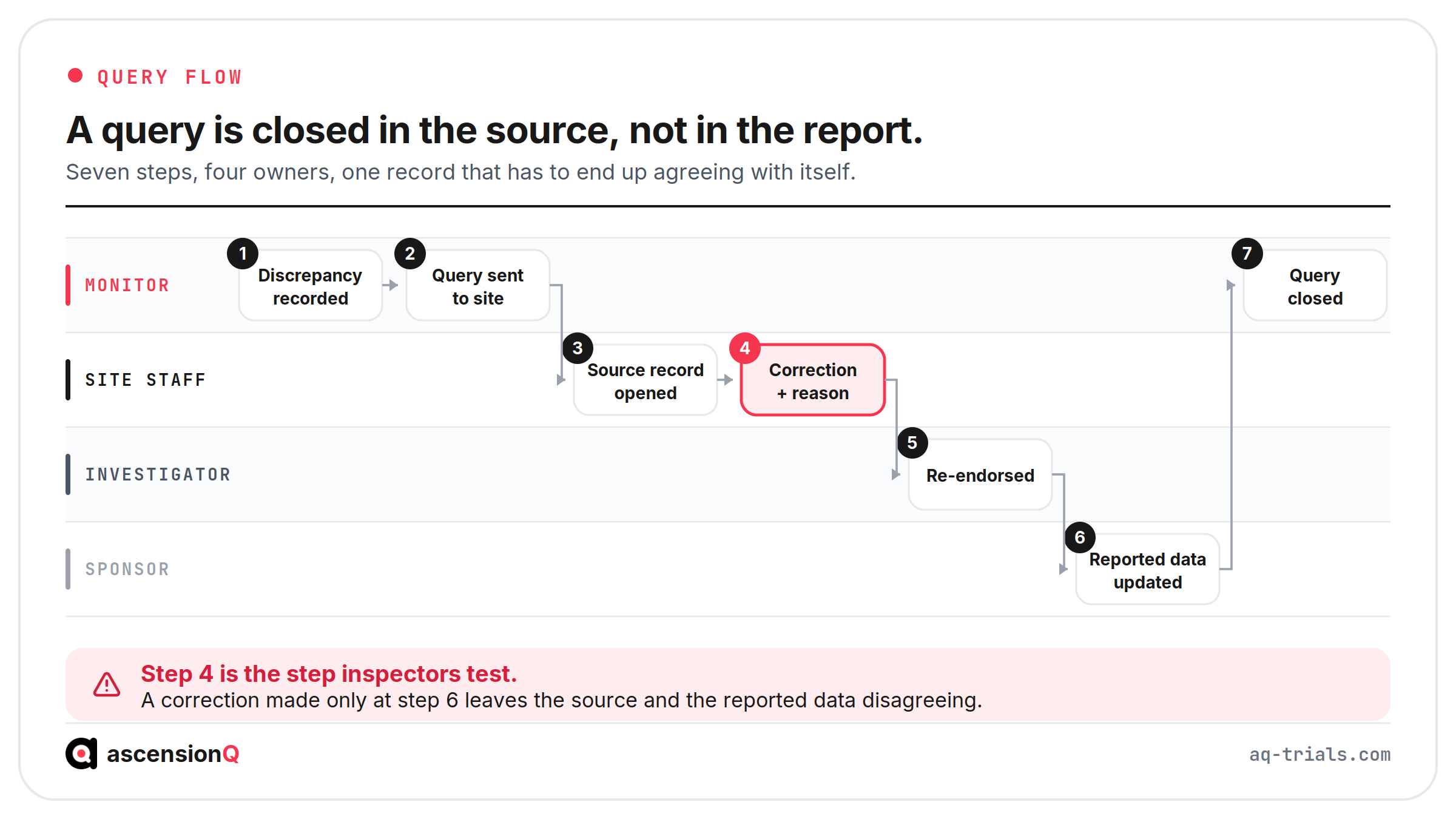
Step four is the step inspectors test. A correction made only in the case report form leaves the source and the reported data disagreeing, and the audit trail records the change without the justification ICH E6(R3) expects. Investigator re-endorsement at step five is read from the trail itself, and our guide to what PI oversight looks like in an eSource audit trail covers what makes a signature defensible after a change.
The schedule around the query belongs to a different record. Monitoring visit planning, visit windows and the site’s monitoring log sit in the site’s clinical trial management system, which is where a remote review is booked and evidenced as a contact.
Also Read: Does eSource Meet ALCOA+? The Attributes Inspectors Check
Where Does Remote Source Data Verification Break Down?
Remote verification fails in six recognisable ways. Each one is a condition set at study set-up rather than a lapse by the monitor on the day.
| Failure | What it looks like | Condition behind it |
| Scope set too wide | A monitor account that reaches every patient on the ward, not the consented participants | The system offers permissions by department rather than by study cohort |
| Shared monitoring account | Read events that cannot be attributed to one named clinical research associate | Access was provisioned to the sponsor organisation rather than to an individual |
| No audit of the read | A screen-share review that leaves no record of which participants were opened | Guided access was chosen without a compensating log of what was reviewed |
| Verification against a copy | The monitor checks a printout or an export while the original sits in another system | The source data location log was never agreed or was left at its draft version |
| Correction in the wrong record | The reported data is amended and the source record still shows the old value | The query workflow routes to the sponsor’s system with no step back to the source |
| Access left live | A monitor who moved off the study a year ago still holds a working login | Deactivation depends on someone remembering, rather than on a scheduled access review |
Consider a hypothetical cardiology study at an NHS trust. The monitor holds remote read-only access and verifies 40 critical fields across eight participants. Two systolic readings disagree with the reported data, and the audit trail shows both were corrected in the source four days after the visit with the reason recorded as “typo”. The finding here is the reason itself, because “typo” does not explain which value was observed. The fix sits in the site’s correction procedure.
A remote monitor can only verify what the site declared as source.
Remote verification works where the access scope, the source declaration and the query route are settled before the first participant is consented. AQ is launching eSource soon as part of the AQ platform, so that monitor access, the source record and the query raised against it sit on one footing. Book a live demo to see the AQ platform today.