One visit traces from source entry to query resolution through five stages, and each stage writes its own entry into the audit trail. The five are the booking that opens the form, the capture during the visit, the investigator’s endorsement, the monitor’s query, and the filing that closes the record.
This guide follows one hypothetical visit at a UK research site from the appointment to the closed query. The trust, the study and the participant are invented for the example. The sequence is the one a research nurse, a principal investigator and a monitor share on a live study, and the wider context sits in our complete guide to eSource in clinical trials for UK research sites.
The visit is one event. The record of it is one chain.
What Has to Be True Before the Visit Form Opens?
Five conditions have to hold before a research nurse can open the visit form, and every one of them is settled before the participant arrives. Each condition is evidenced by a document already filed at the site. The worked example runs on the following facts.
- Study and site: a hypothetical phase III trial at Northgate General NHS Trust, site 01.
- Participant: NG-004, attending visit 3 at week 12.
- Visit window: study day 84, with five days either side.
- Booked date: Tuesday 6 October 2026, which falls on study day 86.
- Declared source: vital signs and the symptom review sit in the site eSource form, and the full blood count is reported by the hospital laboratory.
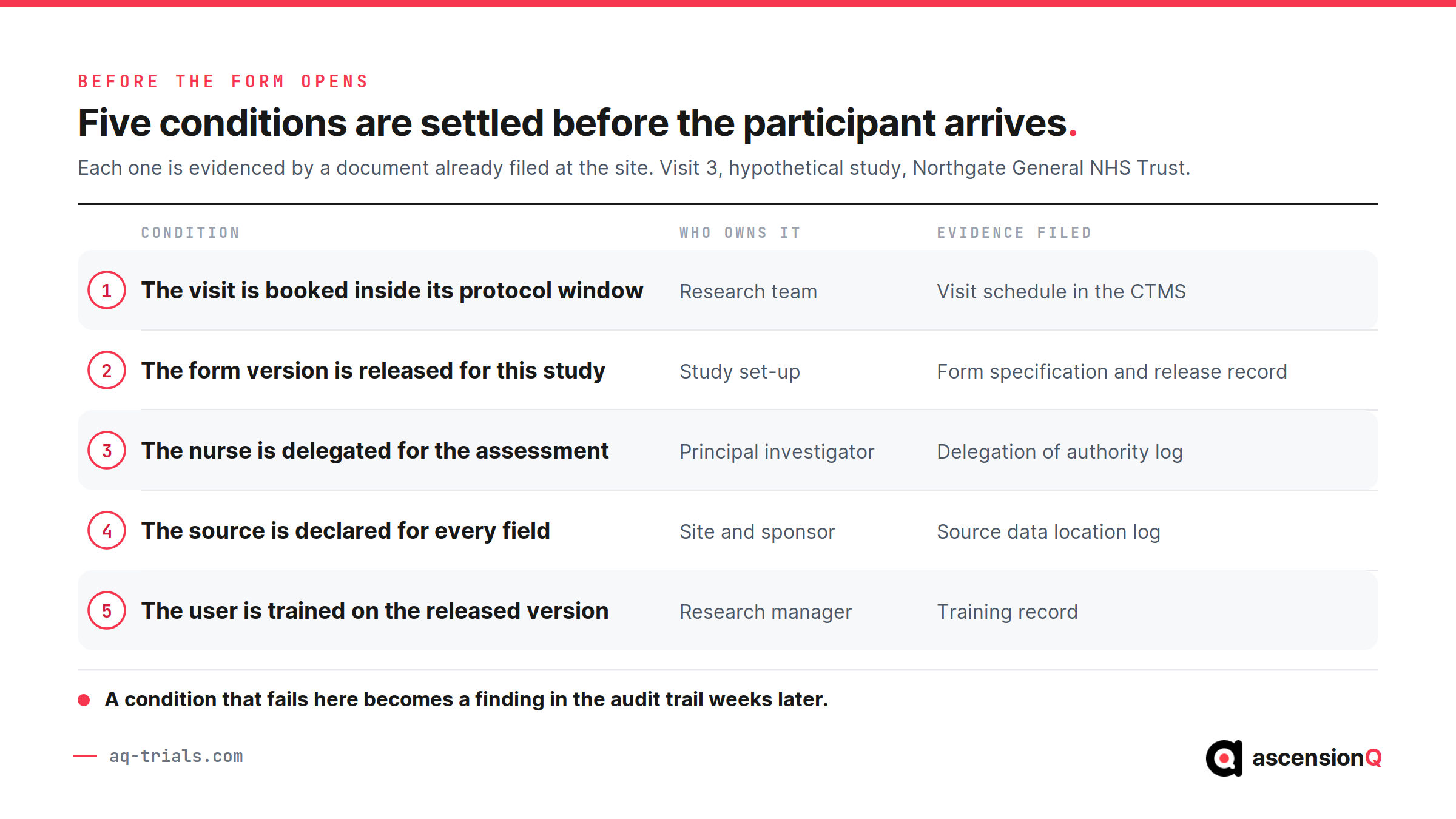
The booking fixes the date every entry is made against. The site’s clinical trial management system holds the appointment and the window it sits inside, and the form is released from the protocol schedule of events. Our guide to how a visit schedule becomes an eSource form covers that build in full.
What Does the Site Record During the Visit?
The research nurse records each assessment at the moment it is made, and the system stamps the entry with the user, date and time on save. The table below shows what the visit produces on 6 October.
| What is recorded | Who records it | Where the original sits |
| Blood pressure 138/86 mmHg at 09:42 | Research nurse, delegated for assessments | The site eSource form |
| Weight 71.2 kg at 09:44 | Research nurse, delegated for assessments | The site eSource form |
| Symptom review, three items, at 09:51 | Research nurse, delegated for assessments | The site eSource form |
| Full blood count reported at 11:20 | Hospital laboratory | The laboratory report |
| Study drug dispensed at 12:05 | Clinical trials pharmacist | The pharmacy accountability record |
Three of these five originals sit outside the eSource form, and the site decided that split in advance. The source data location log records which system holds the original for each data point, so the monitor knows where to look for every value on this visit.
Also Read: What Counts as Source Data in a Clinical Trial?
When Does the Investigator Endorse the Entry?
The principal investigator reviews this visit on 9 October, three days after it happened. ICH E6(R3) section 2.12.3 makes the investigator responsible for the timely review of data, including data arriving from external sources such as the central laboratory. Section 2.12.5 asks the investigator to review and endorse the reported data at milestones agreed with the sponsor.
Four actions make up the review of visit 3.
- The investigator opens the completed form and the laboratory report together, because eligibility and dosing depend on both.
- The investigator assesses the raised white cell count for clinical significance and records that assessment on the form.
- The investigator confirms the visit date against the window and marks study day 86 as within it.
- The investigator applies an electronic signature, and the system records the identity, the date and the time alongside it.
That signature is one of three kinds of investigator entry the trail carries for this study. Our guide to what PI oversight looks like in an eSource audit trail covers the attribution, review and endorsement entries an inspector opens.
Also Read: How to Build a Source Data Plan Before the Site Initiation Visit
How Does the Monitor’s Query Reach the Site and Close?
The monitor reviews the visit remotely on 20 October and finds one discrepancy. The eSource form gives a weight of 71.2 kg, and the electronic patient record shows 76.2 kg from a clinic three days before the visit. ICH E6(R3) section 2.12.6 requires reported data to be consistent with the source records or the discrepancy to be explained, so the difference has to be resolved rather than noted.
The query runs over six days and produces five entries.
- 20 October: the monitor raises a query against the weight field and cites the two values.
- 22 October: the research nurse re-checks the scale printout from the visit and finds 76.2 kg, so the entry was a transposition at the keyboard.
- 22 October: the nurse changes the value to 76.2 kg and gives the reason for change as a transposed digit confirmed against the visit scale printout.
- 23 October: the investigator re-endorses the form, because the endorsed value has changed.
- 26 October: the monitor verifies the corrected value against the source and closes the query.
The original 71.2 kg stays readable throughout. Our guide to how to correct an eSource entry without breaking ALCOA+ covers the correction workflow and what makes a reason for change defensible, and our guide to how monitors do remote source data verification with eSource covers the access scope behind the review itself.
Where Do the Visit’s Records Land When It Closes?
One visit produces records in five separate homes, and the visit closes once each one holds what it should. The figure below shows where each artefact from 6 October comes to rest.
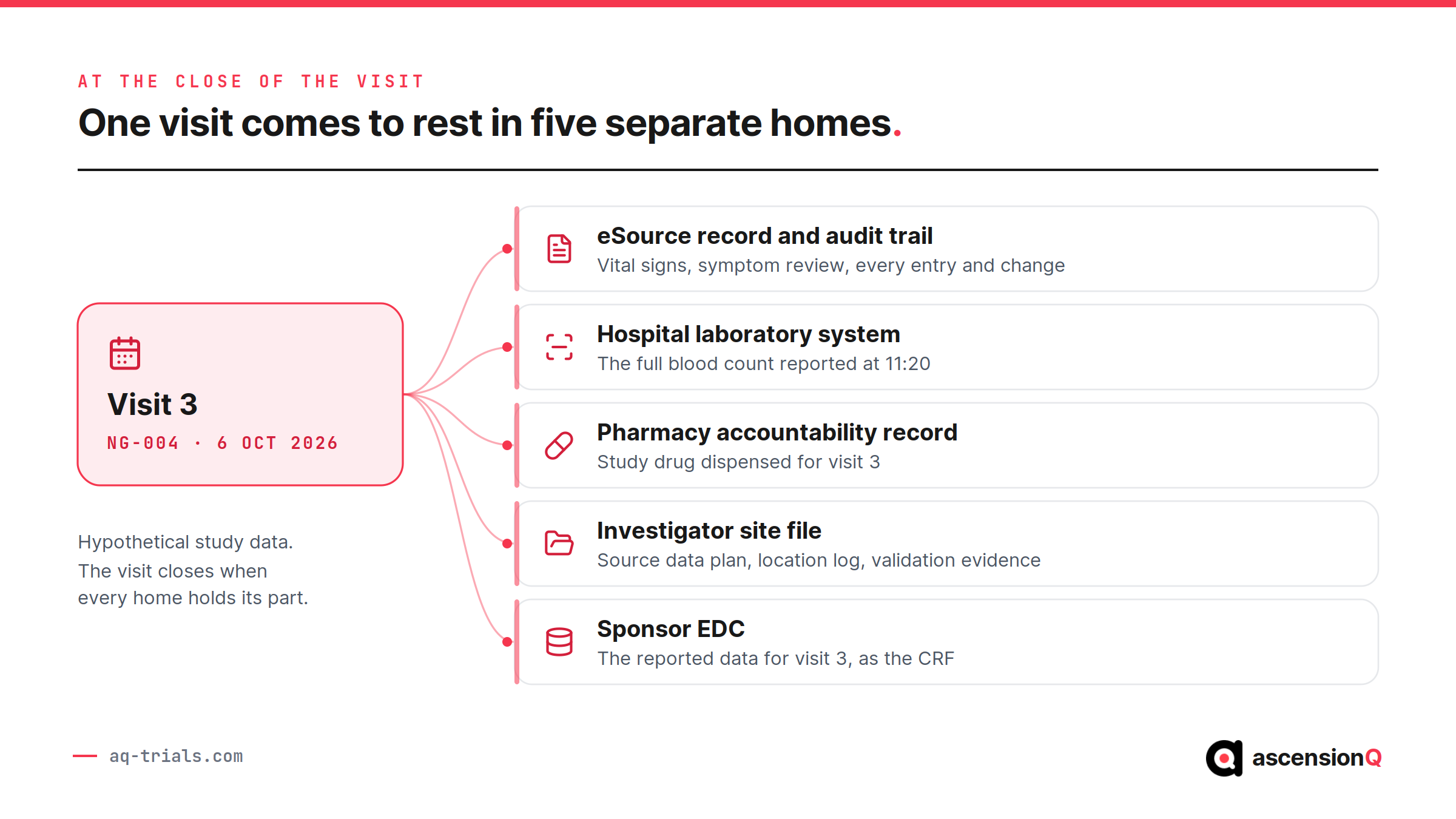
Four conditions have to be met before the site treats visit 3 as closed.
- Every required field on the form carries a value or a documented reason for its absence.
- The investigator’s endorsement is present and postdates the last change to the data.
- All queries on the visit are closed, with the corrections and reasons recorded.
- Any deviation arising from the visit is documented in the study’s deviation log.
The plan, the source data location log and the validation evidence stay in the investigator site file for the life of the study. The visit record itself has a far longer life, and our guide to how long eSource records must be kept and how to archive them covers the UK retention clocks and readable-format archiving.
Also Read: Does eSource Meet ALCOA+? The Attributes Inspectors Check
What Does the Audit Trail Show for the Whole Visit?
The audit trail turns the five stages into one dated sequence of entries. The ledger below holds every entry visit 3 generated, from the release of the form on 1 October to the closure of the query on 26 October.
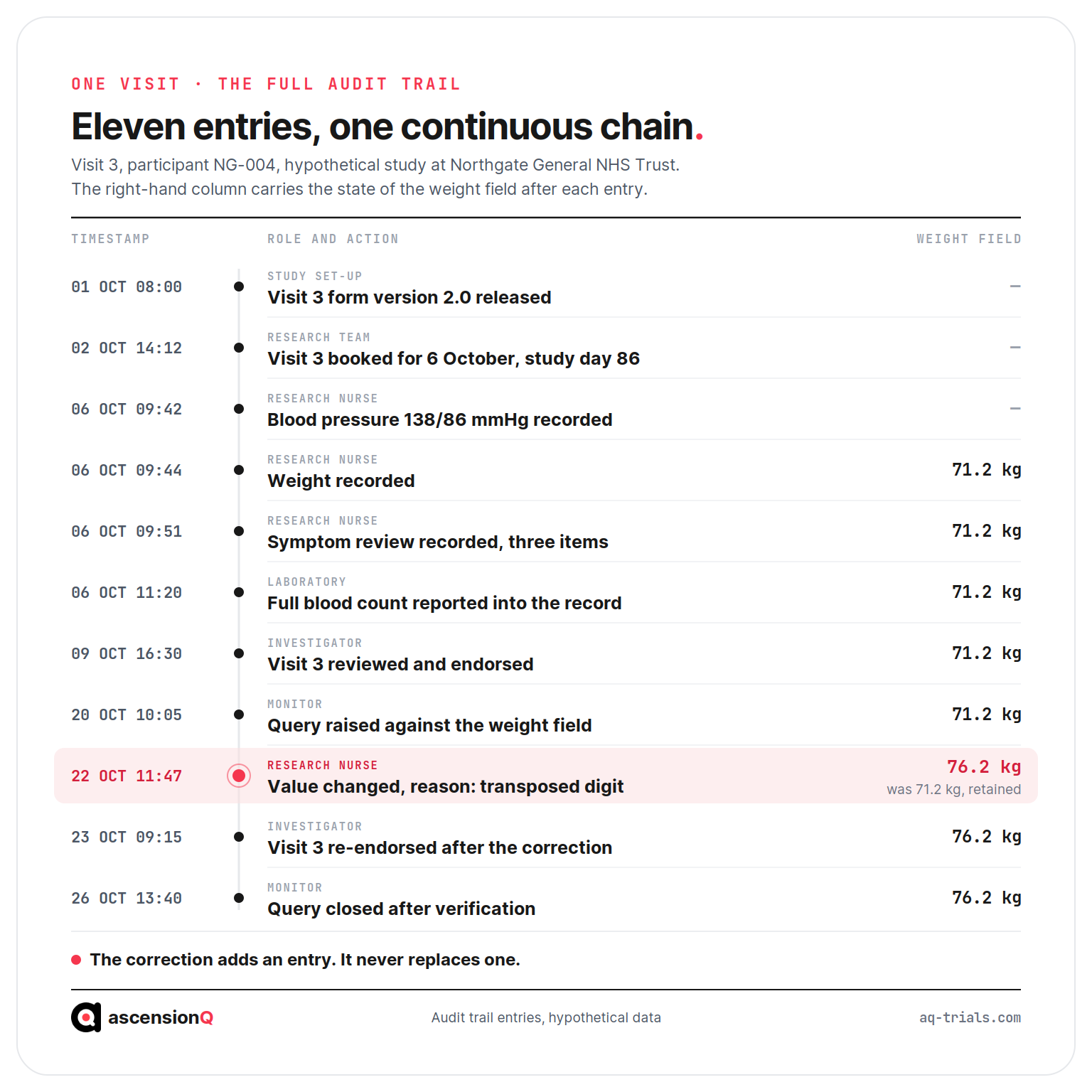
An inspector reads four answers straight off that sequence, and each answer maps to an attribute the MHRA GXP data integrity guidance expects the record to hold.
- Who made each entry, and whether that person was delegated for it on that date.
- How long passed between the observation and its record, which tests contemporaneity.
- What the value was before the correction, which tests whether the original survived.
- Whether the endorsement came after the last change, which tests the oversight itself.
A visit with a complete trail needs no reconstruction.
Where Does This Sequence Break at a Real Site?
The sequence breaks at five points, and the audit trail exposes each one. The table below gives the break, the evidence it leaves and the record it opens.
| Break point | What the trail shows | What it opens |
| Entries made days after the visit | A gap between the visit date and the entry timestamps | A contemporaneity finding at the next inspection |
| A value entered by staff outside the delegation log | A user whose access predates or postdates the delegated period | An access review and a quality record |
| Endorsement given before the last data change | A signature timestamp earlier than the final correction | A repeat endorsement and an oversight question |
| A correction saved with no reason for change | A changed value with an empty reason field | A query the site cannot close on the record alone |
| A visit held outside its window | A booked date beyond the protocol tolerance | A protocol deviation in the study’s deviation log |
The last row leads somewhere the first four do not. A late visit is a departure from the protocol, and the four rows above it are defects in the record. Our guide to when an eSource error should become a protocol deviation or a CAPA sets out the test that separates the two and the point at which a systemic cause opens a CAPA.
A site running twenty studies repeats this sequence several hundred times a year, and the effort concentrates in keeping the booking, the entry, the endorsement and the query tied to one visit. AQ is launching eSource soon as part of the AQ platform. Book a live demo to see the AQ platform today.